

Value Chart Deluxe Edition
Info
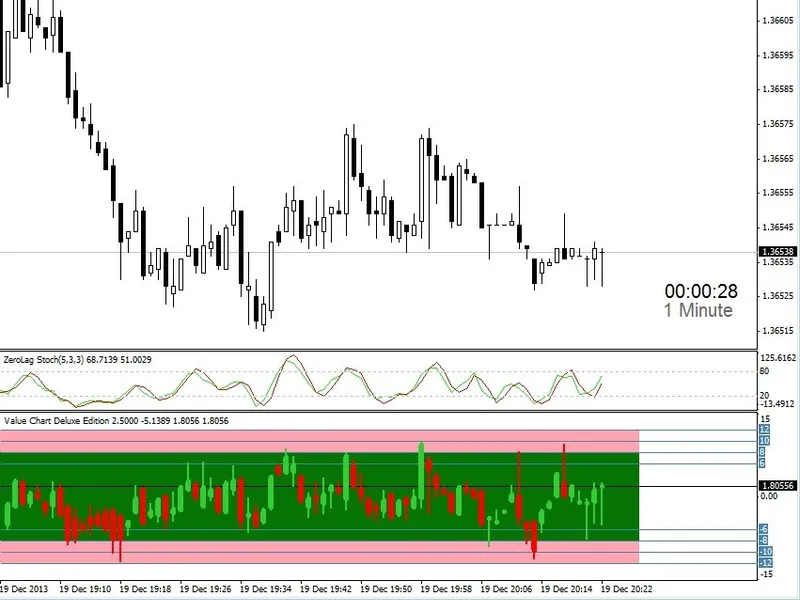
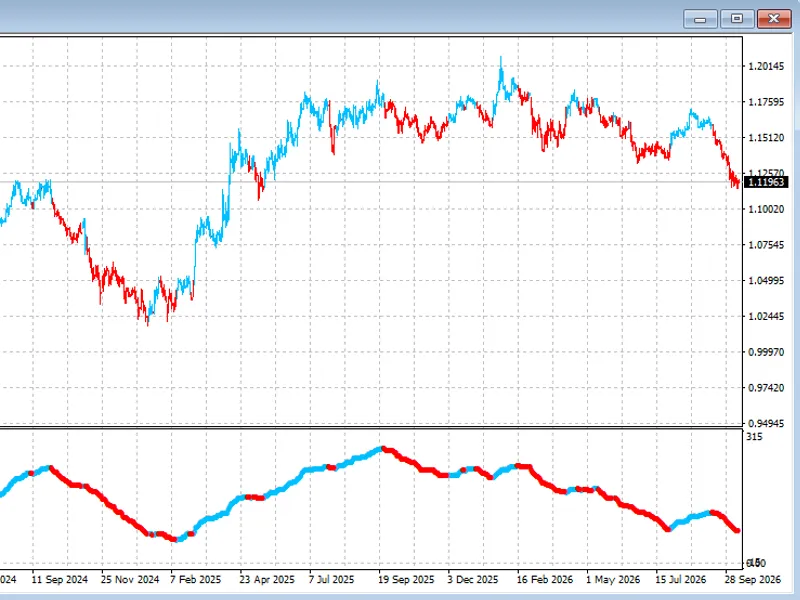
The Value Chart Deluxe Edition is a Indicator for MetaTrader 4 that the value chart was developed to show the valuation of the market. It could be described as a detrended oscillator in which the higher or lower the value on the Value Chart the more likely it is to reverse direction.
Usage
This tool is typically used for enhancing chart analysis and decision making.
Platform
This Indicator works exclusively on MetaTrader 4 (both build 600+ and newer versions).
Setup
Place the downloaded file in MQL4/Indicators folder via File ? Open Data Folder in MetaTrader 4.
How to Install and Use Value Chart Deluxe Edition
1. Installation: Place your file in the MQL/Indicators folder via "Open Data Folder" and restart your terminal.
2. Loading: Find the indicator in the Navigator, drag it onto your chart, and configure the input parameters in the popup window.
3. Customization: Press Ctrl+I to open the indicator list, select your tool, and click "Properties" to change colors, levels, or visual styles.
4. Updating: Replace the old file in the Indicators folder with the new version and restart the platform to apply changes.
Frequently Asked Questions
Q: Why is my indicator not showing? A: Verify the file is in the MQL/Indicators folder, or try right-clicking the "Indicators" tree in the Navigator and clicking "Refresh."
Q: Do custom indicators slow down the platform? A: Too many complex indicators can impact performance; remove unused ones via the "Indicator List" (Ctrl+I).
Q: Can I use MT4 indicators on MT5? A: No, MQL4 and MQL5 are distinct languages; ensure the indicator is compiled specifically for your platform version.
What this tool does
The Value Chart was developed to show the valuation of the market.
Typical Use Case
This Indicator excels in automated trading and technical analysis on MetaTrader 4.
Compatible Platform & Setup
This Indicator works on MetaTrader 4. Place the file in the MQL4/Indicators folder and restart the terminal.
Description & Settings
Related: Barometer Optimum: Align Mean for Optimal Chart Profit - another powerful indicator for MetaTrader 4 traders.
The Value Chart was developed to show the valuation of the market. It could be described as a detrended oscillator in which the higher or lower the value on the Value Chart the more likely it is to reverse direction. Unlike other Value Chart indicators you may be able to find there has always been one huge problem with it and that was that it really taxed the terminal by deleting and creating all Value Chart bars on every tick. This indicator does not have that issue so it will not tax your terminal. This indicator updates only the Value Chart bars that have changed. So you are free to put it on multiple charts.Also recommended: equity chart modeller - similar indicator with strong performance on MetaTrader 4.
Additional features include adjustable Value Chart bar and wick color, bar and wick width, adjustable overbought and oversold area and color, built-in alert and alert levels.
This indicator works on any standard timeframe. It is not designed to be traded alone, in fact, it works great as an addition to an existing strategy. For example, using the Value Chart with the zero lag stochastic set to 5,3,3. If you don't have zero lag stochastic you can use a standard stochastic set to 3,3,5. When the stochastic crosses above the 80 level and the Value Chart is between 8 and 10 consider a sell or if the stochastic is crossing below 20 and headed up and the Value Chart is between -8 and -10 then consider a buy.
Input parameters include numbars, bullish_color, bearish_color, actual_color, wick, body, obhigh_upper, obhigh_lower, oslow_upper, oslow_lower, obhigh_color, normal_color, oslow_color, usealerts, numlevels, and level settings.
Recommendations include using a Keltner channel with default setting, stochastic 5,3,3, and Value Chart Deluxe Edition with default settings.
Updates to the indicator include additional options for levels and code fixes, as well as a new version, Value Chart Deluxe Edition v1.0.2, which includes fixes for bugs, customizable normal area color, and the ability to use the indicator externally via iCustom.
You may also like: albus multi chart 1: advanced chart overlay for metatrader - excellent alternative for indicator users on MetaTrader 4.
Source Code
#property copyright "robotfx"
#property link "https://robotfx.org"
#property indicator_separate_window
#property indicator_levelcolor steelblue
#property indicator_levelstyle 0
#property indicator_buffers 4
#property indicator_color1 black
#property indicator_color2 black
#property indicator_color3 black
#property indicator_color4 black
.......
⚠ Limitations & Risk Warning
- This tool is provided for educational and testing purposes only.
- Past performance does not guarantee future results.
- Trading involves substantial risk of loss. Use on a demo account first.
- Results may vary depending on market conditions, broker, and settings.
- We recommend thorough backtesting and forward testing before using with real funds.