


Advanced Trading Strategy Management for MT4/MT5
Info
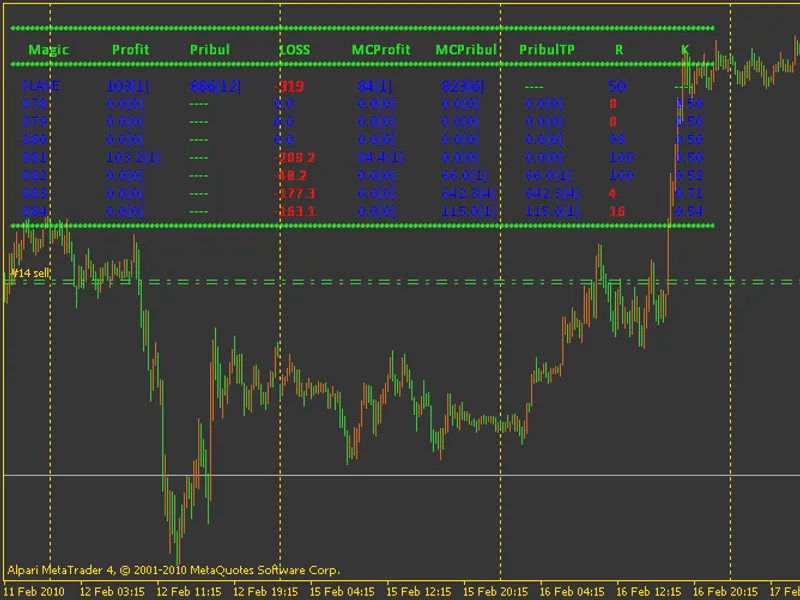
The Advanced Trading Strategy Management for MT4/MT5 is a Expert Advisor for MetaTrader 4 that this system provides a robust framework for managing multiple trading strategies within the metatrader platform. Each strategy leverages a unique magic number, derived from an initial base magic number plus the strategy's index.
Usage
This tool is typically used for automated trading on major forex pairs and gold.
Platform
This Expert Advisor works exclusively on MetaTrader 4 (both build 600+ and newer versions).
Setup
Place the downloaded file in MQL4/Experts folder via File ? Open Data Folder in MetaTrader 4.
How to Install and Use Advanced Trading Strategy Management for MT4/MT5
1. Installation: Open the "File" menu, select "Open Data Folder," navigate to MQL/Experts, paste your file, and restart the terminal.
2. Activation: Drag the EA from the Navigator onto a chart, ensure "Allow live trading" is checked in the Common tab, and verify the AutoTrading button is green.
3. Optimization: Right-click your chart, choose "Expert List," click "Properties" to adjust inputs, and save your preferred setup as a set file for future use.
4. Maintenance: Regularly check the "Experts" tab in the terminal window to monitor trade logs and potential execution errors.
Frequently Asked Questions
Q: Why is my EA not opening trades? A: Check the "AutoTrading" button, ensure "Allow live trading" is enabled, and verify your broker allows automated trading on your account type.
Q: Can I run multiple EAs on one chart? A: No, each chart can only host one active EA; however, you can open multiple charts for different currency pairs to run several EAs.
Q: What does the "smiley face" icon mean? A: A smiley face in the top-right corner of the chart indicates the EA is successfully running; a frowny face means it is disabled.
What this tool does
This system provides a robust framework for managing multiple trading strategies within the MetaTrader platform.
Typical Use Case
This Expert Advisor excels in automated trading and technical analysis on MetaTrader 4.
Compatible Platform & Setup
This Expert Advisor works on MetaTrader 4. Place the file in the MQL4/Experts folder and restart the terminal.
Description & Settings
Related: Scalper EA for Weekend Trading on BTC - another powerful expert for MetaTrader 4 traders.
This system provides a robust framework for managing multiple trading strategies within the MetaTrader platform.Also recommended: Weekend Trading Strategy - similar expert with strong performance on MetaTrader 4.
Each strategy leverages a unique magic number, derived from an initial base magic number plus the strategy's index. To effectively utilize the b-psi@icmanager library, it is recommended to register all active magic numbers in the allowed_magics setting, separated by commas.
For systems with a large number of strategies, the ability to incorporate trailing stop-loss based on total profit is beneficial. This can operate in two modes: classic or moving average-based (trailprofitbyma = true). The classic mode establishes a minimum profit threshold (defaulting to 20 currency units) and then adjusts the stop-loss as price moves favorably. The moving average mode also incorporates trailing stop-loss functionality.
Individual warrant trailing stop-loss can be managed by AI (tx.var.ts = 1) and can be configured for break-even operation (tx.onlybu = true).
Stop-loss orders (tx.var.stop) can be set using classic methods (0) or moving average-based methods (1). When using the moving average method (tx.var.stop = 1), the take-profit can be determined either by the moving average (tx.tp = 0) or by a specified value (tx.tp = tx.tp).
The maximum number of orders per strategy is controlled by max_ordersontc.
Strategies utilizing indicators can be configured to operate on specific timeframes using period.indicators, which do not necessarily need to match the chart's timeframe. These periods affect all relevant indicators, including trailing stop-loss calculations based on moving averages.
period.new.send regulates the pause before opening subsequent orders for a strategy (if opening conditions are met) when max_ordersontc is greater than 1.
Detailed information is available on the associated website. The archives contain all necessary components for the advisor library.
A key advantage of this system is the ease with which custom strategies can be integrated. The total number of strategies processed by the advisor is determined by the constant #define max_tc. By defining the conditions for opening and closing orders, incorporating external configuration variables, and adding your strategy, you can seamlessly integrate new trading approaches.
Important Note:
All external variables intended for advisor configuration that are related to quote dimensions are designed to handle 4-digit pricing. When you set a value for a 4-digit system, the advisor automatically recalculates the capacity based on the quotes received from the data center.
This system was last updated in 2026.
You may also like: Trade Manager MT4: Advanced Position Management for MetaTrader 4 - excellent alternative for expert users on MetaTrader 4.
Source Code
#property copyright "robotfx"
#property link "https://robotfx.org"
/* *         !
   *   h4 - d1 !!!
   *       ,
   *     ,     .
   * :    4- !*/
#define  max_tc                   8    //
#define  trend_up                 0    //    traillingprofit
#define  trend_dw                 1    //    traillingprofit
.......
⚠ Limitations & Risk Warning
- This tool is provided for educational and testing purposes only.
- Past performance does not guarantee future results.
- Trading involves substantial risk of loss. Use on a demo account first.
- Results may vary depending on market conditions, broker, and settings.
- We recommend thorough backtesting and forward testing before using with real funds.