

Symbol Specification Auditor: Uncover Hidden Trading Costs and Risks
Info
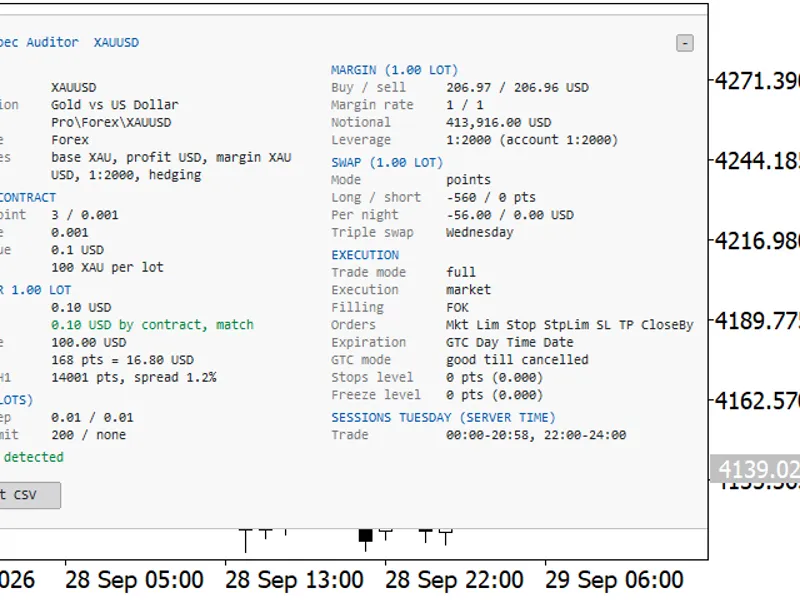
The Symbol Specification Auditor: Uncover Hidden Trading Costs and Risks is a Indicator for MetaTrader 5 that symbol specification auditor displays crucial contract details directly on your chart, including point value, spread cost, margin, swap, execution rules, and trading sessions. All values are converted to your account currency per 1.
Usage
This tool is typically used for enhancing chart analysis and decision making.
Platform
This Indicator works exclusively on MetaTrader 5 (both build 600+ and newer versions).
Setup
Place the downloaded file in MQL5/Indicators folder via File ? Open Data Folder in MetaTrader 5.
How to Install and Use Symbol Specification Auditor: Uncover Hidden Trading Costs and Risks
1. Installation: Place your file in the MQL/Indicators folder via "Open Data Folder" and restart your terminal.
2. Loading: Find the indicator in the Navigator, drag it onto your chart, and configure the input parameters in the popup window.
3. Customization: Press Ctrl+I to open the indicator list, select your tool, and click "Properties" to change colors, levels, or visual styles.
4. Updating: Replace the old file in the Indicators folder with the new version and restart the platform to apply changes.
Frequently Asked Questions
Q: Why is my indicator not showing? A: Verify the file is in the MQL/Indicators folder, or try right-clicking the "Indicators" tree in the Navigator and clicking "Refresh."
Q: Do custom indicators slow down the platform? A: Too many complex indicators can impact performance; remove unused ones via the "Indicator List" (Ctrl+I).
Q: Can I use MT4 indicators on MT5? A: No, MQL4 and MQL5 are distinct languages; ensure the indicator is compiled specifically for your platform version.
What this tool does
Symbol Specification Auditor displays crucial contract details directly on your chart, including point value, spread cost, margin, swap, execution rules, and trading sessions.
Typical Use Case
This Indicator excels in automated trading and technical analysis on MetaTrader 5.
Compatible Platform & Setup
This Indicator works on MetaTrader 5. Place the file in the MQL5/Indicators folder and restart the terminal.
Description & Settings
Related: Trend BOSS: Classifying Market Regimes with Symbolic Fourier Approximation - another powerful indicator for MetaTrader 5 traders.
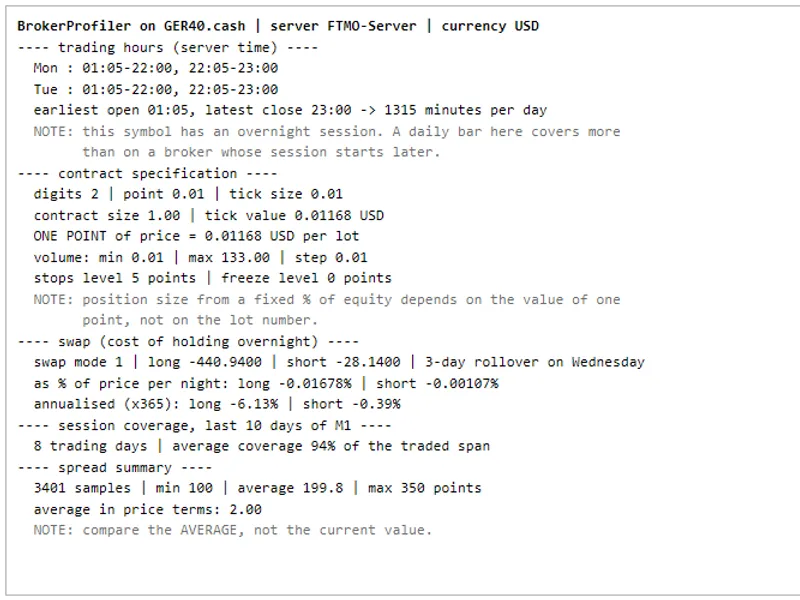
Symbol Specification Auditor displays crucial contract details directly on your chart, including point value, spread cost, margin, swap, execution rules, and trading sessions. All values are converted to your account currency per 1.00 lot. It highlights broker settings that can cause lot-size calculation errors as warnings. A single click exports this audit for all Market Watch symbols to a CSV file.Also recommended: MT5 Symbol Changer Profit Display - similar indicator with strong performance on MetaTrader 5.
The Problem
Trading code that functions correctly on one broker may fail on another due to overlooked contract specification details. The symbol specification window contains this information, but it's spread across multiple tabs and presented in raw units, making it easy to miss critical differences between brokers or account types. Expert Advisors that determine position size based on assumed contract or point values risk incorrect trade amounts without any journal errors. Common issues include:
- Gold contracts of 1 oz instead of 100 oz, or forex symbols with 10,000 units, leading to lot calculation errors.
- Cent accounts where balance, tick value, and margin are denominated in cents.
- Stops Level or Freeze Level settings that reject Stop Loss/Take Profit orders or modifications close to the market price.
- Daily Order settings that delete pending orders, and sometimes Stop Loss/Take Profit levels, at the end of the trading day.
- Tick sizes that differ from the point, causing rejections for prices not on the tick grid.
- Minimum volume or volume step restrictions that force rounding, symbols in close-only mode, or unusual triple-swap days.
This tool consolidates these specifications, converts them to monetary values per 1.00 lot, and flags potential issues with a brief explanation of the consequence. It is purely an auditing tool; it does not place orders, use DLLs, or write files other than the requested CSV export. The panel and the CSV employ identical calculations for consistent analysis across all Market Watch symbols.
Panel Information
The panel displays details for the chart's current symbol. It refreshes every second and updates when the symbol or timeframe changes, allowing you to audit symbols sequentially. If a value cannot be determined, it will be shown as 'n/a' with a reason. Rows triggering a warning are highlighted. Sections include:
- Identity: Symbol, description, path, calculation mode, base, profit, and margin currency, account currency, account leverage, and margin mode.
- Price and Contract: Digits, point, tick size, tick value (profit/loss), contract size, and expiry date for expiring symbols.
- Money per 1.00 Lot: Value of 1 point, value of a 1.00 price move, current spread in points and money, and spread as a percentage of ATR(14) for the chart timeframe.
- Volume: Minimum, step, maximum, and limit.
- Margin for 1.00 Lot: Buy and sell margin, initial margin rates, notional value, and effective leverage (notional/margin) alongside account leverage. Explanations for 'n/a' values are provided (e.g., 'no quotes', 'margin rate is 0').
- Swap for 1.00 Lot: Swap mode, long/short values, overnight cost in account currency, and triple-swap day details.
- Execution: Trade mode, execution mode, filling policies (FOK, IOC, BOC, Return), allowed order types, expiration modes, GTC mode duration, and stops/freeze level in points and price.
- Sessions: Current trading sessions in server time.
Warnings
The Warnings section at the bottom lists critical settings, ordered by severity. Each warning specifies the value and its trading implications. If no issues are found, it displays 'No traps detected'. Warnings highlight specifications that your code should read rather than assume.
- Contract size unusual for the asset class (e.g., forex 100,000, gold 100).
- Tick value or tick size is zero, or discrepancies between point values derived from tick value and contract size.
- Cent account currency (e.g., USC, EUC).
- Trade mode other than full (e.g., long only, short only, close only).
- Expiring contracts.
- No current bid/ask prices.
- Tick size different from the point.
- Stops Level or Freeze Level above zero.
- Daily Orders (GTC mode) which deletes pending orders and/or stops at day's end.
- Minimum volume or volume step greater than 0.01 for forex and CFD symbols.
- Spread exceeding a defined percentage of the chart's ATR(14).
- Triple swap on days other than Wednesday (with exceptions for specific currency pairs and instrument types).
CSV Export
The 'Export CSV' button or the startup option generates a file named SymbolSpecAudit_
The CSV file uses UTF-8 encoding with BOM, comma separation, and standard quoting. Numbers use a dot as the decimal separator. For locales using semicolons as list separators, use the spreadsheet's import dialog to open the file. The file path is logged in the Experts tab.
Panel Handling
The panel can be anchored to any chart corner, displayed in one or two columns (auto or forced), or in a compact warnings-only mode. A collapse button allows minimizing the panel. Colors adapt to the chart background or can be set manually. The layout adjusts for high-DPI screens, and long warnings wrap. Only changed elements are updated to prevent flickering. Objects from previous instances are removed on startup.
Inputs
- Panel corner: Select the chart corner for panel anchoring.
- X/Y offset: Adjusts the horizontal/vertical distance from the corner.
- Layout: 'Auto' uses one column if space permits, otherwise two. 'One column' or 'Two columns' forces the layout.
- Font name: A monospaced font is recommended for alignment.
- Font size: Adjusts the text size.
- Show warnings only: Enables a compact view with title, warnings, and export button.
- Text color: Sets the panel text color.
- Headings color: Sets the section heading color.
- Warnings color: Sets the color for warnings and their background rows.
- OK / no traps color: Sets the color for the 'No traps detected' message.
- Background color: Sets the panel background color.
- Warn if spread exceeds % of ATR(14) (0 = off): Sets the threshold for spread warnings.
- Export all Market Watch symbols to CSV at start: If true, exports all symbols upon indicator startup.
How to Use
Attach the indicator to any chart. It does not interfere with Expert Advisors. Read the Warnings block first, then examine the detailed rows above it. Switch chart symbols to audit them individually or use 'Export CSV' for a comprehensive audit. Use the collapse button to minimize the panel. This tool is ideal for comparing settings between different brokers or account types before migrating an Expert Advisor, focusing on specifications that most impact trade risk or strategy cost.
Notes and Limitations
Margin and point-value calculations use MQL5 documentation formulas, as direct calls to OrderCalcMargin or OrderCalcProfit are not permitted for indicators. Results have been validated against Expert Advisor calculations to within cent rounding for Forex, CFD, and leveraged CFD symbols. Margin may be shown as 'n/a' for certain futures, bonds, or CFD index symbols due to specific broker settings or currency differences. The point-value cross-check is marked 'n/a' for futures and bonds where the broker's tick value is the definitive specification. Swap calculations for interest modes use a 360-day year; reopen modes show 'n/a' due to lack of a fixed amount. Currency conversion relies on Market Watch symbols with live quotes; missing pairs will result in 'n/a' values. Ensure necessary conversion pairs are added to Market Watch. Cent accounts are recognized by their currency code (e.g., USC, EUC) and treated as 1/100 of the major currency; this was tested with simulated data. If a cent account reports its currency as USD, it may not be detected. The reference values for contract sizes and triple-swap days are common defaults; brokers may use variations. ATR(14) is calculated on the last closed bar; initial calculations may reflect loading bar history. The panel refreshes on a 1-second timer, not on every tick. The collapsed state is stored in a temporary global variable. Use one instance per chart. Screenshots were taken with specific settings for demonstration; default settings will produce a larger panel.
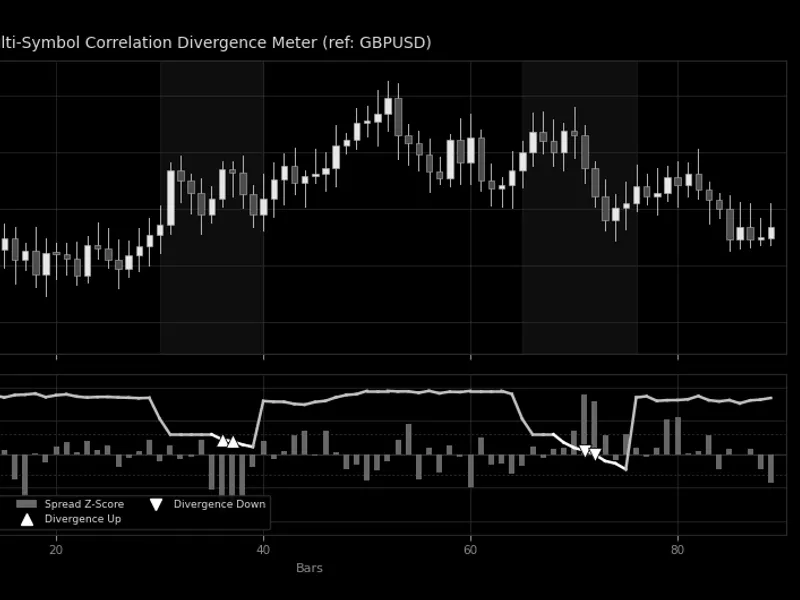
You may also like: Multi-Symbol Correlation Divergence Meter - excellent alternative for indicator users on MetaTrader 5.
Source Code
#property copyright "RobotFX"
#property link "https://robotfx.org"
#property version     "1.00"
#property description "This code is educational. Feel free to use, modify and upgrade as you wish. Visit ROBOTFX.ORG for professional trading tools"
#property indicator_chart_window
#property indicator_plots 0
enum ENUM_SSA_LAYOUT
  {
   SSA_LAYOUT_AUTO = 0,
   SSA_LAYOUT_ONE  = 1,
.......
⚠ Limitations & Risk Warning
- This tool is provided for educational and testing purposes only.
- Past performance does not guarantee future results.
- Trading involves substantial risk of loss. Use on a demo account first.
- Results may vary depending on market conditions, broker, and settings.
- We recommend thorough backtesting and forward testing before using with real funds.