


Spectator Lot Size Calculator: Manage Risk from Stop Loss and Daily Loss Limit
Info
The Spectator Lot Size Calculator: Manage Risk from Stop Loss and Daily Loss Limit is a Script for MetaTrader 5 that many daily loss breaches originate from incorrect position sizing rather than flawed entry strategies. The same lot size applied to a 3-dollar stop and a 15-dollar stop on gold represents significantly different risk levels.
Usage
This tool is typically used for enhancing chart analysis and decision making.
Platform
This Script works exclusively on MetaTrader 5 (both build 600+ and newer versions).
Setup
Place the downloaded file in MQL5/Scripts folder via File ? Open Data Folder in MetaTrader 5.
How to Install and Use Spectator Lot Size Calculator: Manage Risk from Stop Loss and Daily Loss Limit
1. Installation: Move your script file into the MQL/Scripts directory and restart the platform.
2. Execution: Drag the script onto a chart; it will perform a one-time action, such as closing all open orders or clearing chart objects.
3. Editing: Use MetaEditor (F4) to modify code, click "Compile," and verify no errors appear in the terminal before running.
4. Removing: Scripts stop automatically, but you can remove them manually by right-clicking the chart and choosing "Remove Script."
Frequently Asked Questions
Q: How are scripts different from EAs? A: Scripts execute a single action and then stop; EAs monitor the market and trade continuously.
Q: Can I assign a hotkey to a script? A: Yes, right-click the script in the Navigator, select "Set Hotkey," and define your preferred keyboard shortcut.
Q: Why did my script stop? A: Scripts are designed to stop immediately after finishing their programmed command; this is normal behavior.
What this tool does
Many daily loss breaches originate from incorrect position sizing rather than flawed entry strategies.
Typical Use Case
This Script excels in automated trading and technical analysis on MetaTrader 5.
Compatible Platform & Setup
This Script works on MetaTrader 5. Place the file in the MQL5/Scripts folder and restart the terminal.
Description & Settings
Related: Lot Size Calculator: Calculate Position Size Based on Risk and Stop Loss - another powerful script for MetaTrader 5 traders.
Many daily loss breaches originate from incorrect position sizing rather than flawed entry strategies. The same lot size applied to a 3-dollar stop and a 15-dollar stop on gold represents significantly different risk levels. This script calculates the appropriate lot size by working backward from the acceptable cash risk per trade and the stop loss distance.Also recommended: Risk-Based Lot Size Calculator for MetaTrader - similar script with strong performance on MetaTrader 5.
The script dynamically reads the tick value and tick size for the current trading symbol. This ensures accurate lot size calculations for gold, currency pairs, and indices without requiring manual contract specifications. The calculated lot size is rounded down to the nearest broker volume step, and the script will issue a warning if the resulting size is below the broker's minimum volume.
Inputs
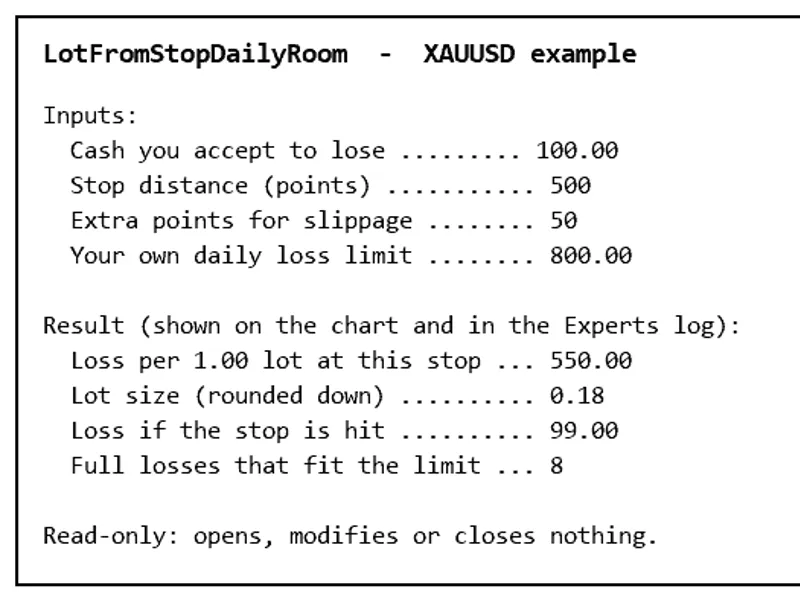
InpRiskCash - The maximum amount of cash you are willing to lose on a single trade, denominated in your account currency.
InpStopPoints - The stop loss distance, specified in points.
InpSlipPoints - An additional buffer in points to account for potential slippage; these points are added to the initial stop loss distance.
InpDailyLimit - Your personal daily loss limit. If set to a positive value, the script will indicate how many full trades of the calculated size can be made before exceeding this limit.
Output
The script displays the following information:
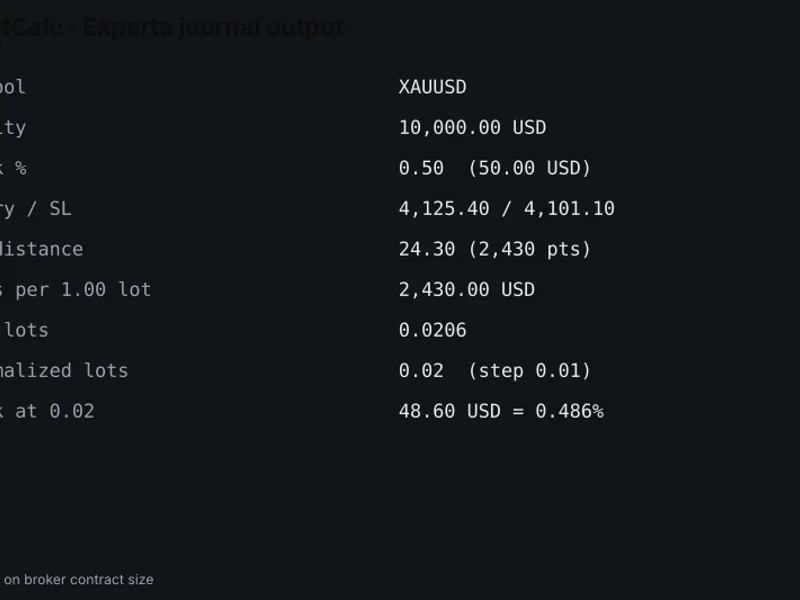
- Loss per 1.00 lot at the specified stop distance.
- The calculated lot size, rounded down to the nearest valid volume step.
- The total loss incurred if the stop loss is hit at the calculated lot size.
- The number of full trades (at the calculated lot size) that can be executed before reaching your daily loss limit.
This information is presented both on the chart as a comment and within the Experts log for easy reference.
Calculation Methodology
The script retrieves SYMBOL_TRADE_TICK_VALUE and SYMBOL_TRADE_TICK_SIZE for the symbol currently displayed on the chart. Using these values, it calculates the monetary value of one point for a 1.00 lot size. This is then multiplied by the sum of the stop distance in points and the slippage allowance to determine the potential loss per 1.00 lot. Finally, the acceptable cash risk per trade is divided by this calculated loss per 1.00 lot to derive the raw lot size. This raw lot size is subsequently rounded down to comply with the SYMBOL_VOLUME_STEP and checked against SYMBOL_VOLUME_MIN and SYMBOL_VOLUME_MAX parameters.
Formula for Loss per 1.00 Lot:
(Stop Points + Slippage Points) x Point Value / Tick Size x Tick Value
Formula for Lot Size:
Cash at Risk / Loss per 1.00 Lot, rounded down to the nearest volume step.
Formula for Losses within Daily Limit:
Daily Limit / Loss at the Rounded Lot Size, rounded down.
Example Calculation for Gold (XAUUSD)
For a standard gold contract (e.g., 100 ounces), a one-dollar price movement typically equates to approximately 100 units of account currency per 1.00 lot. If you set a 5-dollar stop loss (equivalent to 500 points on a two-digit quote), allow for 50 points of slippage, and risk 250 units of account currency, the calculated loss per 1.00 lot would be approximately 550. The script would then suggest a lot size of 0.45, which is the result of rounding down 0.4545. If your daily limit is 1,000, the script would indicate that two such trades could be made before exceeding the limit, with a third trade breaching it. It is important to note that contract sizes can vary between brokers; hence, the script reads these specifications directly from the symbol data rather than making assumptions.
Usage Instructions
To use this script, attach it to the chart of the currency pair or instrument you intend to trade.
Input the following parameters:
- The amount of cash you are prepared to risk on the trade.
- The stop loss distance in points.
- Optionally, specify a slippage allowance and your daily loss limit.
Review the calculated lot size displayed in the chart comment or the Experts tab. Use this size when manually placing your order.
Important Notes
This script utilizes real-time tick values, which may fluctuate due to exchange rate changes if your account currency differs from the symbol's profit currency. It is advisable to re-run the script shortly before executing a trade. The script does not track your open positions or your trading performance for the current day; the daily limit calculation is a straightforward comparison of trade sizes against the limit you have inputted. This script functions solely as a calculation tool and does not execute trades, modify orders, or close positions. All input values are manually entered by the user. Please be aware that broker-specific gaps or slippage can potentially result in losses exceeding your defined stop loss.
You may also like: Automated Lot Size and Risk/Reward Script for MT5 - excellent alternative for script users on MetaTrader 5.
Source Code
#property copyright "RobotFX"
#property link "https://robotfx.org"
#property version   "1.00"
#property script_show_inputs
#property strict
input double InpRiskCash   = 100.0;
input double InpStopPoints = 500;
input double InpSlipPoints = 0;
input double InpDailyLimit = 0.0;
void OnStart()
.......
⚠ Limitations & Risk Warning
- This tool is provided for educational and testing purposes only.
- Past performance does not guarantee future results.
- Trading involves substantial risk of loss. Use on a demo account first.
- Results may vary depending on market conditions, broker, and settings.
- We recommend thorough backtesting and forward testing before using with real funds.