
Multi-TF Data Grabber Lite: Clean CSV Export for MT5
Info
The Multi-TF Data Grabber Lite: Clean CSV Export for MT5 is a Script for MetaTrader 5 that your trading model's accuracy depends on the quality of your data. Many free CSV export tools suffer from common issues like misaligned timeframes, repainting indicators, and lookahead bias, leading to misleading backtest results.
Usage
This tool is typically used for enhancing chart analysis and decision making.
Platform
This Script works exclusively on MetaTrader 5 (both build 600+ and newer versions).
Setup
Place the downloaded file in MQL5/Scripts folder via File ? Open Data Folder in MetaTrader 5.
How to Install and Use Multi-TF Data Grabber Lite: Clean CSV Export for MT5
1. Installation: Move your script file into the MQL/Scripts directory and restart the platform.
2. Execution: Drag the script onto a chart; it will perform a one-time action, such as closing all open orders or clearing chart objects.
3. Editing: Use MetaEditor (F4) to modify code, click "Compile," and verify no errors appear in the terminal before running.
4. Removing: Scripts stop automatically, but you can remove them manually by right-clicking the chart and choosing "Remove Script."
Frequently Asked Questions
Q: How are scripts different from EAs? A: Scripts execute a single action and then stop; EAs monitor the market and trade continuously.
Q: Can I assign a hotkey to a script? A: Yes, right-click the script in the Navigator, select "Set Hotkey," and define your preferred keyboard shortcut.
Q: Why did my script stop? A: Scripts are designed to stop immediately after finishing their programmed command; this is normal behavior.
What this tool does
Your trading model's accuracy depends on the quality of your data.
Typical Use Case
This Script excels in automated trading and technical analysis on MetaTrader 5.
Compatible Platform & Setup
This Script works on MetaTrader 5. Place the file in the MQL5/Scripts folder and restart the terminal.
Description & Settings
Related: Understanding MQL5 Timestamps: Server Time, UTC, and Data Export - another powerful script for MetaTrader 5 traders.
Your trading model's accuracy depends on the quality of your data. Many free CSV export tools suffer from common issues like misaligned timeframes, repainting indicators, and lookahead bias, leading to misleading backtest results.Also recommended: Spread Audit: Analyzing Broker Spreads with M1 Historical Data - similar script with strong performance on MetaTrader 5.
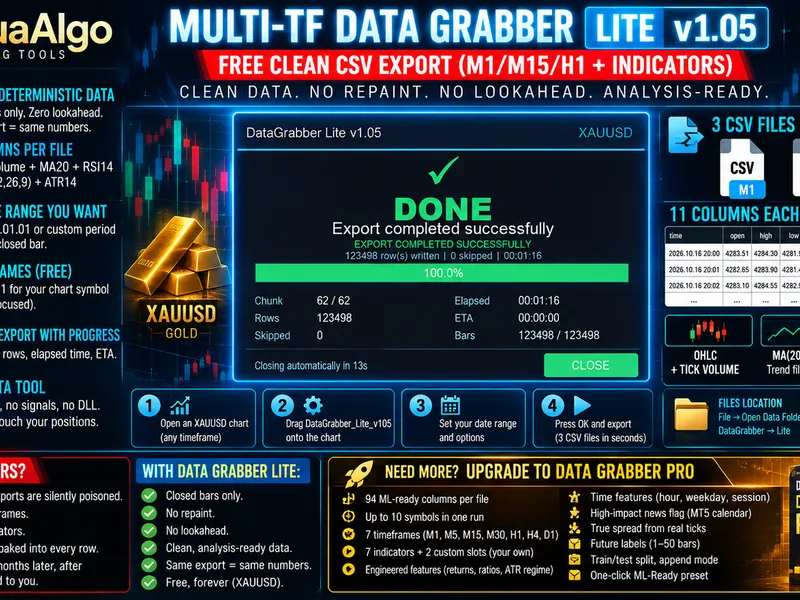
Multi-TF Data Grabber Lite addresses these problems by exporting clean, deterministic, and analysis-ready market data from MT5 to CSV format. It exclusively uses closed bar data, a fixed time range, and eliminates lookahead bias, ensuring consistent and reproducible results every time.
Getting started is simple:
1. Open a chart for your desired symbol (e.g., XAUUSD) in MT5.
2. Drag the DataGrabber_Lite_v105 script from the Navigator onto the chart.
3. In the input dialog, specify your desired date range and select indicators to include.
4. Click OK.
The script supports a flexible date range, defaulting from 2026.01.01 to the last closed bar. You can adjust this to export data for any period, whether it's a few months for experimentation or several years for in-depth analysis.
A dashboard displays live progress, including the current chunk, rows exported, elapsed time, and estimated time of arrival. The dashboard closes automatically upon completion.
Built for reliability, the export process uses a frozen range. If a new bar opens during the export, the process automatically restarts with a fresh freeze, preventing corrupted files. Version 1.05 includes automatic retry functionality.
The tool provides chunked export with clear progress indicators.
Key Features:
- No trading functionality; it is purely a data export tool and cannot affect your positions.
- No DLLs or external trading components.
Exported Data:
You will receive three CSV files, each containing 11 columns, for M1, M15, and H1 timeframes for your chart's symbol. Each row includes:
- Time
- Open
- High
- Low
- Close
- Tick Volume
- MA(20)
- RSI(14)
- MACD Main Line
- MACD Signal Line
- ATR(14)
All indicators are calculated on closed bars only, ensuring no repainting or lookahead bias.
File Location:
Exported CSV files are located in the MT5 terminal's data folder: File → Open Data Folder → MQL5 → Files → DataGrabber → Lite.
Files are named in the format: SYMBOL_TIMEFRAME_YYYYMMDD_HHMMSS.csv (e.g., XAUUSD_M1_20261016_220400.csv).
Note: If symbol history is not fully downloaded on the first run, the generated file might be smaller than expected. Please ensure history is complete, delete any incomplete files, and rerun the script.
The free Lite edition is specifically designed for XAUUSD (Gold) traders, offering M1/M15/H1 timeframes, 4 core indicators, and chart-symbol export. It provides essential data for discretionary traders and initial machine learning experiments.
For advanced users, Multi-TF Data Grabber PRO is available on the Market. It offers an expanded feature set, including 94 ML-ready columns per file, support for up to 10 symbols, 7 base timeframes, 7 built-in indicators (plus custom indicator slots), engineered features, time-based features, news flags, real spread data, and post-hoc future labels for supervised learning.
You may also like: export historical data - excellent alternative for script users on MetaTrader 5.
Source Code
#property copyright "RobotFX"
#property link "https://robotfx.org"
#property version   "1.05"
#property description "This code is educational. Feel free to use, modify and upgrade as you wish. Visit ROBOTFX.ORG for professional trading tools"
#property strict
#property script_show_inputs
const string GRABBER_VERSION    = "1.05";
const string PRODUCT_TAG        = "DataGrabber Lite";
const int    CHUNK_MIN          = 500;
const int    CHUNK_MAX          = 10000;
.......
⚠ Limitations & Risk Warning
- This tool is provided for educational and testing purposes only.
- Past performance does not guarantee future results.
- Trading involves substantial risk of loss. Use on a demo account first.
- Results may vary depending on market conditions, broker, and settings.
- We recommend thorough backtesting and forward testing before using with real funds.