








E-PS I@Multi Se T Strategy
Info
The E-PS I@Multi Se T Strategy is a Expert Advisor for MetaTrader 4 that the idea behind this code is simple - it involves the back and forth motion of the price in a bar. The strategy also includes some options that can be adjusted for optimal performance.
Usage
This tool is typically used for automated trading on major forex pairs and gold.
Platform
This Expert Advisor works exclusively on MetaTrader 4 (both build 600+ and newer versions).
Setup
Place the downloaded file in MQL4/Experts folder via File ? Open Data Folder in MetaTrader 4.
How to Install and Use E-PS I@Multi Se T Strategy
1. Installation: Open the "File" menu, select "Open Data Folder," navigate to MQL/Experts, paste your file, and restart the terminal.
2. Activation: Drag the EA from the Navigator onto a chart, ensure "Allow live trading" is checked in the Common tab, and verify the AutoTrading button is green.
3. Optimization: Right-click your chart, choose "Expert List," click "Properties" to adjust inputs, and save your preferred setup as a set file for future use.
4. Maintenance: Regularly check the "Experts" tab in the terminal window to monitor trade logs and potential execution errors.
Frequently Asked Questions
Q: Why is my EA not opening trades? A: Check the "AutoTrading" button, ensure "Allow live trading" is enabled, and verify your broker allows automated trading on your account type.
Q: Can I run multiple EAs on one chart? A: No, each chart can only host one active EA; however, you can open multiple charts for different currency pairs to run several EAs.
Q: What does the "smiley face" icon mean? A: A smiley face in the top-right corner of the chart indicates the EA is successfully running; a frowny face means it is disabled.
What this tool does
The idea behind this code is simple - it involves the back and forth motion of the price in a bar.
Typical Use Case
This Expert Advisor excels in automated trading and technical analysis on MetaTrader 4.
Compatible Platform & Setup
This Expert Advisor works on MetaTrader 4. Place the file in the MQL4/Experts folder and restart the terminal.
Description & Settings
Related: Martingale System with Random Entry - another powerful expert for MetaTrader 4 traders.
The idea behind this code is simple - it involves the back and forth motion of the price in a bar. The strategy also includes some options that can be adjusted for optimal performance.Also recommended: 10 pips - similar expert with strong performance on MetaTrader 4.
Key Components
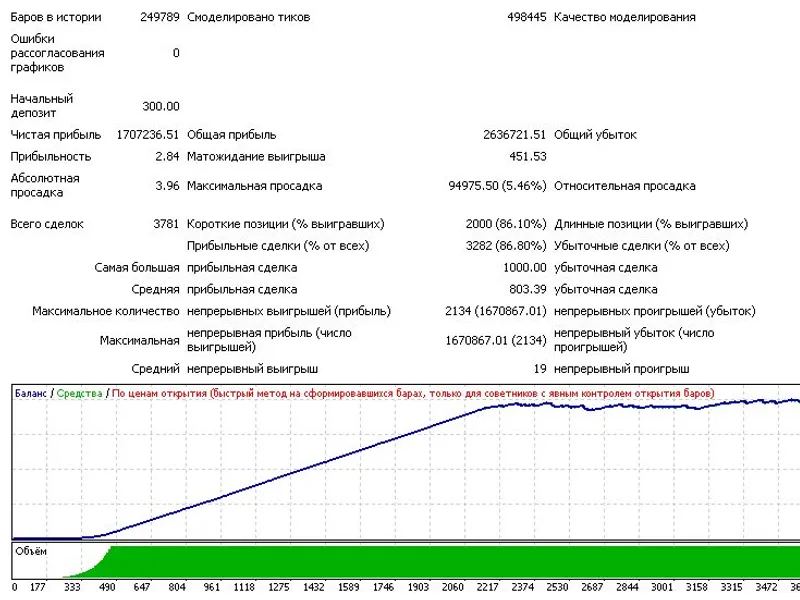
The working bar is controlled by the control period, and the prices are taken at the opening of a new bar in the period. The strategy was tested using the EURUSD currency pair on the H1 timeframe, which is one of the ways to extract a profit using this approach. The controllable risk is a significant advantage of this strategy, with risks limited to 20%.
Important components of this tactic include uninterrupted communication with the server, a sense of proportion, unconditional refinancing, and the ability to make timely changes. The strategy was tested with three brokers, but the expected results were only achieved with one of them. However, the floating spread at this broker proved to be a drawback for this strategy.
The adviser has obvious control over the opening of bars and is part of a larger system consisting of two advisers. The first adviser is used to optimize parameters, while the second is used for real accounts. The system parameters can be optimized for a specific broker, and questions or requests for optimization can be sent via private message.
Recent updates include fixing bugs, introducing an additional filter, and testing the strategy under real market conditions with a maximum lot size of 5.0 and a maximum deposit loading of 15%. The interface has also been translated into English.
You may also like: Arbitrage Strategy for MetaTrader - excellent alternative for expert users on MetaTrader 4.
Source Code
#property copyright "robotfx"
#property link "https://robotfx.org"
extern string setup_expert          = "======== general configuration advisor ========";
extern int    mg                       = 707;              // magic
extern int    newbarinperiod           = 1;                // >= 0 - operate at the beginning of the period, a new bar; -1 - working on each tick
extern int    variant_tradeprice       = 4;                // option prices, with which will work advisor
extern int    controlperiod            = period_h1;        // the period at which advisor makes a decision
extern string setup_rulessend       = "---------------- rules`s send -----------------";
extern double takeprofit               = 20;               // the level of profit in pips
extern double stoploss                 = 200;              // the level of fixation losses in pips
.......
⚠ Limitations & Risk Warning
- This tool is provided for educational and testing purposes only.
- Past performance does not guarantee future results.
- Trading involves substantial risk of loss. Use on a demo account first.
- Results may vary depending on market conditions, broker, and settings.
- We recommend thorough backtesting and forward testing before using with real funds.