


MT5 Order Preflight - Read-Only Validation
Info
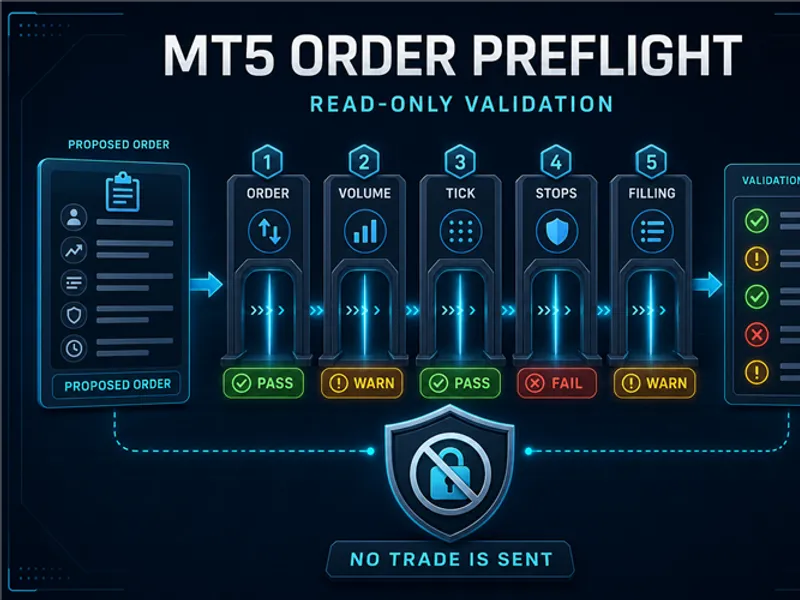
The MT5 Order Preflight - Read-Only Validation is a Script for MetaTrader 5 that purposemt5 order preflight is a read-only diagnostic script for checking a hypothetical market, limit, or stop order against the rules currently advertised for the chart symbol. It helps isolate common request problems before the same values are tested inside a larger Expert Advisor.
Usage
This tool is typically used for enhancing chart analysis and decision making.
Platform
This Script works exclusively on MetaTrader 5 (both build 600+ and newer versions).
Setup
Place the downloaded file in MQL5/Scripts folder via File ? Open Data Folder in MetaTrader 5.
How to Install and Use MT5 Order Preflight - Read-Only Validation
1. Installation: Move your script file into the MQL/Scripts directory and restart the platform.
2. Execution: Drag the script onto a chart; it will perform a one-time action, such as closing all open orders or clearing chart objects.
3. Editing: Use MetaEditor (F4) to modify code, click "Compile," and verify no errors appear in the terminal before running.
4. Removing: Scripts stop automatically, but you can remove them manually by right-clicking the chart and choosing "Remove Script."
Frequently Asked Questions
Q: How are scripts different from EAs? A: Scripts execute a single action and then stop; EAs monitor the market and trade continuously.
Q: Can I assign a hotkey to a script? A: Yes, right-click the script in the Navigator, select "Set Hotkey," and define your preferred keyboard shortcut.
Q: Why did my script stop? A: Scripts are designed to stop immediately after finishing their programmed command; this is normal behavior.
What this tool does
PurposeMT5 Order Preflight is a read-only diagnostic script for checking a hypothetical market, limit, or stop order against the rules currently advertised for the chart symbol.
Typical Use Case
This Script excels in automated trading and technical analysis on MetaTrader 5.
Compatible Platform & Setup
This Script works on MetaTrader 5. Place the file in the MQL5/Scripts folder and restart the terminal.
Description & Settings
Related: Close All Positions and Pending Orders - another powerful script for MetaTrader 5 traders.
PurposeMT5 Order Preflight is a read-only diagnostic script for checking a hypothetical market, limit, or stop order against the rules currently advertised for the chart symbol. It helps isolate common request problems before the same values are tested inside a larger Expert Advisor.
Also recommended: Broker Basket Preflight: Read-Only Diagnostics for Multi-Symbol Broker Configurations - similar script with strong performance on MetaTrader 5.
The script never sends, modifies, or cancels a trade. It creates a plain-text validation report in the Experts tab and, optionally, in the terminal-wide Common\Files folder.
What it checks
- Availability of a current Bid and Ask tick.
- Symbol trade mode and long-only, short-only, or close-only restrictions.
- Support for market, limit, or stop orders.
- Minimum, maximum, and step-aligned volume.
- Tick-size normalization of a hypothetical pending price.
- Pending-order distance against the current stops level.
- Stop-loss and take-profit support and minimum distance.
- Advertised FOK, IOC, or BOC filling flags.
How to use
Copy SCA_MT5OrderPreflight.mq5 to MQL5\Scripts\StratCoreAlpha and compile it.
Run the script on the symbol that exhibits the order problem.
Select the hypothetical order scenario, volume, and distances.
Review every PASS, WARN, and FAIL line in the Experts tab or saved text report.
Add the actual trade retcode and nearby Experts or Journal lines when preparing a reproducible bug report.
Inputs
- InpScenario: market buy/sell, buy/sell limit, or buy/sell stop.
- InpVolume: hypothetical order volume.
- InpPendingDistancePoints: pending distance from the current Ask or Bid.
- InpStopLossPoints and InpTakeProfitPoints: protective distances; zero disables the corresponding check.
- InpWriteTextFile and InpPrintToExperts: report destinations.
- InpFilePrefix: prefix for the Common\Files text report.
Reading the result
- PASS: means the supplied value is consistent with the inspected symbol metadata.
- WARN: identifies a disabled or broker-dependent check that needs review.
- FAIL: means the hypothetical request conflicts with at least one current rule.
[PASS] Volume range: 0.10000000 is inside the advertised range. [PASS] Volume alignment: 0.10000000 matches step 0.01000000. [FAIL] Stop loss distance: 5 points is below the current stops level of 20. Result: DO NOT SEND AS CONFIGURED
Privacy and safety
The report excludes account login, owner name, broker server, balance, equity, positions, orders, history, files, keys, and credentials. Review the generated text before sharing it.
A passing preflight cannot guarantee trade-server acceptance, execution price, or trading results. Market state and broker rules can change between the diagnostic run and a later request.
Source and license
The source is released under the MIT License. The versioned source and installation guide are available at the public GitHub release.
You may also like: Set Sell Limit Order - excellent alternative for script users on MetaTrader 5.
Source Code
#property copyright "RobotFX"
#property link "https://robotfx.org"
#property version   "1.00"
#property strict
#property script_show_inputs
#property description "This code is educational. Feel free to use, modify and upgrade as you wish. Visit ROBOTFX.ORG for professional trading tools"
enum SCA_ORDER_SCENARIO
{
   SCA_MARKET_BUY = 0,
   SCA_MARKET_SELL = 1,
.......
⚠ Limitations & Risk Warning
- This tool is provided for educational and testing purposes only.
- Past performance does not guarantee future results.
- Trading involves substantial risk of loss. Use on a demo account first.
- Results may vary depending on market conditions, broker, and settings.
- We recommend thorough backtesting and forward testing before using with real funds.