






Execution and Slippage Forensics for MetaTrader 5 Account History Audits
Info
The Execution and Slippage Forensics for MetaTrader 5 Account History Audits is a Script for MetaTrader 5 that core ideaexecution & slippage forensics is a standalone diagnostic script for metatrader 5 that audits your real account trading history. It pairs every executed trade deal back to its parent historical order using HistoryOrderSelect().
Usage
This tool is typically used for enhancing chart analysis and decision making.
Platform
This Script works exclusively on MetaTrader 5 (both build 600+ and newer versions).
Setup
Place the downloaded file in MQL5/Scripts folder via File ? Open Data Folder in MetaTrader 5.
How to Install and Use Execution and Slippage Forensics for MetaTrader 5 Account History Audits
1. Installation: Move your script file into the MQL/Scripts directory and restart the platform.
2. Execution: Drag the script onto a chart; it will perform a one-time action, such as closing all open orders or clearing chart objects.
3. Editing: Use MetaEditor (F4) to modify code, click "Compile," and verify no errors appear in the terminal before running.
4. Removing: Scripts stop automatically, but you can remove them manually by right-clicking the chart and choosing "Remove Script."
Frequently Asked Questions
Q: How are scripts different from EAs? A: Scripts execute a single action and then stop; EAs monitor the market and trade continuously.
Q: Can I assign a hotkey to a script? A: Yes, right-click the script in the Navigator, select "Set Hotkey," and define your preferred keyboard shortcut.
Q: Why did my script stop? A: Scripts are designed to stop immediately after finishing their programmed command; this is normal behavior.
What this tool does
Core IdeaExecution & Slippage Forensics is a standalone diagnostic script for MetaTrader 5 that audits your real account trading history.
Typical Use Case
This Script excels in automated trading and technical analysis on MetaTrader 5.
Compatible Platform & Setup
This Script works on MetaTrader 5. Place the file in the MQL5/Scripts folder and restart the terminal.
Description & Settings
Related: One-Click Position Closure with Slippage Protection - another powerful script for MetaTrader 5 traders.
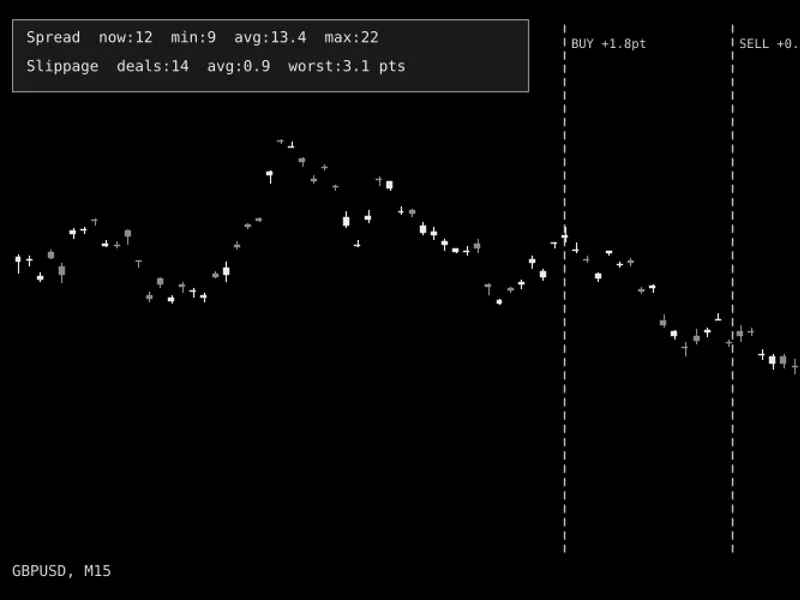
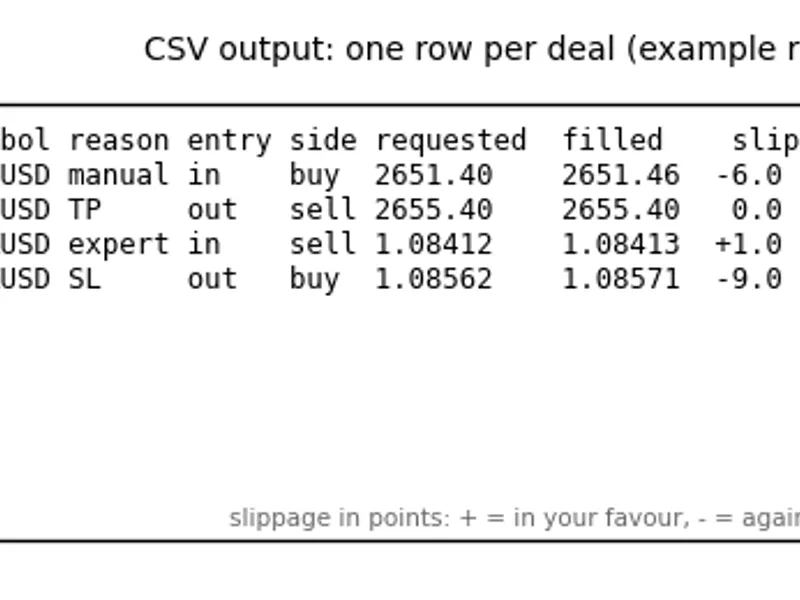
Core IdeaExecution & Slippage Forensics is a standalone diagnostic script for MetaTrader 5 that audits your real account trading history. It pairs every executed trade deal back to its parent historical order using HistoryOrderSelect(). By comparing ORDER_PRICE_OPEN (requested price) against DEAL_PRICE (actual fill price), it quantifies execution quality in both points and account currency. It does not fabricate numbers when market orders omit requested prices.
Also recommended: Broker Execution Diagnostics: Understanding Symbol Specifications - similar script with strong performance on MetaTrader 5.
How to Interpret the Output
1. Sign Convention:
- Positive (+) values in points or currency indicate favorable price improvement (filled better than requested).
- Negative (-) values indicate adverse slippage (filled worse than requested).
2. Four Execution Buckets:
- ALL_MEASURED: Aggregate portfolio fill statistics.
- ENTRIES (IN / INOUT): Entry execution quality under normal liquidity.
- SL_EXITS (DEAL_REASON_SL): Stop-Loss execution slippage, isolating stop-hunting or liquidity gaps.
- OTHER_EXITS: Take-Profit, manual, and automated closes.
Each category reports Count, Mean (pts), Median (pts), Adverse %, Positive %, and Net Slippage ($).
3. 24-Hour Server Profile & Hidden Execution Drag:
- Identifies Broker Server hours (00:00 - 23:00) where rollover or low liquidity may widen adverse slippage.
- Computes Hidden Execution Drag = Commissions + Fees + Swaps + Adverse Slippage, expressed as a percentage of Gross Winning Profit.
4. Exports:
- Prints the full report and worst adverse deals in the Experts tab.
- Displays a concise summary on the chart.
- Exports ExecutionForensics_Deals.csv and ExecutionForensics_Hourly.csv to MQL5\Files\.
External Input Parameters
- InpLookbackDays (default 90): Number of past days to audit. Set 0 to audit the entire loaded account history.
- InpSymbolFilter (default ""): Empty string audits all symbols; "CURRENT" audits only the active chart symbol; or specify an exact symbol name.
- InpMagicFilter (default -1): -1 includes all EAs and manual trades; set a positive MagicNumber to isolate a single Expert Advisor.
- InpExportCSV (default true): Enables CSV export of deal-level records and the 24-hour execution table into MQL5\Files\.
- InpShowChartComment (default true): Displays a compact summary overlay on the active chart.
- InpTopWorstDeals (default 5): Number of worst adverse-slippage fills to list in the Experts log (0 disables).
Recommended Usage
Attach the script to any chart after ensuring the desired date range is loaded in your MT5 Account History tab. Works on all Forex, Metals, Indices, and CFD symbols in both Hedging and Netting accounts.
You may also like: Broker Execution Diagnostics MT5 - excellent alternative for script users on MetaTrader 5.
Source Code
#property copyright "RobotFX"
#property link "https://robotfx.org"
#property version   "1.00"
#property description "This code is educational. Feel free to use, modify and upgrade as you wish. Visit ROBOTFX.ORG for professional trading tools"
#property script_show_inputs
input int      InpLookbackDays      = 90;
input string   InpSymbolFilter      = "";
input long     InpMagicFilter       = -1;
input bool     InpExportCSV         = true;
input bool     InpShowChartComment  = true;
.......
⚠ Limitations & Risk Warning
- This tool is provided for educational and testing purposes only.
- Past performance does not guarantee future results.
- Trading involves substantial risk of loss. Use on a demo account first.
- Results may vary depending on market conditions, broker, and settings.
- We recommend thorough backtesting and forward testing before using with real funds.