


One-Click Position Closure with Slippage Protection
Info
The One-Click Position Closure with Slippage Protection is a Script for MetaTrader 5 that one-click position closure with slippage protectionis a fast execution utility script for metatrader 5 that safely closes open positions while protecting against abnormal spreads and excessive slippage. How it works:The script iterates backwards through open positions.
Usage
This tool is typically used for enhancing chart analysis and decision making.
Platform
This Script works exclusively on MetaTrader 5 (both build 600+ and newer versions).
Setup
Place the downloaded file in MQL5/Scripts folder via File ? Open Data Folder in MetaTrader 5.
How to Install and Use One-Click Position Closure with Slippage Protection
1. Installation: Move your script file into the MQL/Scripts directory and restart the platform.
2. Execution: Drag the script onto a chart; it will perform a one-time action, such as closing all open orders or clearing chart objects.
3. Editing: Use MetaEditor (F4) to modify code, click "Compile," and verify no errors appear in the terminal before running.
4. Removing: Scripts stop automatically, but you can remove them manually by right-clicking the chart and choosing "Remove Script."
Frequently Asked Questions
Q: How are scripts different from EAs? A: Scripts execute a single action and then stop; EAs monitor the market and trade continuously.
Q: Can I assign a hotkey to a script? A: Yes, right-click the script in the Navigator, select "Set Hotkey," and define your preferred keyboard shortcut.
Q: Why did my script stop? A: Scripts are designed to stop immediately after finishing their programmed command; this is normal behavior.
What this tool does
One-Click Position Closure with Slippage Protectionis a fast execution utility script for MetaTrader 5 that safely closes open positions while protecting against abnormal spreads and excessive slippage.
Typical Use Case
This Script excels in automated trading and technical analysis on MetaTrader 5.
Compatible Platform & Setup
This Script works on MetaTrader 5. Place the file in the MQL5/Scripts folder and restart the terminal.
Description & Settings
Related: Close Positions by Custom Filters: Side, Symbol, Magic Number, and Profit - another powerful script for MetaTrader 5 traders.
One-Click Position Closure with Slippage ProtectionAlso recommended: Close All Positions and Orders (Filtered) - MT4/MT5 Script - similar script with strong performance on MetaTrader 5.
is a fast execution utility script for MetaTrader 5 that safely closes open positions while protecting against abnormal spreads and excessive slippage.
How it works:
The script iterates backwards through open positions. It filters by scope, an optional Magic Number, and the live spread before sending close orders via CTrade.
It automatically retries transient broker errors such as REQUOTE, PRICE_CHANGED, PRICE_OFF, TIMEOUT, and CONNECTION. A complete execution summary is printed in the Experts log and an Alert popup is shown.
Input Parameters:
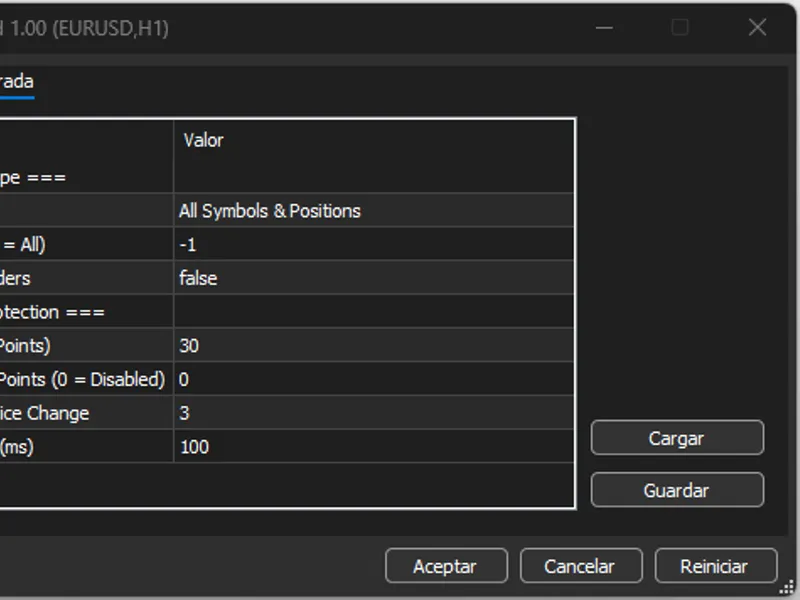
InpCloseScope (default: CLOSE_ALL_SYMBOLS)
— Filter mode: All Symbols, Current Symbol Only, Profitable Positions Only, or Losing Positions Only.
InpMagicFilter (default: -1)
— Optional Magic Number filter (-1 closes positions from any Magic Number).
InpClosePending (default: false)
— If true, also deletes matching pending orders.
InpMaxSlippagePts (default: 30)
— Maximum allowed slippage deviation in points passed to CTrade.
InpMaxSpreadPts (default: 0)
— Maximum spread in points allowed to close a position (0 disables spread filtering).
InpMaxRetries (default: 3)
— Maximum retry attempts on transient requotes or price changes.
InpRetryDelayMs (default: 100)
— Delay in milliseconds between retry attempts.
You may also like: Lot Size Calculator: Calculate Position Size Based on Risk and Stop Loss - excellent alternative for script users on MetaTrader 5.
Source Code
#property copyright "RobotFX"
#property link "https://robotfx.org"
#property version   "1.00"
#property description "This code is educational. Feel free to use, modify and upgrade as you wish. Visit ROBOTFX.ORG for professional trading tools"
#property script_show_inputs
#include <Trade\Trade.mqh>
enum ENUM_CLOSE_SCOPE
{
   CLOSE_ALL_SYMBOLS    = 0,
   CLOSE_CURRENT_SYMBOL = 1,
.......
⚠ Limitations & Risk Warning
- This tool is provided for educational and testing purposes only.
- Past performance does not guarantee future results.
- Trading involves substantial risk of loss. Use on a demo account first.
- Results may vary depending on market conditions, broker, and settings.
- We recommend thorough backtesting and forward testing before using with real funds.