

economic calendar cs v
Info
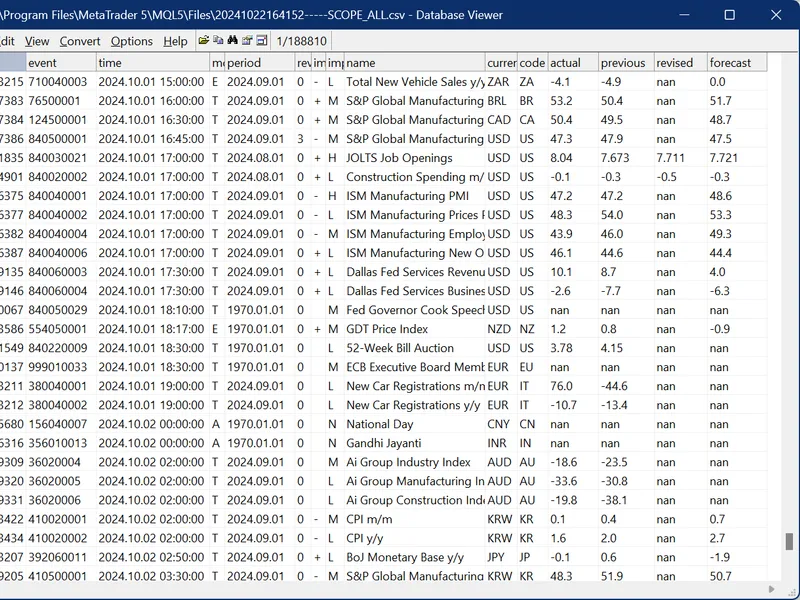
The economic calendar cs v is a Script for MetaTrader 5 that input variables allows you to specify a country code, a currenty code, and a time range to filter required records. if the inputs are left empty, a complete calendar can be requested (if the calendar is requested first time after the terminal started, it can take a while for downloading its base or even time out and produce no results - then please run the script once again).
Usage
This tool is typically used for enhancing chart analysis and decision making.
Platform
This Script works exclusively on MetaTrader 5 (both build 600+ and newer versions).
Setup
Place the downloaded file in MQL5/Scripts folder via File ? Open Data Folder in MetaTrader 5.
How to Install and Use economic calendar cs v
1. Installation: Move your script file into the MQL/Scripts directory and restart the platform.
2. Execution: Drag the script onto a chart; it will perform a one-time action, such as closing all open orders or clearing chart objects.
3. Editing: Use MetaEditor (F4) to modify code, click "Compile," and verify no errors appear in the terminal before running.
4. Removing: Scripts stop automatically, but you can remove them manually by right-clicking the chart and choosing "Remove Script."
Frequently Asked Questions
Q: How are scripts different from EAs? A: Scripts execute a single action and then stop; EAs monitor the market and trade continuously.
Q: Can I assign a hotkey to a script? A: Yes, right-click the script in the Navigator, select "Set Hotkey," and define your preferred keyboard shortcut.
Q: Why did my script stop? A: Scripts are designed to stop immediately after finishing their programmed command; this is normal behavior.
What this tool does
input variables allows you to specify a country code, a currenty code, and a time range to filter required records.
Typical Use Case
This Script excels in automated trading and technical analysis on MetaTrader 5.
Compatible Platform & Setup
This Script works on MetaTrader 5. Place the file in the MQL5/Scripts folder and restart the terminal.
Description & Settings
Related: ht m l file converter for the economic calendar - another powerful script for MetaTrader 5 traders.
input variables allows you to specify a country code, a currenty code, and a time range to filter required records. if the inputs are left empty, a complete calendar can be requested (if the calendar is requested first time after the terminal started, it can take a while for downloading its base or even time out and produce no results - then please run the script once again).
Also recommended: economic calendar data aggregator - similar script with strong performance on MetaTrader 5.
as a result, you'll get a csv-file with calendar records with most important fields (not all fields are exported - feel free to adjust the source code according to your needs).the most interesting feature: the script demonstrates the usage of for adjusting historical events' timestamps in accordance with the server's time zone changes in past, which are persistently reflected in candles' timestamps. this mode is enabled by settings the input
fixcachedtimesbysymbolhistory
to true.
saving events into csv-files with and without the correction makes it easy to compare effects of time correction on the history.
for proper usage of this feature, it's recommended to run the script on xauusd or eurusd h1 charts. when used programmatically, these symbols should be passed to timeserverdst's functions.
the same approach is used in the indicator for exporting time-corrected calendar events into archived cal-files, ready for loading from inside the tester, that ensures accurate backtests and optimizations of news robots.
range of dates in which the time corrections are performed is limited to the maximal number of bars on the chart for timeframe h1
. this is the specificity of the empirical method used inside timeserverdst.mqh.
let us consider a specific event type, preferably with a large impact on the market, such as a release of us nonfarm payrolls (nfp).
after empirical autodetection of the server's time zone, which was in effect during the summer, the library performs calendar export with time correction (shown at the left). as a result, the summer nfps are moved to 15:30, as it should be. you can take a look at the chart for this period to make sure that correction is appropriate.
this specific case is not so dramatic, because the non-corrected announced time 14:30 goes before 15:30, so expert advisers could probably keep waiting for the news and open trades. but when the server time zone is switched to summer, all winter events registered in the calendar contain timestamps delayed by 1 hour (!).
the stuff is still experimental. feel free to send your feedback.
further research on an impact of time corrections on news trading is planned. stay tuned.
04.10.2024 - added writing/reading server time zone offset into cal-files and csv-files.
10.11.2024 - added an option to correct timestamps of events in the history in accordance to retrospective timezone changes of the server.
11.11.2024 - small bugfix and refinement in calendarcache.mqh and calendarfilter.mqh.
22.11.2024 - small bugfixes and improvements in calendarcache.mqh.
You may also like: close positions by symbol - excellent alternative for script users on MetaTrader 5.
Source Code
#property copyright "RobotFX"
#property link "https://robotfx.org"
#property description "Educational code - RobotFX www.robotfx.org"
#property description "Educational code - RobotFX www.robotfx.org"
#property script_show_inputs
#include <MQL5Book/Defines.mqh>
#include <MQL5Book/StringUtils.mqh>
#include <MQL5Book/TimeServerDST.mqh> // including before Calendar cache enables timezone fix-up support
#include <MQL5Book/CalendarFilterCached.mqh>
#include <MQL5Book/PRTF.mqh>
.......
⚠ Limitations & Risk Warning
- This tool is provided for educational and testing purposes only.
- Past performance does not guarantee future results.
- Trading involves substantial risk of loss. Use on a demo account first.
- Results may vary depending on market conditions, broker, and settings.
- We recommend thorough backtesting and forward testing before using with real funds.