
fuzzy - library for developing fuzzy models
Info
The fuzzy - library for developing fuzzy models is a Library for MetaTrader 5 that unzip the archive into the \mql5\include\math\fuzzynet\ directory. The library codes are located here, and sample test scripts can be found in the \mql5\scripts\fuzzynet\ directory.
Usage
This tool is typically used for enhancing chart analysis and decision making.
Platform
This Library works exclusively on MetaTrader 5 (both build 600+ and newer versions).
Setup
Place the downloaded file in MQL5/Libraries folder via File ? Open Data Folder in MetaTrader 5.
How to Install and Use fuzzy - library for developing fuzzy models
1. Storage: Place library files in the MQL/Libraries directory to ensure they are accessible to your projects.
2. Implementation: Include the library in your code using the #import directive, ensuring you match the exact function names and parameters.
3. Compilation: Ensure the library is present in the directory before you compile your main EA or script, as the compiler links them during this phase.
4. Management: Keep libraries organized in sub-folders if you manage many custom functions to maintain a clean project structure.
Frequently Asked Questions
Q: What is a library file used for? A: Libraries store reusable code modules, allowing you to centralize common logic used by multiple EAs or indicators.
Q: Is a library executable? A: No, libraries are non-executable files containing functions; they must be imported into an EA, indicator, or script to function.
Q: Can I update a library while the platform is running? A: You should compile your EA or script after updating a library to ensure the latest code changes are integrated.
What this tool does
Unzip the archive into the \mql5\include\math\fuzzynet\ directory.
Typical Use Case
This Library excels in automated trading and technical analysis on MetaTrader 5.
Compatible Platform & Setup
This Library works on MetaTrader 5. Place the file in the MQL5/Libraries folder and restart the terminal.
Description & Settings
Related: ATS Trade Management Library - Break-Even, Trailing Stop, and Partial Closes - another powerful library for MetaTrader 5 traders.
Unzip the archive into theAlso recommended: ATS Risk Library: Advanced Lot Sizing and Trading Guards - similar library with strong performance on MetaTrader 5.
Fuzzynet is one of the most popular mathematical libraries for creating fuzzy models. It is an easy-to-use component that implements Mamdani and Sugeno fuzzy inference systems.
Fuzzynet includes:
- Flexible form for developing fuzzy system rules.
- Fuzzy inference system.
- Fuzzy inference system.
- One method for Mamdani-type systems.
- Unlimited amount of input and output variables.
The following additions have been made when converting the library into MQL5:
- 8 new membership functions.
- 4 new defuzzification methods for Mamdani-type systems.
Using the library:
Depending on your task, create an empty fuzzy Mamdani or Sugeno-type system.
- Create fuzzy input and output variables.
- Appropriate terms are added to each fuzzy variable. Before that, a name and a membership function are assigned to a term.
- Variables are added to the system.
- A set of rules is created.
- The rules are added to the system.
- Input data is sent to the system.
- The system calculation function is called.
Note:
The Mamdani-type inference system can be configured at any stage after its creation before the system calculation function is called. If the system settings have not been changed after its creation, the system works with default settings:
- Aggregation is performed using the min operator (an output fuzzy set is truncated).
- Aggregation is performed using the max operator (receiving maximum values of the output membership functions obtained after implication).
- Defuzzification is performed using the center of gravity method.
To work with the library, include mamdanifuzzysystem.mqh or sugenofuzzysystem.mqh file depending on the system you are creating.
Using Fuzzynet Library in MQL5
Before writing a fuzzy system, you should have a clear vision of its elements, including:
- Number of input and output values to be rearranged by fuzzy variables.
- Number of terms and their membership functions for each fuzzy variable.
- The type of fuzzy system depending on your task.
- Number and content of fuzzy rules corresponding to the selected system.
- Specific parameters and features of the system.
The system development and calculation:
- Create an empty system.
- For a Mamdani-type system:
- For a Sugeno-type system:
- Create all fuzzy input variables separately from the system by assigning a name and maximum/minimum values to all variables as parameters.
- Create functions of fuzzy terms, create fuzzy terms themselves, and pass appropriate names and membership functions to them. After that, add the terms to the corresponding variables. To reduce the program code, the process can be written as follows:
- Enter the input variables to the system.
- Create input variables paying attention to your system type. For a Mamdani-type system, creation is similar to the previous steps. For a Sugeno-type model, create special fuzzy variables accepting only a variable name as a parameter: linear functions interpreting the linear combination of input values are added to a Sugeno-type fuzzy variable instead of fuzzy terms. A name and a coefficient array are used as linear function parameters. A linear equation is formed based on that array, so it is important to maintain the order of elements in the array. A coefficient array length should be equal to the amount of input values or exceed it by one. If the lengths are equal, an absolute term of an equation is zero. If the array length exceeds the amount by one, an absolute term is equal to the last element value. All other array elements, starting from the first one, are assigned to fuzzy input variables in the order they were entered into the system.
- Similarly, output variables should be added to the system:
- For a Mamdani-type system:
- For a Sugeno-type system:
- Arrange a set of rules according to the system. The rules are defined as a common string and automatically analyzed based on keywords. The keywords are "if", "then", "is", "and", "or", "not", "(", ")", "slightly", "somewhat", "very", and "extremely", as well as all names of variables, terms, and functions available in your system.
- For a Mamdani-type system:
- For a Sugeno-type system:
- Enter all rules into the system:
- For a Mamdani-type system:
- For a Sugeno-type system:
- Pass input values of the variables to the system for calculation. Define the input values, and the system accepts the list of values including the dictionary_obj_double class object. This class is described in the dictionary.mqh file and implements the setall(cobject *key, const double value) method, accepting two parameters - a fuzzy variable and a numerical value. Create the list and add all values to it:
- Specify the output values:
- Call the calculate(clist *&list) function for the system, returning the list of system calculation results. The out list stores all calculated output values in the order they were entered into the system. Receive the results:
Sample Scripts
Tips Sample (Mamdani)
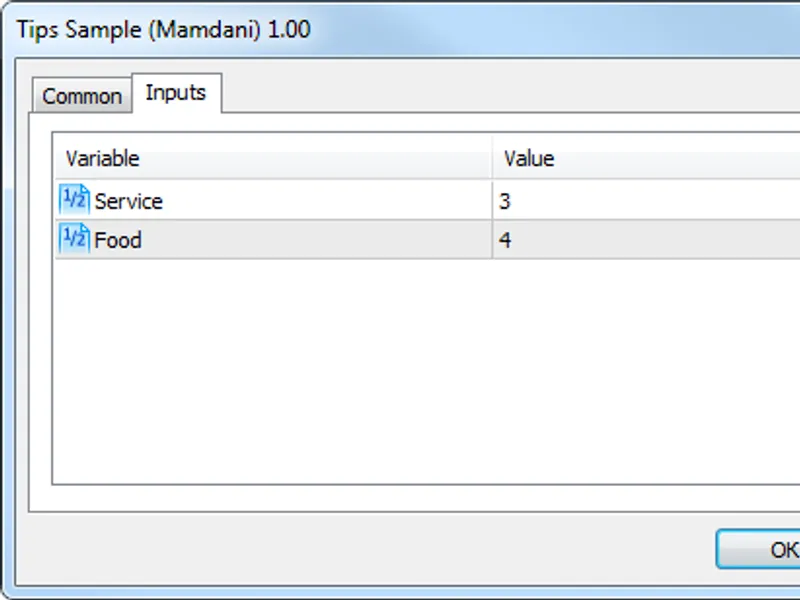
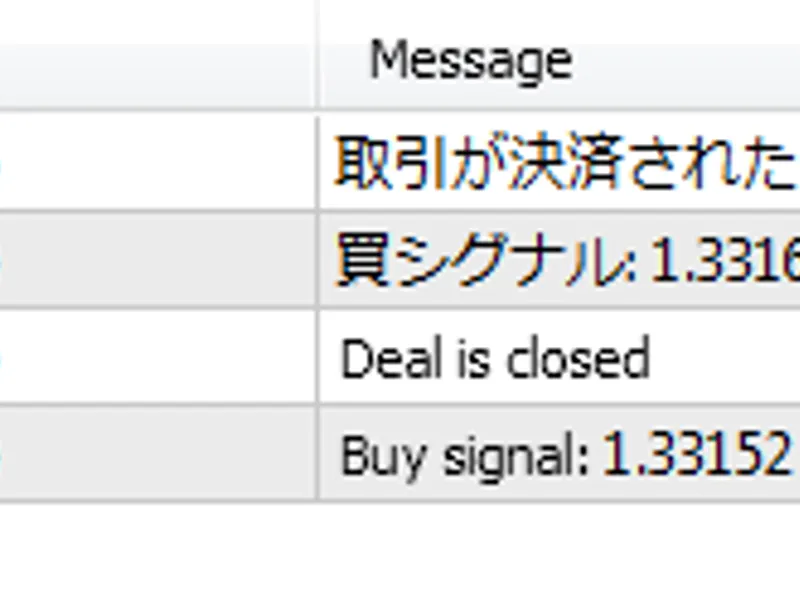
tips_sample_mamdani.mq5 calculates the tip percentage based on the quality of service and food.
Enter the input parameters:
Calculation results:
Cruise Control Sample (Sugeno)
cruise_control_sample_sugeno.mq5 is a fuzzy regulator sample script representing a car cruise control system. It calculates the necessary acceleration using the current deviation and the deviation rate of change to reach a desired speed.
Enter the input parameters:
Calculation results:
You may also like: MQTT Five — MQTT 5.0 Client Library for MetaTrader 5 - excellent alternative for library users on MetaTrader 5.
Source Code
#include <math\fuzzy\mamdanifuzzysystem.mqh>
#include <math\fuzzy\sugenofuzzysystem.mqh>
bool test_normalcombinationmembershipfunction()
  {
   bool result=true;
   double delta=1e-20;
   double x[]={-4.0,5.1,0.1};
   double b1=1.2;
   double sigma1=0.45;
   double b2=3.1;
.......
⚠ Limitations & Risk Warning
- This tool is provided for educational and testing purposes only.
- Past performance does not guarantee future results.
- Trading involves substantial risk of loss. Use on a demo account first.
- Results may vary depending on market conditions, broker, and settings.
- We recommend thorough backtesting and forward testing before using with real funds.