



as q order executor: advanced order execution for mt5
Info
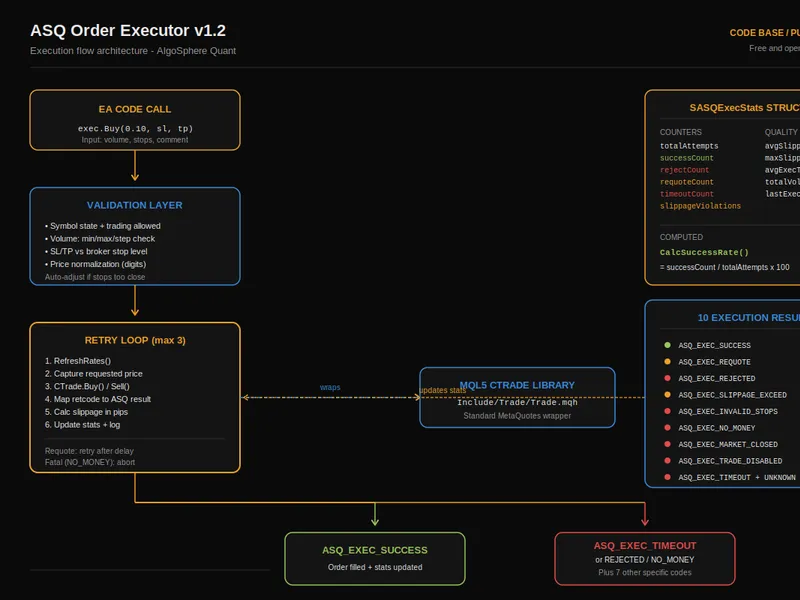
The as q order executor: advanced order execution for mt5 is a Library for MetaTrader 5 that as q order executor features: - automatic retry logic with configurable maximum attempts and delay. - requote handling with a separate retry path distinct from rejections.
Usage
This tool is typically used for enhancing chart analysis and decision making.
Platform
This Library works exclusively on MetaTrader 5 (both build 600+ and newer versions).
Setup
Place the downloaded file in MQL5/Libraries folder via File ? Open Data Folder in MetaTrader 5.
How to Install and Use as q order executor: advanced order execution for mt5
1. Storage: Place library files in the MQL/Libraries directory to ensure they are accessible to your projects.
2. Implementation: Include the library in your code using the #import directive, ensuring you match the exact function names and parameters.
3. Compilation: Ensure the library is present in the directory before you compile your main EA or script, as the compiler links them during this phase.
4. Management: Keep libraries organized in sub-folders if you manage many custom functions to maintain a clean project structure.
Frequently Asked Questions
Q: What is a library file used for? A: Libraries store reusable code modules, allowing you to centralize common logic used by multiple EAs or indicators.
Q: Is a library executable? A: No, libraries are non-executable files containing functions; they must be imported into an EA, indicator, or script to function.
Q: Can I update a library while the platform is running? A: You should compile your EA or script after updating a library to ensure the latest code changes are integrated.
What this tool does
as q order executor features: - automatic retry logic with configurable maximum attempts and delay.
Typical Use Case
This Library excels in automated trading and technical analysis on MetaTrader 5.
Compatible Platform & Setup
This Library works on MetaTrader 5. Place the file in the MQL5/Libraries folder and restart the terminal.
Description & Settings
Related: simplified order management class for mt4/mt5 - another powerful library for MetaTrader 5 traders.
as q order executor features:- automatic retry logic with configurable maximum attempts and delay.
Also recommended: close orders - similar library with strong performance on MetaTrader 5.
- requote handling with a separate retry path distinct from rejections.- slippage calculation in pips with violation detection.
- auto-normalization of stop loss (sl) and take profit (tp) against the broker's stop level.
- auto-detection of fill policy (fok, ioc, return).
- comprehensive execution statistics: success rate, average slippage, average execution time, and total volume.
- supports market orders (buy/sell) and pending orders (limit/stop, buy/sell).
- robust position management: close, partial close, modify sl/tp, and close all positions by magic number.
- human-readable result codes covering 10 distinct execution states.
- optional verbose logging for detailed debugging.
demo ea included:
attach the included demo ea to any chart for a live demonstration.
- dashboard with buy, sell, and close all action buttons.
- real-time execution statistics with color-coded metrics.
- success rate gauge: green (>=95%), amber (>=80%), red (<80%).
- displays total attempts, successful executions, rejections, requotes, timeouts, and slippage violations.
- shows average and maximum slippage in pips, average execution time in milliseconds, and total volume executed.
- reset button to clear statistics during a session.
usage example:
#include "asq_orderexecutor.mqh"
casqorderexecutor exec;
exec.initialize(_symbol, 20260417);
exec.setmaxretries(3);
exec.setmaxslippage(30);
exec.setverboselogging(true);
enum_asq_exec_result result = exec.buy(0.10, sl, tp, "strategy a");
if(result == asq_exec_success) print("executed at ", exec.getstats().avgslippagepips, " pips slip");
exec.closeallbymagic();
place both files (asq_orderexecutor.mqh and asq_orderexecutor_demo.mq5) in the same mql5 folder for instant compilation.
files:
- asq_orderexecutor.mqh: library (960 lines)
- asq_orderexecutor_demo.mq5: demo ea (334 lines)
compatible with metatrader 5, all brokers, all instruments, and all timeframes. this is a free and open-source library comprising 1,294 lines of production mql5 code.
You may also like: modify orders - excellent alternative for library users on MetaTrader 5.
Source Code
#property copyright "robotfx"
#property link "https://robotfx.org"
#property version   "1.20"
#property description "This code is provided AS IS and intended for educational purposes only. Professional trading EAs and indicators - robotfx www.robotfx.org"
#include "asq_orderexecutor.mqh"
input group "===== trading settings ====="
input double inplotsize          = 0.01;
input int    inpstoplosspips     = 50;
input int    inptakeprofitpips   = 100;
input ulong  inpmagicnumber      = 20260417;
.......
⚠ Limitations & Risk Warning
- This tool is provided for educational and testing purposes only.
- Past performance does not guarantee future results.
- Trading involves substantial risk of loss. Use on a demo account first.
- Results may vary depending on market conditions, broker, and settings.
- We recommend thorough backtesting and forward testing before using with real funds.