






us dollar index (usdx) multicurrency indicator
Info
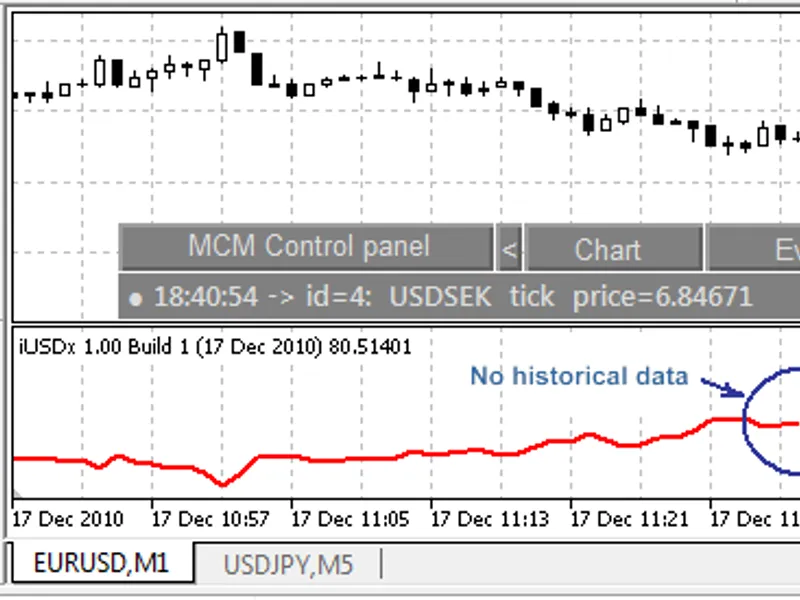
The us dollar index (usdx) multicurrency indicator is a Indicator for MetaTrader 5 that the us dollar index measures the performance of the us dollar against a basket of currencies: eur, jpy, gbp, cad, chf, and sek. the us dollar index started in march 1973, soon after the dismantling of the bretton woods system.
Usage
This tool is typically used for enhancing chart analysis and decision making.
Platform
This Indicator works exclusively on MetaTrader 5 (both build 600+ and newer versions).
Setup
Place the downloaded file in MQL5/Indicators folder via File ? Open Data Folder in MetaTrader 5.
How to Install and Use us dollar index (usdx) multicurrency indicator
1. Installation: Place your file in the MQL/Indicators folder via "Open Data Folder" and restart your terminal.
2. Loading: Find the indicator in the Navigator, drag it onto your chart, and configure the input parameters in the popup window.
3. Customization: Press Ctrl+I to open the indicator list, select your tool, and click "Properties" to change colors, levels, or visual styles.
4. Updating: Replace the old file in the Indicators folder with the new version and restart the platform to apply changes.
Frequently Asked Questions
Q: Why is my indicator not showing? A: Verify the file is in the MQL/Indicators folder, or try right-clicking the "Indicators" tree in the Navigator and clicking "Refresh."
Q: Do custom indicators slow down the platform? A: Too many complex indicators can impact performance; remove unused ones via the "Indicator List" (Ctrl+I).
Q: Can I use MT4 indicators on MT5? A: No, MQL4 and MQL5 are distinct languages; ensure the indicator is compiled specifically for your platform version.
What this tool does
the us dollar index measures the performance of the us dollar against a basket of currencies: eur, jpy, gbp, cad, chf, and sek.
Typical Use Case
This Indicator excels in automated trading and technical analysis on MetaTrader 5.
Compatible Platform & Setup
This Indicator works on MetaTrader 5. Place the file in the MQL5/Indicators folder and restart the terminal.
Description & Settings
Related: multi-timeframe relative strength index (mtf rsi) indicator for mt4/mt5 - another powerful indicator for MetaTrader 5 traders.
the us dollar index measures the performance of the us dollar against a basket of currencies: eur, jpy, gbp, cad, chf, and sek.Also recommended: institutional fractal dimension index (regime detector) - similar indicator with strong performance on MetaTrader 5.
the us dollar index started in march 1973, soon after the dismantling of the bretton woods system. at its start, the value of the us dollar index was 100.000. it has since traded as high as the mid-160s and as low as 70.698 on march 16, 2008, the lowest since its inception in 1973.
the makeup of the basket has been altered only once, when several european currencies were subsumed by the euro at the start of 1999. the us dollar index is updated whenever us dollar markets are open, which is from sunday evening new york time for 24 hours a day to late friday afternoon new york time.
the us dollar index is calculated as a geometric average of 6 currency pairs: usdx = 50.14348112 * eurusd^(-0.576) * usdjpy^0.136 * gbpusd^(-0.119) * usdcad^0.091 * usdsek^0.042 * usdchf^0.036
features of this implementation of the us dollar index include:
- it works in real multicurrency mode by receiving all ticks on each symbol without delays.
- full synchronization of currency pairs. for example, if there isn't historical data for some currency pair, it doesn't calculate the value of the us dollar index.
- full control of data synchronization for each currency pair using the initialization event.
- the implementation of the indicator is much simpler than implementation using ontick or ontimer functions, with no delay.
- you can modify the frequency of the indicator recalculation on the fly.
to install:
- download and compile the necessary files.
- the symbols in market watch should be ordered: eurusd, usdjpy, gbpusd, usdcad, usdsek, usdchf. the order of symbols in market watch is important for the calculation of the index.
- unpack the files to the /mql5 folder. next, attach the indicator from /mql5/indicators/ to some chart.
- after that, it's necessary to configure the events: set new tick event for all symbols and new bar event for the main symbol.
You may also like: relative strength index of volatility - excellent alternative for indicator users on MetaTrader 5.
⚠ Limitations & Risk Warning
- This tool is provided for educational and testing purposes only.
- Past performance does not guarantee future results.
- Trading involves substantial risk of loss. Use on a demo account first.
- Results may vary depending on market conditions, broker, and settings.
- We recommend thorough backtesting and forward testing before using with real funds.