









ticks indicator
Info
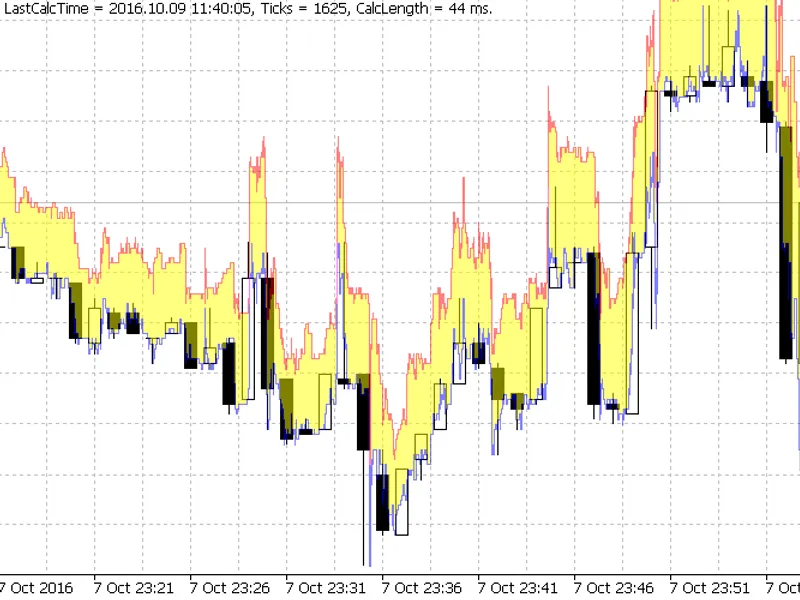
The ticks indicator is a Indicator for MetaTrader 5 that differs from other tick indicators in that it shows the history on the main chart directly over the bars. the "spread" history is clearly visible, as well as formation process of each bar.
Usage
This tool is typically used for enhancing chart analysis and decision making.
Platform
This Indicator works exclusively on MetaTrader 5 (both build 600+ and newer versions).
Setup
Place the downloaded file in MQL5/Indicators folder via File ? Open Data Folder in MetaTrader 5.
How to Install and Use ticks indicator
1. Installation: Place your file in the MQL/Indicators folder via "Open Data Folder" and restart your terminal.
2. Loading: Find the indicator in the Navigator, drag it onto your chart, and configure the input parameters in the popup window.
3. Customization: Press Ctrl+I to open the indicator list, select your tool, and click "Properties" to change colors, levels, or visual styles.
4. Updating: Replace the old file in the Indicators folder with the new version and restart the platform to apply changes.
Frequently Asked Questions
Q: Why is my indicator not showing? A: Verify the file is in the MQL/Indicators folder, or try right-clicking the "Indicators" tree in the Navigator and clicking "Refresh."
Q: Do custom indicators slow down the platform? A: Too many complex indicators can impact performance; remove unused ones via the "Indicator List" (Ctrl+I).
Q: Can I use MT4 indicators on MT5? A: No, MQL4 and MQL5 are distinct languages; ensure the indicator is compiled specifically for your platform version.
What this tool does
differs from other tick indicators in that it shows the history on the main chart directly over the bars.
Typical Use Case
This Indicator excels in automated trading and technical analysis on MetaTrader 5.
Compatible Platform & Setup
This Indicator works on MetaTrader 5. Place the file in the MQL5/Indicators folder and restart the terminal.
Description & Settings
Related: Stochastic Reversal Signal Indicator - another powerful indicator for MetaTrader 5 traders.
differs from other tick indicators in that it shows the history on the main chart directly over the bars. the "spread" history is clearly visible, as well as formation process of each bar. visually shows the formation of the current real-time bar.
Also recommended: Previous Day High, Low, and Close Indicator - similar indicator with strong performance on MetaTrader 5.
warningas the indicator shows the price tick history for all time interval visible on the chart, the number of ticks for visualization may count up to hundreds of thousands and millions. such heavy load causes the indicator to work slowly. for example, at the minimum scale on the h1, the visible interval may reach several months. the indicator will work very slowly, in order to load and display many millions of ticks.
if you are going to monitor ticks, it is logical to use a small tf (up to m5) and a large scale, in order to be able to see the price history in details (as in the figure above).
the indicator was taken from the and slightly modified — it had array overflows. added (several lines) filling the area between the corresponding lowask and highbid. much of the excess was removed from the original — oop construction of the indicator and unused mqh-files.
it is surprisingly (has no indicator buffers at all) stable.
its design is far from optimal. apparently, this is due to the fact that many bugs in the copyticks function had not been fixed yet at the time it was written. however, it shows the history data correctly and quite quickly (there is room for increasing the speed significantly).
addressing this indicator via icustom and indicatorcreate is meaningless — there are no indicator buffers. it only serves for history visualization. and it is actually designed as an indicator only due to a certain coincidence of the main function — to show.
for example, the same as an ea
that is, it simply uses one of the custom types of interactive graphical objects. therefore, paradoxically, this indicator is only formally an indicator — the technical form of mt program.
the transparency level for this object can be set in the input parameters.
the indicator is self-sufficient, it does not use standard libraries.
making a screenshot using the terminal means is problematic — it may not match what the terminal shows.
complies for metatrader 4, but of course, it does not show anything (no copyticks data).
You may also like: Quantora ADR Calculator MT5 - Professional Average Daily Range Indicator for MetaTrader 5 - excellent alternative for indicator users on MetaTrader 5.
Source Code
#property strict
#define amount_buffers 0
#property indicator_chart_window
#property indicator_buffers amount_buffers
#ifdef __mql5__
  #property indicator_plots amount_buffers
#endif
input color excolorbid = ::clrblue;      //  bid
input color excolorask = ::clrred;       //  ask
input color excolorspread = ::clryellow; //  spread
.......
⚠ Limitations & Risk Warning
- This tool is provided for educational and testing purposes only.
- Past performance does not guarantee future results.
- Trading involves substantial risk of loss. Use on a demo account first.
- Results may vary depending on market conditions, broker, and settings.
- We recommend thorough backtesting and forward testing before using with real funds.