


Previous Week High and Low Indicator
Info
The Previous Week High and Low Indicator is a Indicator for MetaTrader 5 that previous week high & lowthe idea behind itthe weekly range is a clean higher-timeframe reference point. It filters out daily noise and provides two key numbers: where price was rejected and where it was accepted over the previous full week.
Usage
This tool is typically used for enhancing chart analysis and decision making.
Platform
This Indicator works exclusively on MetaTrader 5 (both build 600+ and newer versions).
Setup
Place the downloaded file in MQL5/Indicators folder via File ? Open Data Folder in MetaTrader 5.
How to Install and Use Previous Week High and Low Indicator
1. Installation: Place your file in the MQL/Indicators folder via "Open Data Folder" and restart your terminal.
2. Loading: Find the indicator in the Navigator, drag it onto your chart, and configure the input parameters in the popup window.
3. Customization: Press Ctrl+I to open the indicator list, select your tool, and click "Properties" to change colors, levels, or visual styles.
4. Updating: Replace the old file in the Indicators folder with the new version and restart the platform to apply changes.
Frequently Asked Questions
Q: Why is my indicator not showing? A: Verify the file is in the MQL/Indicators folder, or try right-clicking the "Indicators" tree in the Navigator and clicking "Refresh."
Q: Do custom indicators slow down the platform? A: Too many complex indicators can impact performance; remove unused ones via the "Indicator List" (Ctrl+I).
Q: Can I use MT4 indicators on MT5? A: No, MQL4 and MQL5 are distinct languages; ensure the indicator is compiled specifically for your platform version.
What this tool does
Previous Week High & LowThe Idea Behind ItThe weekly range is a clean higher-timeframe reference point.
Typical Use Case
This Indicator excels in automated trading and technical analysis on MetaTrader 5.
Compatible Platform & Setup
This Indicator works on MetaTrader 5. Place the file in the MQL5/Indicators folder and restart the terminal.
Description & Settings
Related: Opening Gap Tracker: Daily, Weekend Gaps with Fill Tracking and Alerts - another powerful indicator for MetaTrader 5 traders.
Previous Week High & LowAlso recommended: ATR Monitor — Daily, Weekly, and Monthly Range - similar indicator with strong performance on MetaTrader 5.
The Idea Behind It
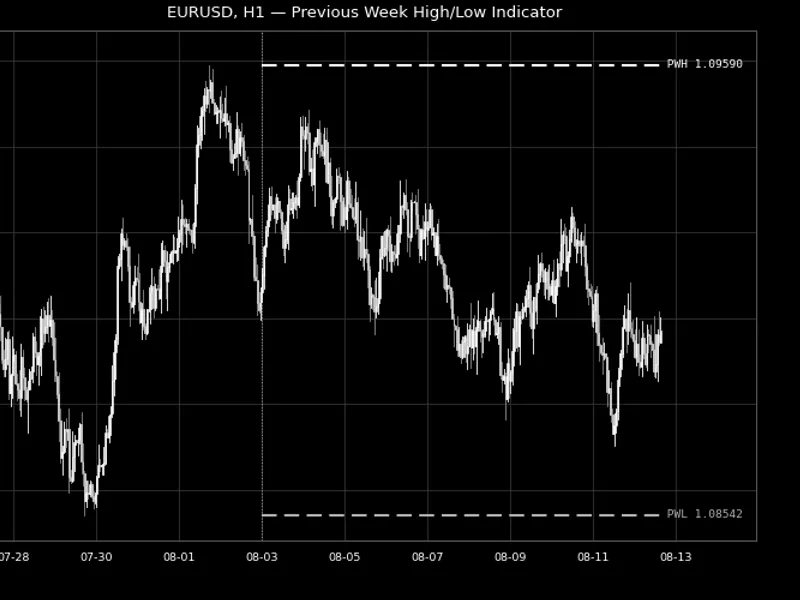
The weekly range is a clean higher-timeframe reference point. It filters out daily noise and provides two key numbers: where price was rejected and where it was accepted over the previous full week. Swing and intraday traders use these levels as a map for the upcoming week. They might fade a return to last week's high, watch for a breakout continuation once it's cleared, or use last week's low as a support reference. This indicator reads these values directly from the completed Weekly (W1) bar and draws them as horizontal levels on the current week. This eliminates the need to switch to a weekly chart to find them.
It functions on any symbol and any intraday-to-daily timeframe, as the levels are always derived from W1 data, irrespective of the chart's timeframe. Optionally, multiple previous weeks can be displayed. Each week's High/Low is drawn only across its active week, which is useful for identifying lined-up or repeatedly respected levels across several weeks.
How to Interpret It
PWH (Previous Week High)
- The highest price reached during the prior completed trading week. Often acts as swing resistance or a breakout trigger once cleared.
PWL (Previous Week Low)
- The lowest price reached during the prior completed trading week. Often acts as swing support or a breakdown trigger once broken.
Multi-week Stacking
- When InpWeeksToShow is greater than 1, each older week's level is drawn only across the week it applied to. A "-N" suffix is added to its label (e.g., PWH-1, PWH-2), ensuring historical and current levels never overlap or cause confusion.
Live Refresh
- Levels are automatically rebuilt the moment a new Weekly bar opens. The indicator always reflects the most recently completed week without requiring removal and re-attachment.
External Variables (Inputs)
Input
Default
Purpose
InpWeeksToShow
1
Number of previous trading weeks to display (1-8). Each week's levels are drawn only across the week they applied to.
InpShowHigh
true
Toggles the Previous Week High line on or off.
InpShowLow
true
Toggles the Previous Week Low line on or off.
InpHighColor / InpLowColor
Lime / Red
Independent colors for the two levels.
InpLineStyle / InpLineWidth
Dash / 1
Line style and width applied to both levels.
InpShowLabels
true
Shows a text label (e.g., "PWH") at the right-hand edge of each level.
InpShowPriceInLabel
true
Appends the exact price value to each label.
InpLabelFontSize
8
Font size used for the level labels.
Recommended Use
Works on any symbol and any timeframe up to and including Daily (M1–D1 are typical), as the High/Low values are always sourced from the Weekly timeframe regardless of the chart period. The exact week boundary (which day the weekly bar opens on) is determined by your broker's server. Most servers open weeks on Sunday or Monday. Verify this against your trading week definition before relying on the exact level, especially around holidays with shortened trading weeks.
All chart objects are created under a single internal name prefix and are fully removed via ObjectsDeleteAll() in OnDeinit() when the indicator is detached, ensuring no residual objects are left on the chart.
Fig. 1. Previous week's High and Low plotted as horizontal levels across the current week on EURUSD H1. Rendered in black and white per the Code Base image guidelines (750×500 px). This example is from 2026.
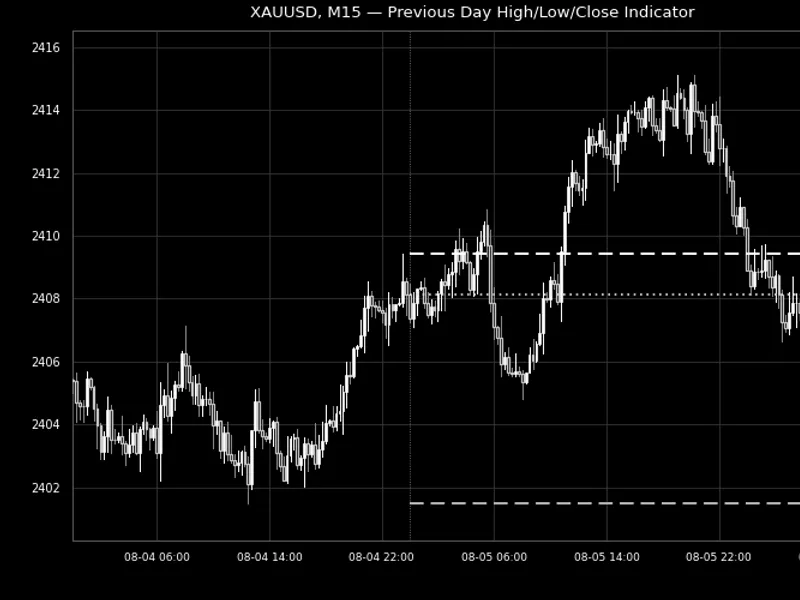
You may also like: Previous Day High, Low, and Close Indicator - excellent alternative for indicator users on MetaTrader 5.
Source Code
#property copyright "RobotFX"
#property link "https://robotfx.org"
#property version   "1.00"
#property description "This code is educational. Feel free to use, modify and upgrade as you wish. Visit ROBOTFX.ORG for professional trading tools"
#property indicator_chart_window
#property indicator_buffers 0
#property indicator_plots   0
#property strict
input group "=== Data Settings ==="
input int    InpWeeksToShow     = 1;
.......
⚠ Limitations & Risk Warning
- This tool is provided for educational and testing purposes only.
- Past performance does not guarantee future results.
- Trading involves substantial risk of loss. Use on a demo account first.
- Results may vary depending on market conditions, broker, and settings.
- We recommend thorough backtesting and forward testing before using with real funds.