




PCA Synthetics: Advanced Portfolio Coefficient Calculation
Info
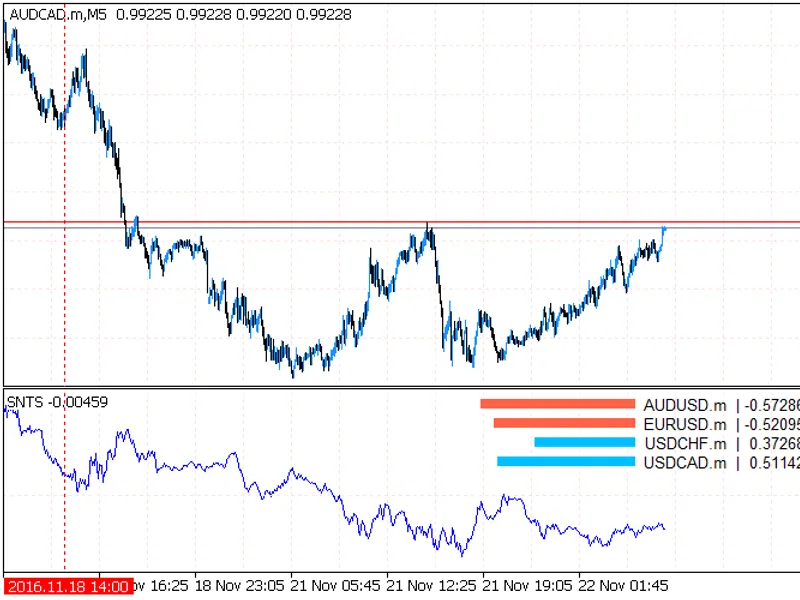
The PCA Synthetics: Advanced Portfolio Coefficient Calculation is a Indicator for MetaTrader 5 that this indicator automatically selects coefficients for a portfolio of synthetic instruments that tend towards equilibrium at zero. The indicator requires the alglib library in the terminal's include\math folder.
Usage
This tool is typically used for enhancing chart analysis and decision making.
Platform
This Indicator works exclusively on MetaTrader 5 (both build 600+ and newer versions).
Setup
Place the downloaded file in MQL5/Indicators folder via File ? Open Data Folder in MetaTrader 5.
How to Install and Use PCA Synthetics: Advanced Portfolio Coefficient Calculation
1. Installation: Place your file in the MQL/Indicators folder via "Open Data Folder" and restart your terminal.
2. Loading: Find the indicator in the Navigator, drag it onto your chart, and configure the input parameters in the popup window.
3. Customization: Press Ctrl+I to open the indicator list, select your tool, and click "Properties" to change colors, levels, or visual styles.
4. Updating: Replace the old file in the Indicators folder with the new version and restart the platform to apply changes.
Frequently Asked Questions
Q: Why is my indicator not showing? A: Verify the file is in the MQL/Indicators folder, or try right-clicking the "Indicators" tree in the Navigator and clicking "Refresh."
Q: Do custom indicators slow down the platform? A: Too many complex indicators can impact performance; remove unused ones via the "Indicator List" (Ctrl+I).
Q: Can I use MT4 indicators on MT5? A: No, MQL4 and MQL5 are distinct languages; ensure the indicator is compiled specifically for your platform version.
What this tool does
This indicator automatically selects coefficients for a portfolio of synthetic instruments that tend towards equilibrium at zero.
Typical Use Case
This Indicator excels in automated trading and technical analysis on MetaTrader 5.
Compatible Platform & Setup
This Indicator works on MetaTrader 5. Place the file in the MQL5/Indicators folder and restart the terminal.
Description & Settings
Related: Line Master: Advanced Trend Lines with Change Signals - another powerful indicator for MetaTrader 5 traders.
This indicator automatically selects coefficients for a portfolio of synthetic instruments that tend towards equilibrium at zero. The indicator requires the alglib library in the terminal's include\math folder.Also recommended: Titan TrendPulse AI: Advanced Trend and Momentum Indicator - similar indicator with strong performance on MetaTrader 5.
Theoretical Background
Each instrument moves independently. This indicator treats each direction as a separate dimension in a multidimensional array. By rotating the matrix (multiplying each element by a specific number), it identifies an axis that minimizes the distance and total variance of all instruments from that axis. The multiplier value becomes the coefficient for each currency in the portfolio. A positive coefficient indicates a buy order, while a negative coefficient signifies a sell order. This allows for maintaining the stationarity of the created synthetic by periodically recalculating coefficients. Furthermore, PCA identifies multiple axes, not just the one with the least variance. The number of instruments in the portfolio equals the number of components (vectors), each referred to as a principal component, indicating its influence on the total portfolio movement.
Potential Issues
If the chart fails to draw, check the Experts tab for error messages or synchronization issues with other charts. If no messages are present, try switching between different timeframes.
The calculated vector values have been validated against results from an R package, confirming their accuracy. However, the sign of a specific coefficient might be incorrect as PCA does not inherently determine signs. The correct sign (+ or -) can be determined empirically.
Problem #2 is described with pictures at the following link: [Link to Problem Description]
Parameters:
- inpvector: 0 (maximum variance axis) to N-1 (minimum variance axis), where N is the number of currencies in the portfolio.
- inpframe: 300 (floating window for coefficient calculation; computations are performed for every inpdepth bars within this frame).
- inpdepth: 1000 (total number of historical bars for chart drawing).
- inpforward: 500 (number of bars after which coefficient recalculation stops, and previous coefficients are used).
- oosinpperiod: 1 (smoothing period for Moving Average to reduce chart choppiness).
- inptimeperiod: period_current (timeframe for calculations).
- inpnormalize: true (normalize prices before display to smooth volatility differences, e.g., between USDJPY and EURGBP).
- inpsynthetics: true (draw the summary synthetic multiplied by coefficients, or draw each pair individually).
- inpprices: logs (normalization algorithm for pairs).
- inpsymbols: "audusd,usdchf,usdcad" (pairs included in the portfolio).
- inpmagic: "id" (custom indicator name to prevent conflicts when using multiple instances on the same chart).
The concept was originally inspired by: [Link to Original Idea]
You may also like: MSNR Key Levels MultiTF: Advanced Support & Resistance Analysis - excellent alternative for indicator users on MetaTrader 5.
Source Code
#property indicator_separate_window
#property indicator_buffers 10
#property indicator_plots   10
#property indicator_type1   draw_line
#property indicator_color1  clrblue
#property indicator_type2   draw_line
#property indicator_color2  clrblack
#property indicator_type3   draw_line
#property indicator_color3  clrred
#property indicator_type4   draw_line
.......
⚠ Limitations & Risk Warning
- This tool is provided for educational and testing purposes only.
- Past performance does not guarantee future results.
- Trading involves substantial risk of loss. Use on a demo account first.
- Results may vary depending on market conditions, broker, and settings.
- We recommend thorough backtesting and forward testing before using with real funds.