



Net Currency Exposure and Hedged Margin Simulator Panel MT5
Info
The Net Currency Exposure and Hedged Margin Simulator Panel MT5 is a Indicator for MetaTrader 5 that overviewmanaging multiple open positions across different symbols in metatrader 5 can obscure two critical account risks: overlapping currency exposure and broker-specific hedged margin rules. For instance, holding concurrent buy trades on EURUSD, GBPUSD, and XAUUSD results in concentrated short exposure to the US Dollar, despite them being distinct instruments.
Usage
This tool is typically used for hedging and risk management in volatile market conditions.
Platform
This Indicator works exclusively on MetaTrader 5 (both build 600+ and newer versions).
Setup
Place the downloaded file in MQL5/Indicators folder via File ? Open Data Folder in MetaTrader 5.
How to Install and Use Net Currency Exposure and Hedged Margin Simulator Panel MT5
1. Installation: Place your file in the MQL/Indicators folder via "Open Data Folder" and restart your terminal.
2. Loading: Find the indicator in the Navigator, drag it onto your chart, and configure the input parameters in the popup window.
3. Customization: Press Ctrl+I to open the indicator list, select your tool, and click "Properties" to change colors, levels, or visual styles.
4. Updating: Replace the old file in the Indicators folder with the new version and restart the platform to apply changes.
Frequently Asked Questions
Q: Why is my indicator not showing? A: Verify the file is in the MQL/Indicators folder, or try right-clicking the "Indicators" tree in the Navigator and clicking "Refresh."
Q: Do custom indicators slow down the platform? A: Too many complex indicators can impact performance; remove unused ones via the "Indicator List" (Ctrl+I).
Q: Can I use MT4 indicators on MT5? A: No, MQL4 and MQL5 are distinct languages; ensure the indicator is compiled specifically for your platform version.
What this tool does
OverviewManaging multiple open positions across different symbols in MetaTrader 5 can obscure two critical account risks: overlapping currency exposure and broker-specific hedged margin rules.
Typical Use Case
This Indicator excels in automated trading and technical analysis on MetaTrader 5.
Compatible Platform & Setup
This Indicator works on MetaTrader 5. Place the file in the MQL5/Indicators folder and restart the terminal.
Description & Settings
Related: Currency Strength Scanner MT5 - Free Analysis Tool - another powerful indicator for MetaTrader 5 traders.
OverviewManaging multiple open positions across different symbols in MetaTrader 5 can obscure two critical account risks: overlapping currency exposure and broker-specific hedged margin rules. For instance, holding concurrent buy trades on EURUSD, GBPUSD, and XAUUSD results in concentrated short exposure to the US Dollar, despite them being distinct instruments. Likewise, initiating an opposing position on an already traded symbol impacts the required margin differently based on whether the broker employs the Larger-Leg rule or a specific hedged margin rate.
Also recommended: Currency Strength Meter - Analyze Major Currency Movements - similar indicator with strong performance on MetaTrader 5.
The Net Currency Exposure & Hedged Margin Simulator Panel is a streamlined, real-time on-chart utility developed using CCanvas. It consolidates all open positions across the account to present the net lot exposure for each currency and simulates the precise margin and Stop-Out implications of placing a new Buy or Sell order prior to execution.
Key Features
- Real-Time Account & Margin Telemetry
-- Displays live Account Equity, Used Margin, Free Margin, and Margin Level (%) directly on the chart.
-- Updates automatically every second using OnTimer() and on every incoming tick.
- Net Currency Exposure Breakdown (Visual Bar Chart)
-- Analyzes all open positions across every symbol on the account, separating each trade into its Base and Profit currencies.
-- Calculates the exact Long, Short, and Net lot exposure for each individual currency.
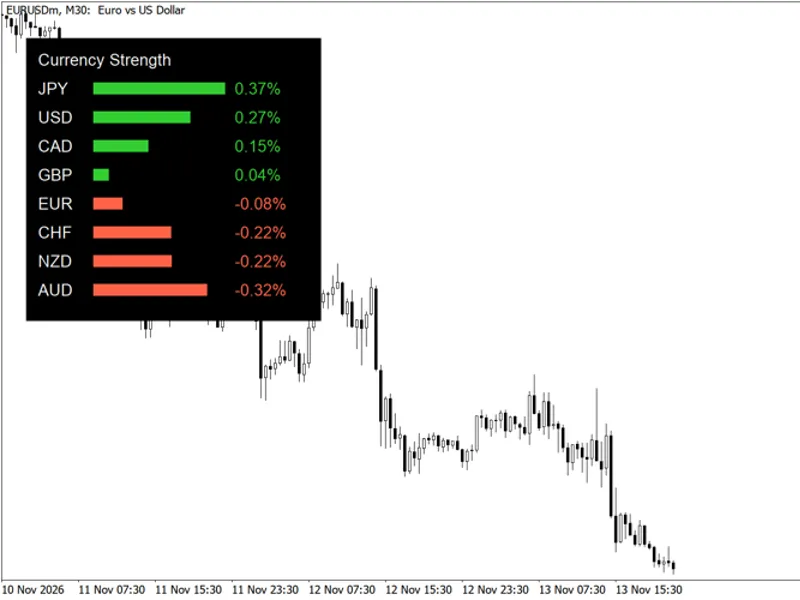
-- Renders color-coded horizontal exposure bars (green for net long, red for net short), dynamically scaled to the largest currency exposure.
- Pre-Trade "What-If" Hedged Margin Simulator
-- Automatically identifies your broker's margin calculation mode (SYMBOL_MARGIN_HEDGED_USE_LEG or SYMBOL_MARGIN_HEDGED contract specification).
-- Simulates the placement of a Buy or Sell order with a user-defined volume (InpSimLots) on the current chart symbol.
-- Displays the exact Margin Delta (change in required margin), the projected Margin Level (%), and the remaining monetary buffer before reaching the account's Stop-Out threshold.
-- Highlights hedged leg pairs in cyan when the simulated order offsets an existing opposite position.
- Draggable CCanvas Interface & Auto-Resizing
-- Features a clean, dark-themed HUD built with the standard CCanvas library.
-- Allows you to click and drag the top header bar to reposition the panel anywhere on the chart without impeding chart scrolling.
-- Automatically adjusts the panel's height based on the number of active currencies in your portfolio.
Input Parameters
- InpSimLots (default: 0.50) — The order volume (in lots) utilized for the Buy/Sell "What-If" margin simulation on the current symbol.
- InpPanelX (default: 20) — The initial horizontal position of the dashboard from the left edge of the chart (in pixels).
- InpPanelY (default: 30) — The initial vertical position of the dashboard from the top edge of the chart (in pixels).
- InpLogToExperts (default: true) — Enables or disables the logging of a detailed diagnostic summary to the MetaTrader 5 Experts tab every 30 seconds.
Step-by-Step Download & Installation Guide
Important: This tool comprises two files: MarginExposurePanel.mq5 (the primary indicator) and MarginExposureAnalyzer.mqh (the calculation engine). Both files must reside in the same directory for the indicator to compile correctly.
Method 1: Manual Download & Setup
1. On this CodeBase page, download both files: MarginExposurePanel.mq5 and MarginExposureAnalyzer.mqh (or select "Download as ZIP" to obtain both files together).
2. Open your MetaTrader 5 terminal, navigate to File in the top-left menu, and select Open Data Folder.
3. Proceed to MQL5 -> Indicators -> Free Indicators (or create a new folder, e.g., MQL5 -> Indicators -> MarginExposure).
4. Copy and paste BOTH MarginExposurePanel.mq5 and MarginExposureAnalyzer.mqh into that specific folder.
5. Press F4 in MetaTrader 5 to launch MetaEditor. Locate MarginExposurePanel.mq5 in the Navigator panel on the left, double-click to open it, and press F7 (Compile) to confirm there are 0 errors.
6. Return to MetaTrader 5, open the Navigator window (Ctrl + N), expand Indicators, and drag MarginExposurePanel onto any live chart.
Method 2: Direct Download via MetaTrader 5 Terminal
1. Open MetaTrader 5 and access the Toolbox window at the bottom (Ctrl + T).
2. Switch to the Code Base tab, search for "Net Currency Exposure and Hedged Margin Simulator Panel", right-click on it, and select Download.
3. After downloading, drag it from the Navigator -> Indicators -> Downloads folder onto your chart.
Risk Disclaimer & Important Notice
This indicator functions as an analytical and educational calculation utility designed exclusively to assist traders in visualizing portfolio currency exposure and estimating pre-trade margin requirements. It does NOT generate buy/sell trade signals, execute orders, or offer financial or investment advice.
Trading Forex, CFDs, metals, and leveraged instruments involves a high degree of risk and may not be suitable for all investors. Simulated margin values, projected Margin Levels, and Stop-Out buffers are estimates derived from current symbol specifications and live quotes. These may differ slightly from actual broker execution due to factors such as spreads, slippage, swaps, or dynamic leverage adjustments. Always conduct thorough testing of this tool on a Demo account initially. By downloading and utilizing this utility, you acknowledge that you trade entirely at your own risk, and the author assumes no responsibility or liability for any financial losses or trading decisions arising from its use.
You may also like: Currency Strength Ranking Panel - excellent alternative for indicator users on MetaTrader 5.
Source Code
#property copyright "RobotFX"
#property link "https://robotfx.org"
#property version   "1.00"
#property indicator_chart_window
#property indicator_plots 0
#include <Canvas\Canvas.mqh>
#include "MarginExposureAnalyzer.mqh"
input double InpSimLots         = 0.50;
input int    InpPanelX          = 20;
input int    InpPanelY          = 30;
.......
⚠ Limitations & Risk Warning
- This tool is provided for educational and testing purposes only.
- Past performance does not guarantee future results.
- Trading involves substantial risk of loss. Use on a demo account first.
- Results may vary depending on market conditions, broker, and settings.
- We recommend thorough backtesting and forward testing before using with real funds.