




Currency Strength Scanner MT5 - Free Analysis Tool
Info
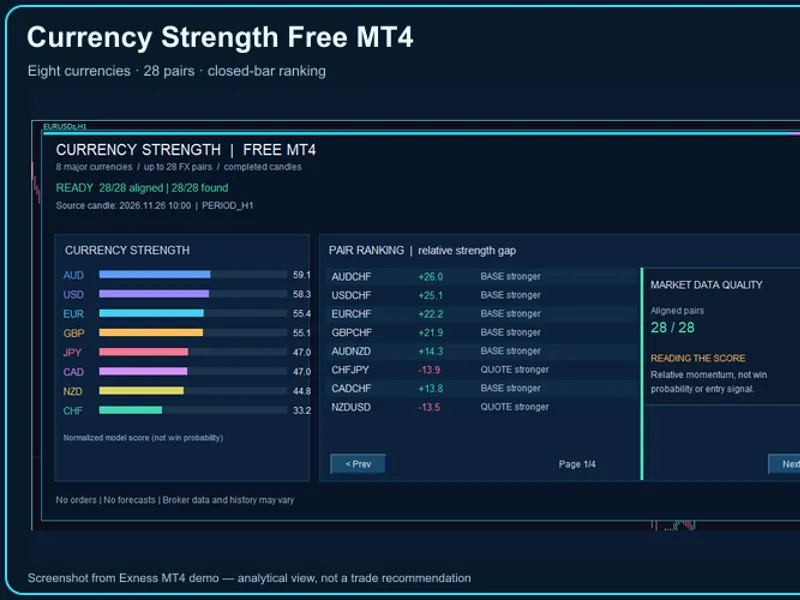
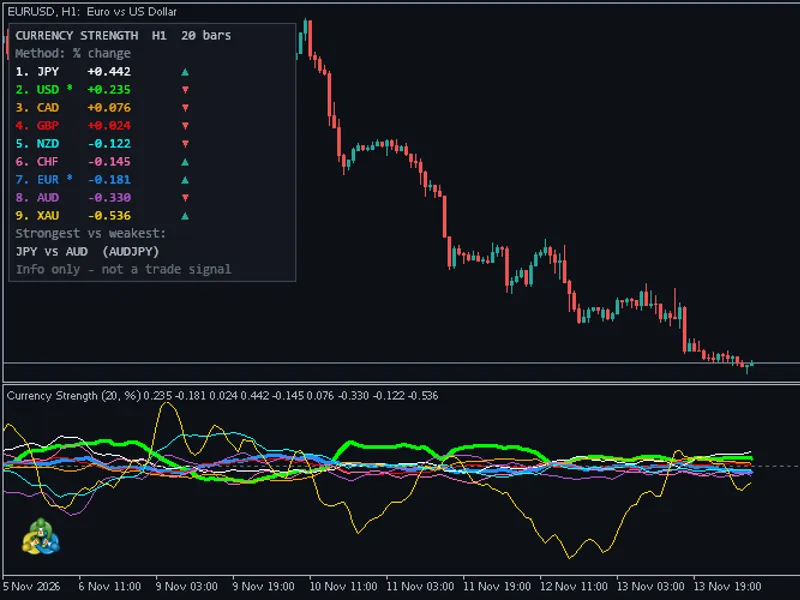
The Currency Strength Scanner MT5 - Free Analysis Tool is a Indicator for MetaTrader 5 that currency strength free for metatrader 5currency strength free is an original standalone mql5 indicator designed for comparing the eight major currencies: eur, usd, gbp, jpy, chf, aud, cad, and nzd. It integrates data from up to 28 forex crosses to create an on-chart currency-strength panel and a ranked list of pairs.
Usage
This tool is typically used for enhancing chart analysis and decision making.
Platform
This Indicator works exclusively on MetaTrader 5 (both build 600+ and newer versions).
Setup
Place the downloaded file in MQL5/Indicators folder via File ? Open Data Folder in MetaTrader 5.
How to Install and Use Currency Strength Scanner MT5 - Free Analysis Tool
1. Installation: Place your file in the MQL/Indicators folder via "Open Data Folder" and restart your terminal.
2. Loading: Find the indicator in the Navigator, drag it onto your chart, and configure the input parameters in the popup window.
3. Customization: Press Ctrl+I to open the indicator list, select your tool, and click "Properties" to change colors, levels, or visual styles.
4. Updating: Replace the old file in the Indicators folder with the new version and restart the platform to apply changes.
Frequently Asked Questions
Q: Why is my indicator not showing? A: Verify the file is in the MQL/Indicators folder, or try right-clicking the "Indicators" tree in the Navigator and clicking "Refresh."
Q: Do custom indicators slow down the platform? A: Too many complex indicators can impact performance; remove unused ones via the "Indicator List" (Ctrl+I).
Q: Can I use MT4 indicators on MT5? A: No, MQL4 and MQL5 are distinct languages; ensure the indicator is compiled specifically for your platform version.
What this tool does
Currency Strength Free for MetaTrader 5Currency Strength Free is an original standalone MQL5 indicator designed for comparing the eight major currencies: EUR, USD, GBP, JPY, CHF, AUD, CAD, and NZD.
Typical Use Case
This Indicator excels in automated trading and technical analysis on MetaTrader 5.
Compatible Platform & Setup
This Indicator works on MetaTrader 5. Place the file in the MQL5/Indicators folder and restart the terminal.
Description & Settings
Related: Currency Strength Meter - Analyze Major Currency Movements - another powerful indicator for MetaTrader 5 traders.
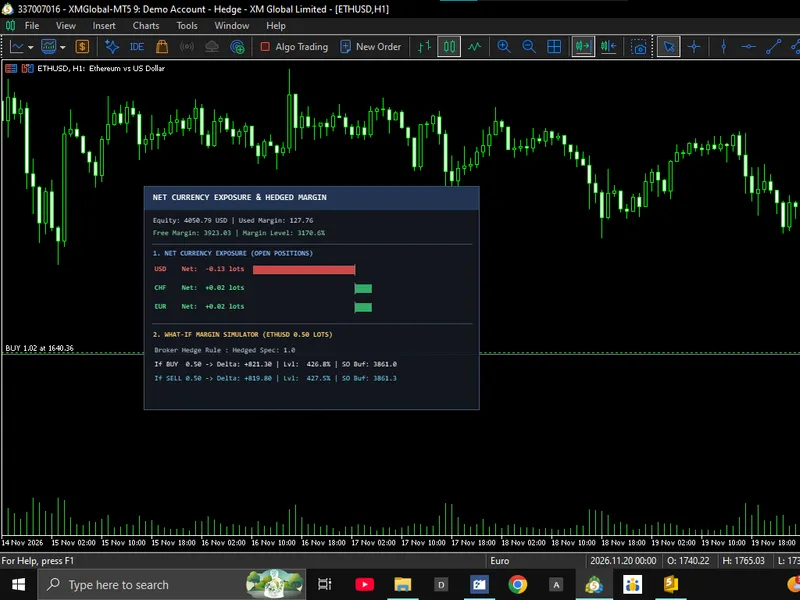
Currency Strength Free for MetaTrader 5Also recommended: Net Currency Exposure and Hedged Margin Simulator Panel MT5 - similar indicator with strong performance on MetaTrader 5.
Currency Strength Free is an original standalone MQL5 indicator designed for comparing the eight major currencies: EUR, USD, GBP, JPY, CHF, AUD, CAD, and NZD. It integrates data from up to 28 forex crosses to create an on-chart currency-strength panel and a ranked list of pairs. Its primary function is to assist traders in understanding recent relative momentum and selecting charts for further analysis, rather than providing specific entry, exit, or profit predictions.
Calculation Methodology
For each currency pair, the indicator analyzes the completed candles within the selected analysis timeframe. It calculates the logarithmic change over a defined lookback period, adjusting this change by the variation in intervening closed-bar returns. The base currency is assigned a resulting signed contribution, while the quote currency receives the opposite contribution. Each currency's contributions are averaged across its valid pair coverage, scaled to a 0–100 range centered around 50, and then ranked. Larger discrepancies between the scores of two currencies are reflected in the pair-ranking panel.
The scale illustrates the model's relative momentum and does not indicate the probability of a successful trade. Positive and negative gaps between pairs signify which component currency holds the higher score. Scores may fluctuate as source bars update or as missing broker history loads.
Key Features
- Eight distinct currency-strength bars, each with individual coloring, ranked from strongest to weakest.
- Support for up to 28 currency pairs, displaying relative-strength gaps and explaining base/quote currency strength.
- One independently configurable analysis timeframe and a closed-bar lookback period.
- Automatic detection of common broker symbol prefixes and suffixes, with an option for a preferred suffix.
- Readiness indicators showing discovered and synchronized pairs, along with data-gap and stale-quote notifications.
- Navigation options for the pair list (Previous/Next) and a compact display mode for smaller chart windows.
- Eight indicator buffers providing the latest currency-strength snapshot for further analysis; these buffers do not offer historical backfill.
- No trading functionalities, external library dependencies, account requirements, or subscription fees.
Installation and Setup
Download the source file to your MetaTrader 5 Indicators directory via CodeBase/MetaEditor and compile it, or open and compile the downloaded .mq5 file directly.
Attach the Currency Strength Free indicator to a chart and allow the terminal to synchronize the historical data for the available forex pairs.
Configure the input parameters:
- InpTimeframe: Sets the analysis timeframe (default is H1).
- InpLookbackBars: Determines the lookback period for analysis (default is 12).
- InpMinimumPairs: Controls when the dashboard can label its data context as READY (default is 20).
- InpPreferredSuffix: Specify your broker's preferred symbol naming convention if necessary.
Begin by reviewing the strongest/weakest currency panel, then examine the ranked pair list and the current synchronized-pair count before independently evaluating any potential trading setup.
Data and Testing Considerations
Incomplete data coverage is clearly indicated rather than being presented as comprehensive. If certain broker pairs cannot be identified or if their closed-bar timestamps do not align, the dashboard will display the available information along with a data warning. The age of live quotes is for informational purposes; data from weekends or closed markets should not be interpreted as live trading signals. A larger chart provides a more readable dashboard display.
This standalone version includes a single .mq5 source file and has no dependencies on private modules or additional files. The source code contains an MIT license notice. It was compiled in MetaEditor without errors or warnings and tested on MetaQuotes-Demo with 28/28 synchronized pairs; this does not guarantee identical data coverage across all brokers. No trades were executed during testing. This tool is intended for research and educational purposes only; trading outcomes are not guaranteed.
You may also like: Compact ADX Trend Strength Dashboard - excellent alternative for indicator users on MetaTrader 5.
Source Code
#property copyright "RobotFX"
#property version "1.11"
#property description "This code is educational. Feel free to use, modify and upgrade as you wish. Visit ROBOTFX.ORG for professional trading tools"
#property indicator_chart_window
#property indicator_buffers 8
#property indicator_plots 8
input group "Free currency strength scanner"
input ENUM_TIMEFRAMES InpTimeframe=PERIOD_H1;
input int InpLookbackBars=12;
input int InpMinimumPairs=20;
.......
⚠ Limitations & Risk Warning
- This tool is provided for educational and testing purposes only.
- Past performance does not guarantee future results.
- Trading involves substantial risk of loss. Use on a demo account first.
- Results may vary depending on market conditions, broker, and settings.
- We recommend thorough backtesting and forward testing before using with real funds.