
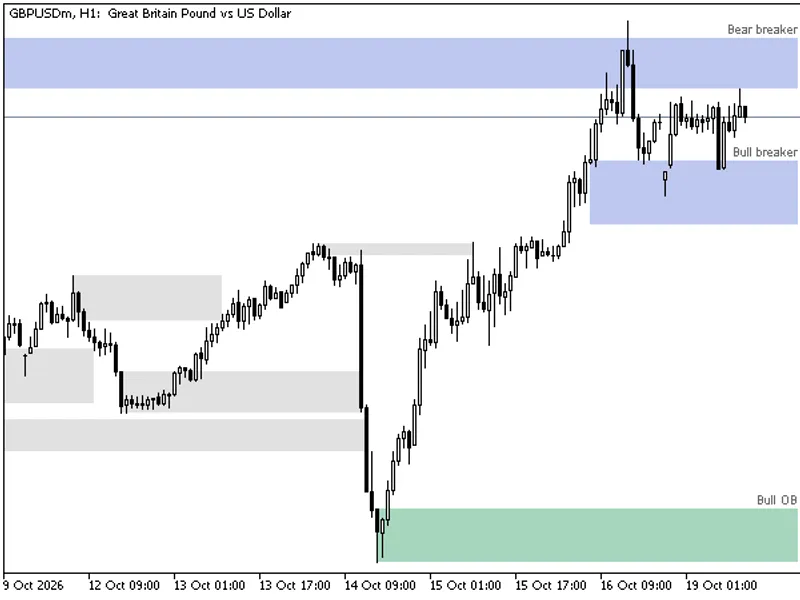
MTF Order Block Zones Indicator for MT4/MT5
Info
The MTF Order Block Zones Indicator for MT4/MT5 is a Indicator for MetaTrader 5 that an order block is a price zone that traders watch for potential support or resistance. This indicator visually represents these zones on your chart, whether they are from the current chart timeframe or a higher one.
Usage
This tool is typically used for enhancing chart analysis and decision making.
Platform
This Indicator works exclusively on MetaTrader 5 (both build 600+ and newer versions).
Setup
Place the downloaded file in MQL5/Indicators folder via File ? Open Data Folder in MetaTrader 5.
How to Install and Use MTF Order Block Zones Indicator for MT4/MT5
1. Installation: Place your file in the MQL/Indicators folder via "Open Data Folder" and restart your terminal.
2. Loading: Find the indicator in the Navigator, drag it onto your chart, and configure the input parameters in the popup window.
3. Customization: Press Ctrl+I to open the indicator list, select your tool, and click "Properties" to change colors, levels, or visual styles.
4. Updating: Replace the old file in the Indicators folder with the new version and restart the platform to apply changes.
Frequently Asked Questions
Q: Why is my indicator not showing? A: Verify the file is in the MQL/Indicators folder, or try right-clicking the "Indicators" tree in the Navigator and clicking "Refresh."
Q: Do custom indicators slow down the platform? A: Too many complex indicators can impact performance; remove unused ones via the "Indicator List" (Ctrl+I).
Q: Can I use MT4 indicators on MT5? A: No, MQL4 and MQL5 are distinct languages; ensure the indicator is compiled specifically for your platform version.
What this tool does
An order block is a price zone that traders watch for potential support or resistance.
Typical Use Case
This Indicator excels in automated trading and technical analysis on MetaTrader 5.
Compatible Platform & Setup
This Indicator works on MetaTrader 5. Place the file in the MQL5/Indicators folder and restart the terminal.
Description & Settings
Related: Order Block Marker with Mitigation Tracking - another powerful indicator for MetaTrader 5 traders.
An order block is a price zone that traders watch for potential support or resistance. This indicator visually represents these zones on your chart, whether they are from the current chart timeframe or a higher one. It tracks each zone bar by bar, showing which zones are untouched, how many times price has visited them, and where the most recent zones have been breached.Also recommended: Order Block Zones for Smart Money Concepts - similar indicator with strong performance on MetaTrader 5.
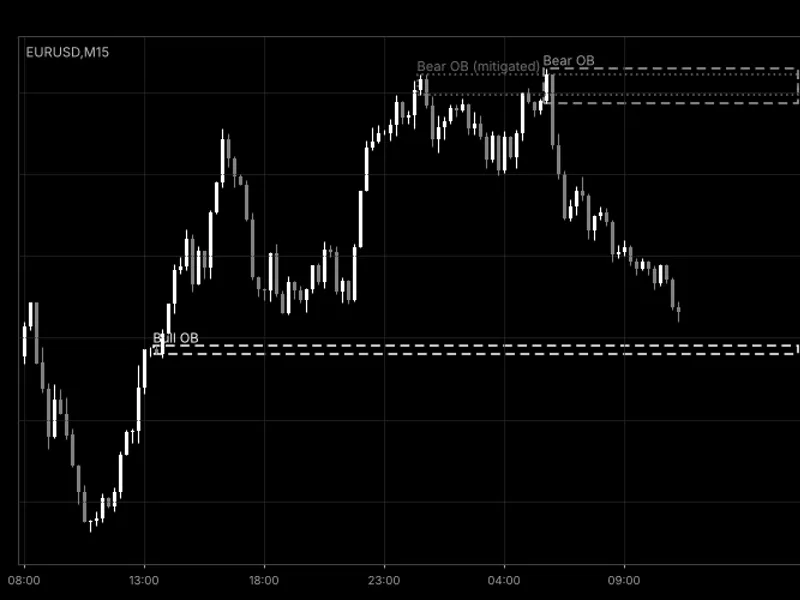
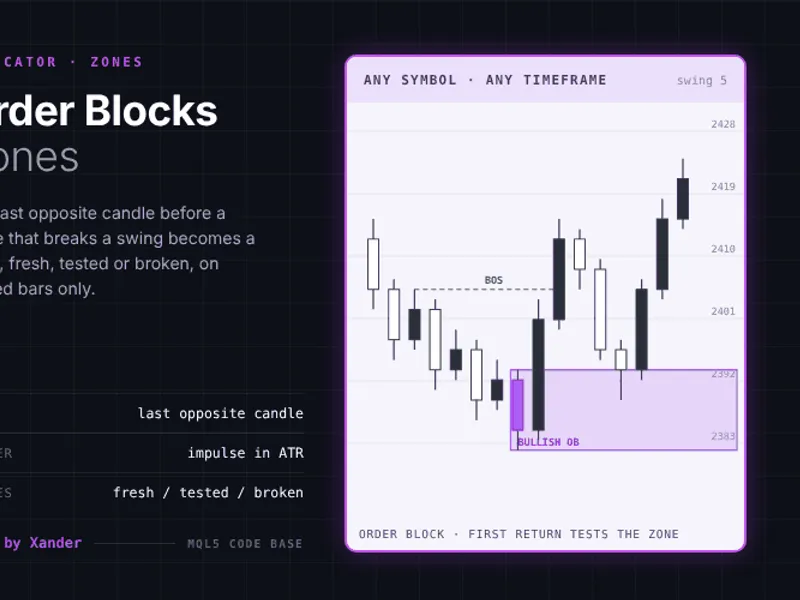
The indicator displays zones in three states: fresh, tested, and broken.
A fresh zone is shown in a strong color. When price enters a zone for the first time, it turns 'tested' and its fill becomes lighter, with subsequent visits increasing the test count. A zone is considered 'broken' when a candle closes decisively beyond its boundary; a wick penetration is not enough. Zones are labeled with their timeframe and status, such as 'H1 demand | 2 tests'. Broken zones disappear from the chart, except for the most recent broken zone on each side, which remains as a faint outline.
Definition of an Order Block:
A demand block is typically an initial bearish candle followed by a series of bullish candles. A supply block is the inverse. The subsequent bullish candles must move price sufficiently away from the block candle. The zone's price level can be derived from the first candle of the run, the full high-to-low range, or the deepest wick near the block candle.
Zone Measurement:
The indicator measures zone sizes in average ranges of the block's timeframe, making it adaptable to any trading instrument. This approach ensures consistent identification across different symbols and timeframes, unlike methods based on fixed percentages.
Zone Merging and Limits:
To prevent chart clutter, overlapping zones of the same type (demand on demand, supply on supply) merge into a single, wider zone. Overlapping zones of the opposite type are retired. The indicator maintains a limit on the number of active zones per side (defaulting to four, adjustable up to 20) to keep the chart focused. Broken zones do not count towards this limit.
Multi-Timeframe (MTF) Functionality:
Utilize higher-timeframe blocks on a lower-timeframe chart. For example, H4 blocks on an H1 chart will appear and be tracked based on H1 price action. The zone's timeframe is clearly indicated, and separate indicator copies can coexist on the same chart.
Alerts and Expert Advisor Integration:
The indicator provides real-time updates, reacting to price changes on the current bar and providing historical data. Optional alerts can be configured for new block appearances and first price returns to fresh zones. Four data buffers are available for integration with Expert Advisors via iCustom and CopyBuffer, providing access to the nearest live demand and supply zone levels.
User Inputs:
Blocks:
- Block timeframe (set to chart's timeframe by default)
- Candles in the run (range: 1 to 20, default: 5)
- Minimum run move (in average ranges, default: 0.85)
- Minimum block candle body (default: 0.15)
- Run candle body threshold (default: 0.03)
Zones:
- Live zones per side (adjustable, default: 4)
- Zone price calculation (wick to body, default)
- Candle for price calculation (default: 1)
- Candles to search for deepest wick (default: 2)
- Hide distant zones (in average ranges, 0 to disable)
Colors:
- Demand zone color (default: blue)
- Supply zone color (default: amber)
- Blending options with chart background
Alerts:
- New blocks and first returns (default: off)
The indicator operates on any symbol and timeframe. Removing the indicator will clear all associated drawings from the chart.
Educational purposes only. Trading involves risk. Information updated to 2026.
You may also like: Order Blocks and Breaker Blocks (SMC) - No Repaint, with Mitigation and Alerts - excellent alternative for indicator users on MetaTrader 5.
Source Code
#property copyright "RobotFX"
#property link "https://robotfx.org"
#property version   "1.04"
#property description "This code is educational. Feel free to use, modify and upgrade as you wish. Visit ROBOTFX.ORG for professional trading tools"
#property indicator_chart_window
#property indicator_buffers 4
#property indicator_plots   4
#property indicator_type1   DRAW_NONE
#property indicator_label1  "Demand top"
#property indicator_type2   DRAW_NONE
.......
⚠ Limitations & Risk Warning
- This tool is provided for educational and testing purposes only.
- Past performance does not guarantee future results.
- Trading involves substantial risk of loss. Use on a demo account first.
- Results may vary depending on market conditions, broker, and settings.
- We recommend thorough backtesting and forward testing before using with real funds.