


Key Trading Levels Indicator: PDH/PDL, Weekly, Monthly, Midnight Open, Asian Range, and Sweeps
Info
The Key Trading Levels Indicator: PDH/PDL, Weekly, Monthly, Midnight Open, Asian Range, and Sweeps is a Indicator for MetaTrader 5 that this indicator automatically draws crucial trading levels on your chart, including previous day high/low (pdh/pdl), previous week high/low (pwh/pwl), previous month high/low (pmh/pml), new york midnight open, day open, week open, month open, and the asian trading range. It also identifies and marks price sweeps and breaks at these levels, providing clear visual signals for potential trading opportunities.
Usage
This tool is typically used for enhancing chart analysis and decision making.
Platform
This Indicator works exclusively on MetaTrader 5 (both build 600+ and newer versions).
Setup
Place the downloaded file in MQL5/Indicators folder via File ? Open Data Folder in MetaTrader 5.
How to Install and Use Key Trading Levels Indicator: PDH/PDL, Weekly, Monthly, Midnight Open, Asian Range, and Sweeps
1. Installation: Place your file in the MQL/Indicators folder via "Open Data Folder" and restart your terminal.
2. Loading: Find the indicator in the Navigator, drag it onto your chart, and configure the input parameters in the popup window.
3. Customization: Press Ctrl+I to open the indicator list, select your tool, and click "Properties" to change colors, levels, or visual styles.
4. Updating: Replace the old file in the Indicators folder with the new version and restart the platform to apply changes.
Frequently Asked Questions
Q: Why is my indicator not showing? A: Verify the file is in the MQL/Indicators folder, or try right-clicking the "Indicators" tree in the Navigator and clicking "Refresh."
Q: Do custom indicators slow down the platform? A: Too many complex indicators can impact performance; remove unused ones via the "Indicator List" (Ctrl+I).
Q: Can I use MT4 indicators on MT5? A: No, MQL4 and MQL5 are distinct languages; ensure the indicator is compiled specifically for your platform version.
What this tool does
This indicator automatically draws crucial trading levels on your chart, including Previous Day High/Low (PDH/PDL), Previous Week High/Low (PWH/PWL), Previous Month High/Low (PMH/PML), New York midnight open, day open, week open, month open, and the Asian trading range.
Typical Use Case
This Indicator excels in automated trading and technical analysis on MetaTrader 5.
Compatible Platform & Setup
This Indicator works on MetaTrader 5. Place the file in the MQL5/Indicators folder and restart the terminal.
Description & Settings
Related: Symbol Trading Hours: Broker Sessions, Countdown, and Off-Hours Bars - another powerful indicator for MetaTrader 5 traders.
This indicator automatically draws crucial trading levels on your chart, including Previous Day High/Low (PDH/PDL), Previous Week High/Low (PWH/PWL), Previous Month High/Low (PMH/PML), New York midnight open, day open, week open, month open, and the Asian trading range.Also recommended: Round Number Reaction Map: Analyzing Price Behavior at Key Levels - similar indicator with strong performance on MetaTrader 5.
It also identifies and marks price sweeps and breaks at these levels, providing clear visual signals for potential trading opportunities.
Files
KeyLevelsSweeps.mq5 - The indicator file.
BrokerTime.mqh - A time zone utility class (ensure both files are in the same indicator folder for proper compilation).
Features Drawn
Previous day high and low (PDH, PDL).
Previous week high and low (PWH, PWL).
Previous month high and low (PMH, PML).
Specific Open Levels: Drawn as dotted lines, these include the New York midnight open (00:00 New York time, often considered the true day open), the standard day open, week open, and month open.
Asian Range: The high and low of the Asian trading session (default is 20:00 to 00:00 New York time, configurable via inputs).
Historical Level Visualization: Each level is displayed as a line extending across its respective period for the last 40 days (configurable input), allowing you to observe past price behavior at these key levels.
Level Labels: A label appears at the right edge of the chart displaying the name and price of each level. If a level has been swept or broken within the current period, its label will indicate this (e.g., "PDH swept", "PWL broken"). Labels for closely positioned levels are merged to prevent overlap.
Sweep Marks: Arrows are placed on bars where price has moved through a high or low level and subsequently closed back within it. The name of the affected level is shown next to the arrow.
Defining the Trading Day Start
The precise definition of the trading day's start can influence the accuracy of PDH/PDL. This indicator offers multiple options:
Broker Midnight: Accounts for variations in broker session times, including the short Sunday session which may be appended to Monday.
New York Midnight (00:00): Uses the standard New York midnight as the day's start.
17:00 New York Time: Aligns with the common start of the forex trading day (default setting).
The BrokerTime utility class accurately determines your broker's clock based on historical Friday closing prices and accounts for applicable summer time changes (both US and European) throughout the year. Manual setting is also an option.
No Repaint Guarantee
All levels are determined and drawn once their respective periods are complete. Opens are fixed once the period begins, and the Asian range is finalized after the session ends. Sweeps, breaks, and alerts are calculated based on closed bars only. Once drawn, these marks are permanent and will not be altered or removed.
Level Calculation Basis: Levels are calculated using M15 bars, ensuring consistency across all timeframes (M1, M15, H1, H4, etc.).
Sweep, Break, and Alert Functionality
Sweep Definition:
- High Level Sweep: Price trades above the level and closes at or below it.
- Low Level Sweep: Price trades below the level and closes at or above it.
Break Definition: A close price beyond the specified level.
Event Triggering: Only the first occurrence of a sweep or break for each level within a given period is considered, ensuring one alert per level per period.
Alerts: Optional pop-up alerts and push notifications can be enabled.
For Expert Advisors (EAs)
Indicator Buffers: Buffers 12 through 23 provide the precise numerical values for each level (they will be empty if a level is disabled or not yet determined). These include PDH, PDL, PWH, PWL, PMH, PML, New York midnight open, day open, week open, month open, Asian high, and Asian low.
Sweep Detection Buffers: Buffer 24 is set to the high price on a bar that swept a high level, and Buffer 25 is set to the low price on a bar that swept a low level.
Line Data: Buffers 0 through 11 represent the drawn lines. Note that these buffers are empty on the first bar of each period, which prevents vertical line steps. It is recommended to use buffers 12 through 23 for EA calculations.
Using iCustom: When calling this indicator via iCustom, each input group is treated as a single parameter. Pass a string to define the group, for example: iCustom(_Symbol, _Period, "KeyLevelsSweeps", "Day", 2, 0, 2.0, ...).
Configurable Inputs: The indicator offers extensive customization through inputs, including day start settings, broker time synchronization, level selection, Asian session hours, historical drawing periods, sweep mark appearance, label options (price, distance, font size), color schemes (six available), and alert settings.
Testing and Validation
An independent validation process was conducted using Python code. This process meticulously recalculated all levels from exported M15 bars, comparing the results against the indicator's buffers across three distinct trading setups on a demo account: EURUSD H1 (day starts at 17:00 NY time), XAUUSD M15 (day starts at NY midnight), and GBPUSD M5 (day starts at broker midnight). This rigorous comparison involved 74,964 level values with zero discrepancies. Sweep mark accuracy was also verified across 6,247 bars, yielding zero differences.
Repaint Test: A dedicated test EA monitored and recorded bar close values. Subsequent re-reading of these bars confirmed that no repainting occurred, with 87,458 values compared and no changes detected.
Strategy Tester Runs: The indicator was tested using validator-style runs in the Strategy Tester on EURUSD H1, XAUUSD D1, GBPUSD M30, and EURUSD M1 (covering 663,241 bars). While no visual output is generated in non-visual Strategy Tester runs, all indicator buffers were confirmed to be calculated correctly without errors.
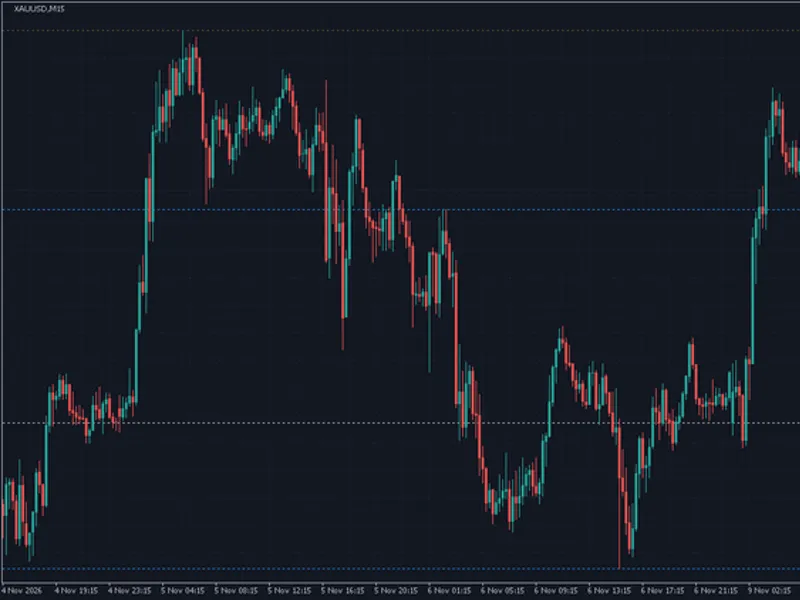
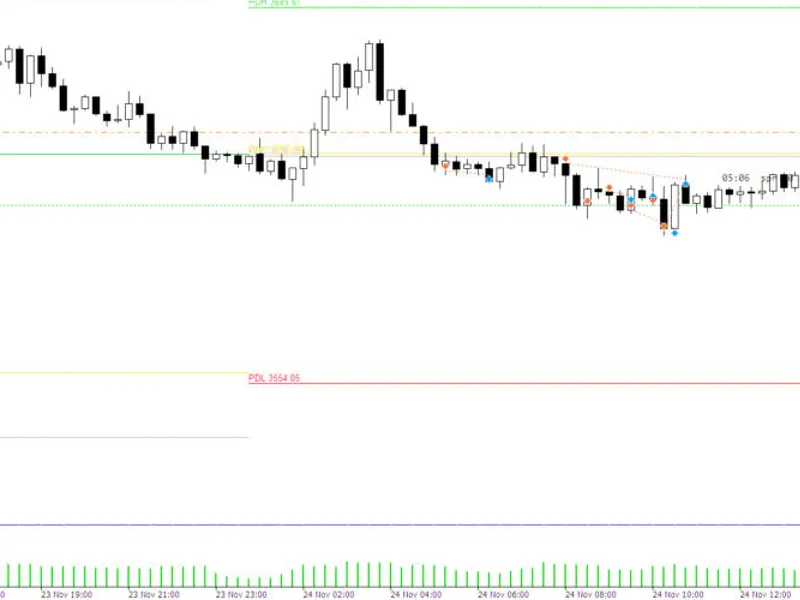
The accompanying screenshot displays a live XAUUSD M15 chart from a demo account, illustrating the indicator's functionality.
You may also like: Ezo O Prev Levels - Previous Day and Week Reference Levels - excellent alternative for indicator users on MetaTrader 5.
Source Code
#property copyright "RobotFX"
#property version   "1.00"
#property description "This code is educational. Feel free to use, modify and upgrade as you wish. Visit ROBOTFX.ORG for professional trading tools"
#property indicator_chart_window
#property indicator_buffers 26
#property indicator_plots   26
#include "BrokerTime.mqh"
#property indicator_label1  "PDH"
#property indicator_type1   DRAW_LINE
#property indicator_label2  "PDL"
.......
⚠ Limitations & Risk Warning
- This tool is provided for educational and testing purposes only.
- Past performance does not guarantee future results.
- Trading involves substantial risk of loss. Use on a demo account first.
- Results may vary depending on market conditions, broker, and settings.
- We recommend thorough backtesting and forward testing before using with real funds.