




id lite info ma
Info
The id lite info ma is a Indicator for MetaTrader 5 that by default, this indicator displays nine values of two different moving averages (МА) for the , a difference between previous sequential МА values and a difference between mas in points. you can set the data display with positive or negative offsets and/or rounded to required decimal digits.
Usage
This tool is typically used for enhancing chart analysis and decision making.
Platform
This Indicator works exclusively on MetaTrader 5 (both build 600+ and newer versions).
Setup
Place the downloaded file in MQL5/Indicators folder via File ? Open Data Folder in MetaTrader 5.
How to Install and Use id lite info ma
1. Installation: Place your file in the MQL/Indicators folder via "Open Data Folder" and restart your terminal.
2. Loading: Find the indicator in the Navigator, drag it onto your chart, and configure the input parameters in the popup window.
3. Customization: Press Ctrl+I to open the indicator list, select your tool, and click "Properties" to change colors, levels, or visual styles.
4. Updating: Replace the old file in the Indicators folder with the new version and restart the platform to apply changes.
Frequently Asked Questions
Q: Why is my indicator not showing? A: Verify the file is in the MQL/Indicators folder, or try right-clicking the "Indicators" tree in the Navigator and clicking "Refresh."
Q: Do custom indicators slow down the platform? A: Too many complex indicators can impact performance; remove unused ones via the "Indicator List" (Ctrl+I).
Q: Can I use MT4 indicators on MT5? A: No, MQL4 and MQL5 are distinct languages; ensure the indicator is compiled specifically for your platform version.
What this tool does
by default, this indicator displays nine values of two different moving averages (МА) for the , a difference between previous sequential МА values and a difference between mas in points.
Typical Use Case
This Indicator excels in automated trading and technical analysis on MetaTrader 5.
Compatible Platform & Setup
This Indicator works on MetaTrader 5. Place the file in the MQL5/Indicators folder and restart the terminal.
Description & Settings
Related: Quantora Symbol Information Dashboard MT5 - Professional Symbol and Trading Specifications Panel - another powerful indicator for MetaTrader 5 traders.
Also recommended: Quantora Symbol Information Panel MT5 - Real-time Trading Specifications Dashboard - similar indicator with strong performance on MetaTrader 5.
by default, this indicator displays nine values of two different moving averages (МА) for the , a difference between previous sequential МА values and a difference between mas in points. you can set the data display with positive or negative offsets and/or rounded to required decimal digits. displaying the values for zero (current) bar is not supported.this indicator, as , can be used for displaying not only a difference between sequential values, but also a distance in points, without extending the source code:
between bars'
high
and
low
,
high
and
open
,
high
and
close
or
high
and the values of a certain moving average, also considering some positive or negative offsets in points and/or with decreased or "extended" number of decimal digits;
between
open
and ... (etc.);
between
close
and ... (etc.);
between
low
and ... (etc.);
between two moving averages, considering or not considering positive or negative offsets and/or with fewer or more decimal digits.
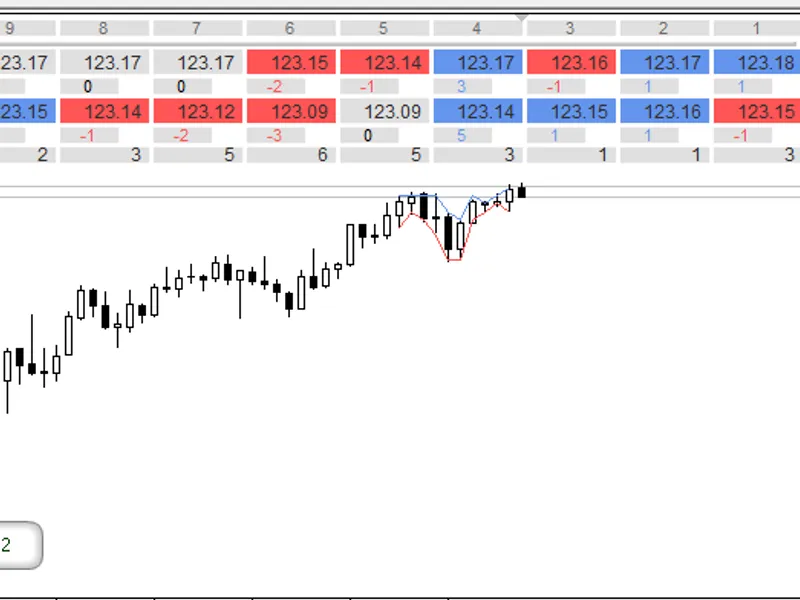
as shown on the screenshots below, a table is displayed on a 3-digit chart with values, rounded to 2 decimal digits, and also "extended" to 4 decimal digits.
other than that, the indicator is identical to its :
in the indicator table, the colors change automatically for МА (or bars) marks and differences between adjacent sequential values. different colors apply when values change to greater, lesser and/or equal. changing color for difference between two moving averages (and/or bars or offsets) displayed in the fifth table row is not supported.
the calculations and changing the table values occur when:
when new bars appear;
when the user changes indicator's input parameters;
when the user changes the timeframe or the symbol of the chart with an attached indicator.
if nine values in each table row by x axis is too much or too low, then to change the number of cells and thus the amount of calculated and displayed data, you need to change
9
to a positive number >= 2 in this line of code:
additional information:
note:
the table heading shows the bar numbers the values of which are displayed by the indicator. in the indicator parameters, you can change the starting bar number to any positive non-zero value. the reason for not including the zero bar is that i wrote the indicator for personal needs and i didn't require to display constantly changing data for the current (zero) bar. however, if you require to display data (results) changing with every tick for a currently forming bar, you need to implement a slightly different code structure.in fact, the limitation for current (zero) bars applies only to values in the table. so you can, if required, add lines to the code, for example, to implement notifications (alerts etc.) triggering when
the current price breaks through certain values from the table
. you can also trigger the notifications when certain "new" values from the table are less than/greater than or equal to certain "old" values. also, you can replace the existing ma or bar mark calculations with some other required calculations.
you can view the parameters of each moving average (set in the input parameters or remaining by default) at any time by hovering the cursor over the table cells.
note:
tooltips with parameter values will display only if "show object descriptions" option is turned on in the chart properties.
instead of МА values, you can set the display of data with required positive or negative offsets in points from each moving average or bar marks.
note:
to make the indicator display
open
and/or
high
and/or
low
and/or
close
of adjacent bars and differences between them instead of ma calculations, you need to set the following ma values in the input parameters:
period moving averages
... =
1
;
ma method
...= ;
apply to
... = . with this set of parameters, the indicator will calculate directly by bar marks, without getting the handle.
if you need to round or "extend" the МА or bar values to a certain decimal digit, set the required value (number of decimal digits) for
decimal digits
input parameter.
you can also turn off the display of indicator lines in the input parameters.
note:
line colors depend on direction of
first
calculated bar value, which is set in the line
shift (bar for first value):
. plotted lines are 1 bar longer deep into the chart, than the number of МА values in the table (this allows to see which mark the last bar in the table is compared with).
in the input parameters, you can also change the table offset by x and y axis, table cells size, font size, colors, and bring the table to front (by default, it's rendered in the background, to avoid obscuring the bars).
fig.1. indicator lines, marks and differences in points between
high
and
low
prices, rounded to 2 decimal digits, on a 3-digit chart
fig.2. marks and differences in points between 2 moving averages, "extended" to 4 decimal digits, on a 3-digit chart
note:
if you have added this indicator on a chart along with standard moving average(s) and you haven't set offsets and/or rounding in the id lite info ma input parameters, but the lines of this indicator don't match the standard mas (
with the same parameters
), then please do not jump to conclusions about the accuracy of calculation.
open the
data window
and check the number of displayed digits for the standard moving average (for example, it may use 4 decimal digits on a 3-digit chart).
this is normal and convenient in my opinion because moving averages are calculated by average values. example:
(1.2052 + 1.2057 + 1.2073)/3 = 1.2060667
. therefore, calculated values with rounded or extended digits increase the number of possible use scenarios.
if the lines
should perfectly match (with other parameters identical)
, you can choose a greater number of decimal digits in
decimal digits
drop-down list in the id lite info ma input parameters.
fig.3. built-in moving average and id lite info ma (with decimal digits
=
current chart) on a 3-digit chart
increased maximum moving averages periods value from 500 to 3000 bars. because this limit can be set freely, you can change this value to any other positive integer value. it is set in the function:
minor code corrections and optimizations.
You may also like: daily risk monitor lite for mt5 - excellent alternative for indicator users on MetaTrader 5.
Source Code
/.......
⚠ Limitations & Risk Warning
- This tool is provided for educational and testing purposes only.
- Past performance does not guarantee future results.
- Trading involves substantial risk of loss. Use on a demo account first.
- Results may vary depending on market conditions, broker, and settings.
- We recommend thorough backtesting and forward testing before using with real funds.