



Quantora Symbol Information Panel MT5 - Real-time Trading Specifications Dashboard
Info
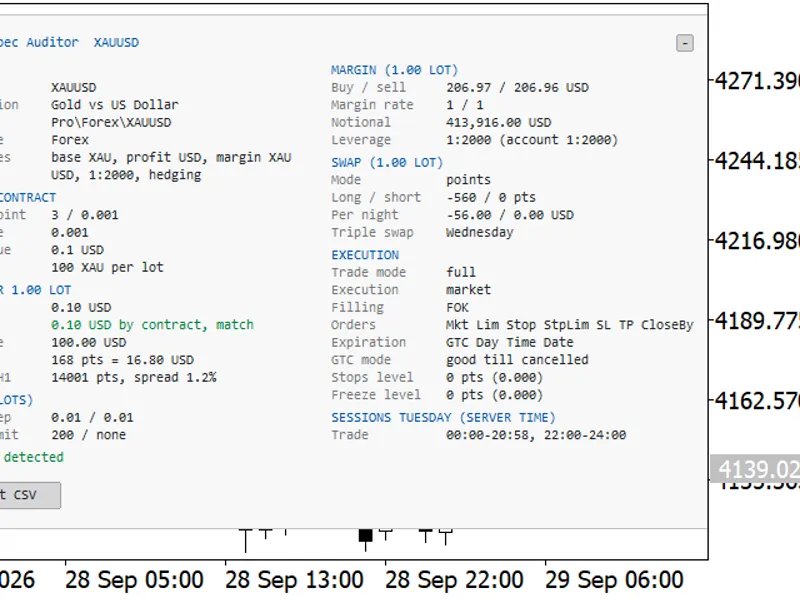
The Quantora Symbol Information Panel MT5 - Real-time Trading Specifications Dashboard is a Indicator for MetaTrader 5 that quantora symbol information panel mt5 is a professional real-time market information utility designed for metatrader 5. The indicator collects important trading specifications directly from the broker and displays them in a single organized dashboard.
Usage
This tool is typically used for enhancing chart analysis and decision making.
Platform
This Indicator works exclusively on MetaTrader 5 (both build 600+ and newer versions).
Setup
Place the downloaded file in MQL5/Indicators folder via File ? Open Data Folder in MetaTrader 5.
How to Install and Use Quantora Symbol Information Panel MT5 - Real-time Trading Specifications Dashboard
1. Installation: Place your file in the MQL/Indicators folder via "Open Data Folder" and restart your terminal.
2. Loading: Find the indicator in the Navigator, drag it onto your chart, and configure the input parameters in the popup window.
3. Customization: Press Ctrl+I to open the indicator list, select your tool, and click "Properties" to change colors, levels, or visual styles.
4. Updating: Replace the old file in the Indicators folder with the new version and restart the platform to apply changes.
Frequently Asked Questions
Q: Why is my indicator not showing? A: Verify the file is in the MQL/Indicators folder, or try right-clicking the "Indicators" tree in the Navigator and clicking "Refresh."
Q: Do custom indicators slow down the platform? A: Too many complex indicators can impact performance; remove unused ones via the "Indicator List" (Ctrl+I).
Q: Can I use MT4 indicators on MT5? A: No, MQL4 and MQL5 are distinct languages; ensure the indicator is compiled specifically for your platform version.
What this tool does
Quantora Symbol Information Panel MT5 is a professional real-time market information utility designed for MetaTrader 5.
Typical Use Case
This Indicator excels in automated trading and technical analysis on MetaTrader 5.
Compatible Platform & Setup
This Indicator works on MetaTrader 5. Place the file in the MQL5/Indicators folder and restart the terminal.
Description & Settings
Related: Trend BOSS: Classifying Market Regimes with Symbolic Fourier Approximation - another powerful indicator for MetaTrader 5 traders.
Quantora Symbol Information Panel MT5 is a professional real-time market information utility designed for MetaTrader 5.Also recommended: Symbol Specification Auditor: Uncover Hidden Trading Costs and Risks - similar indicator with strong performance on MetaTrader 5.
The indicator collects important trading specifications directly from the broker and displays them in a single organized dashboard.
Instead of searching through MetaTrader symbol specification windows, traders can instantly monitor price information, spread, contract specifications, lot limits, swap values, margin information and trading status directly on the chart.
Main Features
- Live Bid price
- Live Ask price
- Current Spread in points
- Market Open / Closed status
- Symbol Digits
- Point Size
- Tick Size
- Tick Value
- Contract Size
- Minimum Lot
- Maximum Lot
- Lot Step
- Stops Level
- Freeze Level
- Swap Long
- Swap Short
- Base Currency
- Profit Currency
- Margin Currency
- Account Currency
- Initial Margin information
- Maintenance Margin information
- Symbol Trading Mode
- Server Time
- Current chart symbol support
- Optional custom symbol
- Automatic real-time updates
- Professional Quantora dashboard
- Low CPU usage
- Works on all chart timeframes
- Compatible with Forex, Gold, Indices, Crypto and other MT5 instruments
- Free and open-source MQ5 code
Broker-Specific Information
The indicator retrieves symbol specifications directly from MetaTrader 5 using the information supplied by the connected broker.
This includes important properties such as:
- SYMBOL_POINT
- SYMBOL_TRADE_TICK_SIZE
- SYMBOL_TRADE_TICK_VALUE
- SYMBOL_TRADE_CONTRACT_SIZE
- SYMBOL_VOLUME_MIN
- SYMBOL_VOLUME_MAX
- SYMBOL_VOLUME_STEP
- SYMBOL_TRADE_STOPS_LEVEL
- SYMBOL_TRADE_FREEZE_LEVEL
Because contract specifications can differ between brokers, the displayed information automatically adapts to the selected symbol and broker.
Trading Information
The dashboard also displays useful trading conditions including:
Trading Mode
- Full, Long Only, Short Only, Close Only or Disabled.
Swap Long / Short
- Swap values provided by the broker.
Lot Specifications
- Minimum volume, maximum volume and permitted volume step.
Stops / Freeze Level
- Broker restrictions related to order modification and Stop Loss / Take Profit placement.
Supported Markets
The indicator can be used with broker-supported MetaTrader 5 instruments including:
Forex • Gold • Metals • Indices • Crypto • Commodities
Available specifications depend on the information supplied by the broker.
Installation
Place:
- Quantora_Symbol_Information_Panel_MT5.mq5
inside:
- MQL5 → Indicators
Compile the source code using MetaEditor and attach Quantora Symbol Information Panel MT5 to any chart.
The dashboard will automatically retrieve the specifications of the current chart symbol.
Important Note
All symbol, trading, swap, margin and contract information displayed by the indicator comes from the MetaTrader 5 symbol specifications provided by the connected broker.
Values may therefore differ between brokers and account types.
The indicator is an informational trading utility and does not open, close or manage trading positions.
Product Information
You may also like: MT5 Symbol Changer Profit Display - excellent alternative for indicator users on MetaTrader 5.
Source Code
#property copyright "RobotFX"
#property link "https://robotfx.org"
#property version   "1.00"
#property strict
#property indicator_chart_window
#property indicator_plots 0
#property description "This code is educational. Feel free to use, modify and upgrade as you wish. Visit ROBOTFX.ORG for professional trading tools"
input group "========== SYMBOL SETTINGS =========="
input bool                InpUseCurrentSymbol   = true;
input string              InpCustomSymbol       = "";
.......
⚠ Limitations & Risk Warning
- This tool is provided for educational and testing purposes only.
- Past performance does not guarantee future results.
- Trading involves substantial risk of loss. Use on a demo account first.
- Results may vary depending on market conditions, broker, and settings.
- We recommend thorough backtesting and forward testing before using with real funds.