





Fair Value Gap (FVG) Detector with Auto-Removal When Filled (2026 Update)
Info
The Fair Value Gap (FVG) Detector with Auto-Removal When Filled (2026 Update) is a Indicator for MetaTrader 5 that fair value gap (fvg) detector with auto-removal when filledconcepta fair value gap represents a price imbalance created by rapid price movement. It is identified by three consecutive candles where the first and third candles' ranges do not overlap.
Usage
This tool is typically used for enhancing chart analysis and decision making.
Platform
This Indicator works exclusively on MetaTrader 5 (both build 600+ and newer versions).
Setup
Place the downloaded file in MQL5/Indicators folder via File ? Open Data Folder in MetaTrader 5.
How to Install and Use Fair Value Gap (FVG) Detector with Auto-Removal When Filled (2026 Update)
1. Installation: Place your file in the MQL/Indicators folder via "Open Data Folder" and restart your terminal.
2. Loading: Find the indicator in the Navigator, drag it onto your chart, and configure the input parameters in the popup window.
3. Customization: Press Ctrl+I to open the indicator list, select your tool, and click "Properties" to change colors, levels, or visual styles.
4. Updating: Replace the old file in the Indicators folder with the new version and restart the platform to apply changes.
Frequently Asked Questions
Q: Why is my indicator not showing? A: Verify the file is in the MQL/Indicators folder, or try right-clicking the "Indicators" tree in the Navigator and clicking "Refresh."
Q: Do custom indicators slow down the platform? A: Too many complex indicators can impact performance; remove unused ones via the "Indicator List" (Ctrl+I).
Q: Can I use MT4 indicators on MT5? A: No, MQL4 and MQL5 are distinct languages; ensure the indicator is compiled specifically for your platform version.
What this tool does
Fair Value Gap (FVG) Detector with Auto-Removal When FilledConceptA Fair Value Gap represents a price imbalance created by rapid price movement.
Typical Use Case
This Indicator excels in automated trading and technical analysis on MetaTrader 5.
Compatible Platform & Setup
This Indicator works on MetaTrader 5. Place the file in the MQL5/Indicators folder and restart the terminal.
Description & Settings
Related: Daily Point of Control (POC) and Value Area Lines - another powerful indicator for MetaTrader 5 traders.
Fair Value Gap (FVG) Detector with Auto-Removal When FilledAlso recommended: Support/Resistance and Fair Value Gap Zones - similar indicator with strong performance on MetaTrader 5.
Concept
A Fair Value Gap represents a price imbalance created by rapid price movement. It is identified by three consecutive candles where the first and third candles' ranges do not overlap. The middle candle's body covers the range between the first and third candles, indicating a period where trading occurred without opposing activity. Many traders anticipate the price returning to fill these gaps, utilizing them for entry points, targets, or as indicators of strong momentum.
Bullish FVG
- The Low of the third candle is higher than the High of the first candle. The gap exists between these two price levels.
Bearish FVG
- The High of the third candle is lower than the Low of the first candle. The gap exists between these two price levels.
Indicator Functionality
The indicator detects these gaps on completed bars, visually representing each with a box. It continuously monitors active gaps against new price action. Once a gap is filled according to user-defined criteria, its corresponding box is removed, ensuring the chart displays only currently unfilled gaps.
The indicator maintains a list of active gaps. Upon initialization, it scans a predefined number of historical bars. Subsequently, each new closed bar is processed once, and every price tick is used solely to check active gaps against the current bar. The historical data is not re-scanned.
Interpretation
White Box (Default)
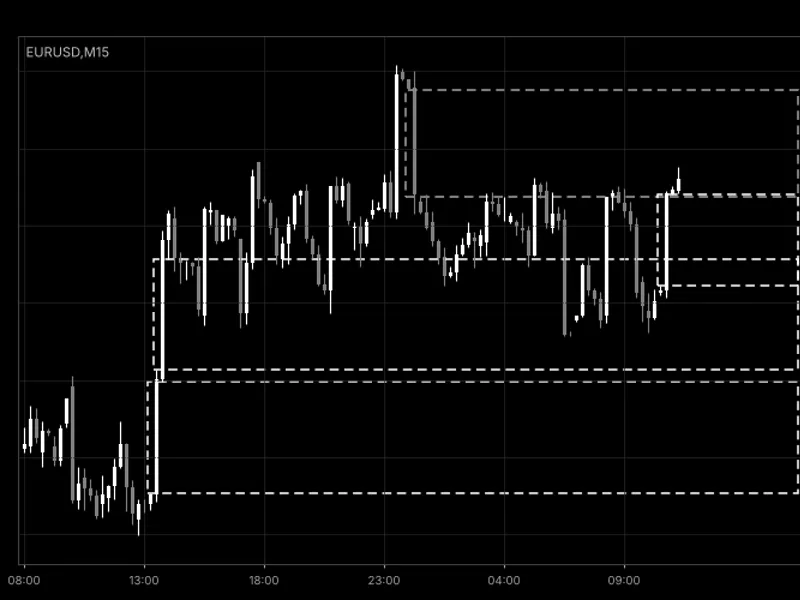
- Represents an unfilled bullish gap. The box originates from the first candle of the FVG pattern and extends to the right. Price action moving back into this zone from above is often observed as a potential support area.
Gray Box (Default)
- Represents an unfilled bearish gap. This zone is typically watched as a potential resistance area when price action returns from below.
Box Edges
- The upper and lower boundaries of the box represent the high and low prices of the identified gap. Hovering over a box displays its type and size in points.
Disappearing Boxes
- When the price action fills a gap, the box is removed. If the 'InpDeleteFilled' input is set to false, filled gaps remain visible as gray dotted boxes extending up to the fill bar.
Visual Cues
- Large boxes indicate strong, unidirectional price moves. A concentration of open boxes on one side suggests persistent market imbalance.
Gap Filling Rules
The fill rule is determined by the 'InpFillMode' input:
FVG_FILL_TOUCH
- The gap is considered filled upon the first instance of price entering its range.
FVG_FILL_HALF
- The gap is considered filled when price action reaches the midpoint of the gap.
FVG_FULL
- The gap is considered filled only when price action completely traverses the gap's range (default setting).
The fill check utilizes the High and Low prices (wicks) of the bars subsequent to the gap formation.
External Variables (Inputs)
Input Name
Default Value
Purpose
Detection
InpMinGapPoints
10
Minimum gap size in points; gaps smaller than this value are ignored (0 means any gap size is considered).
InpLookbackBars
500
Number of historical bars to scan upon indicator initialization (range: 10 to 5000).
InpMaxZones
30
Maximum number of FVG zones to display simultaneously; older zones are removed first (range: 1 to 200).
Fill Rule
InpFillMode
FVG_FILL_FULL
Defines when a gap is considered filled: FVG_FILL_TOUCH, FVG_FILL_HALF, or FVG_FILL_FULL.
InpDeleteFilled
true
Determines if filled zones are deleted (true) or remain visible as dotted boxes (false).
InpFilledColor
clrDimGray
Color used for displaying filled zones when 'InpDeleteFilled' is false.
Appearance
InpBullColor
clrWhite
Color for displaying bullish gaps.
InpBearColor
clrGray
Color for displaying bearish gaps.
InpZoneStyle
STYLE_DASH
Border style for the displayed zones.
InpZoneWidth
1
Thickness of the zone borders (range: 1 to 5).
InpFillZones
false
If true, fills the zones with their respective colors.
InpExtendBars
20
Number of bars to the right of the last bar that zones will extend (range: 0 to 200).
Alerts
InpAlertNew
false
If true, triggers an alert when a new gap forms on a closed bar.
Recommended Usage
This indicator is effective on any trading symbol and timeframe. FVGs tend to be more significant on liquid markets and timeframes ranging from M5 to H4. On very short timeframes, FVGs can be frequent; consider increasing 'InpMinGapPoints' in such cases.
Adjust the minimum gap size based on the specific symbol. For a 5-digit Forex symbol, 10 points is equivalent to 1 pip, which is quite small. Metals and indices typically require a substantially larger point value.
Gaps are identified exclusively on closed bars. Therefore, a gap does not appear or disappear while the third candle is still forming. A gap is confirmed and displayed only after its third candle has closed.
During the initial run, the indicator scans only the most recent 'InpLookbackBars' bars. Consequently, very old gaps are not displayed. Filled gaps are removed promptly, meaning that after a restart, the chart accurately reflects only the currently open gaps within the scanned history.
To maintain chart clarity, when the number of open gaps exceeds 'InpMaxZones', the oldest gaps are automatically removed.
Gaps occurring between bars due to weekends or session breaks are treated like any other gap and are displayed if the pattern criteria are met.
It is important to remember that a gap is a price-action concept, not a direct trading signal. It should be used in conjunction with trend analysis, structural insights, or higher-timeframe context.
All graphical objects created by the indicator are prefixed with 'Fvg_' and are automatically removed when the indicator is deleted from the chart. To avoid object name conflicts, do not attach two instances of this indicator to the same chart.
As this is a chart indicator and does not execute trades, it functions identically on both netting and hedging account types.
Example Visualization
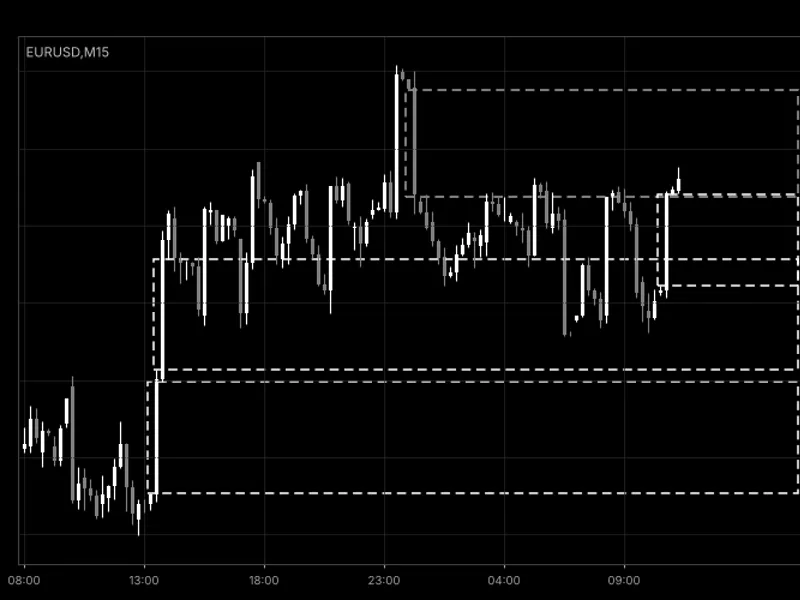
Figure 1 depicts the FvgDetector on an M15 chart using default settings, showing open bullish gaps in white and a bearish gap in gray.
You may also like: Fair Value Gap (FVG) Detector with Auto-Removal - excellent alternative for indicator users on MetaTrader 5.
Source Code
#property copyright "RobotFX"
#property link "https://robotfx.org"
#property version     "1.00"
#property description "This code is educational. Feel free to use, modify and upgrade as you wish. Visit ROBOTFX.ORG for professional trading tools"
#property indicator_chart_window
#property indicator_plots   0
enum ENUM_FVG_FILL
  {
   FVG_FILL_TOUCH,
   FVG_FILL_HALF,
.......
⚠ Limitations & Risk Warning
- This tool is provided for educational and testing purposes only.
- Past performance does not guarantee future results.
- Trading involves substantial risk of loss. Use on a demo account first.
- Results may vary depending on market conditions, broker, and settings.
- We recommend thorough backtesting and forward testing before using with real funds.