




Universal Pip Value and Dynamic Lot Size Calculator for MQL5
Info
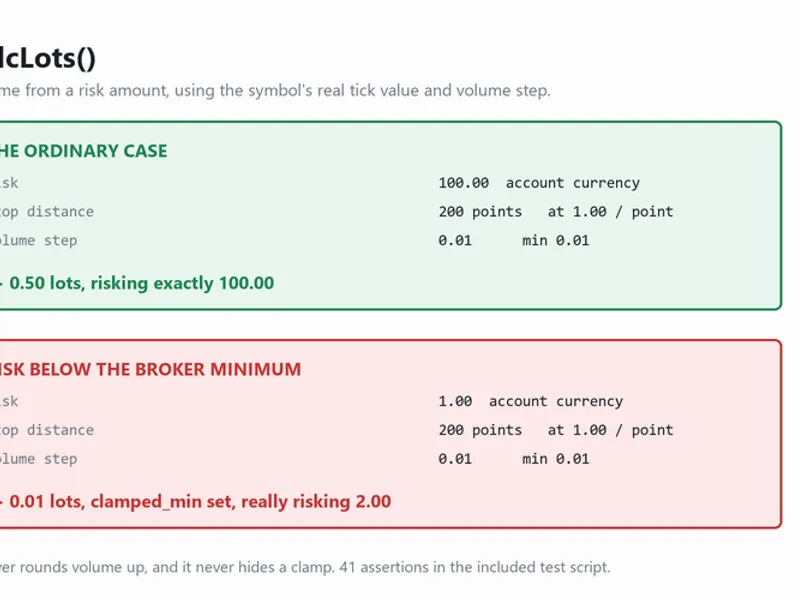
The Universal Pip Value and Dynamic Lot Size Calculator for MQL5 is a Expert Advisor for MetaTrader 5 that criskcalculator is an object-oriented mql5 header library for risk management and volume calculations in expert advisors and trading tools. It calculates pip values and lot sizes based on account risk and Stop Loss distance in pips.
Usage
This tool is typically used for automated trading on major forex pairs and gold.
Platform
This Expert Advisor works exclusively on MetaTrader 5 (both build 600+ and newer versions).
Setup
Place the downloaded file in MQL5/Experts folder via File ? Open Data Folder in MetaTrader 5.
How to Install and Use Universal Pip Value and Dynamic Lot Size Calculator for MQL5
1. Installation: Open the "File" menu, select "Open Data Folder," navigate to MQL/Experts, paste your file, and restart the terminal.
2. Activation: Drag the EA from the Navigator onto a chart, ensure "Allow live trading" is checked in the Common tab, and verify the AutoTrading button is green.
3. Optimization: Right-click your chart, choose "Expert List," click "Properties" to adjust inputs, and save your preferred setup as a set file for future use.
4. Maintenance: Regularly check the "Experts" tab in the terminal window to monitor trade logs and potential execution errors.
Frequently Asked Questions
Q: Why is my EA not opening trades? A: Check the "AutoTrading" button, ensure "Allow live trading" is enabled, and verify your broker allows automated trading on your account type.
Q: Can I run multiple EAs on one chart? A: No, each chart can only host one active EA; however, you can open multiple charts for different currency pairs to run several EAs.
Q: What does the "smiley face" icon mean? A: A smiley face in the top-right corner of the chart indicates the EA is successfully running; a frowny face means it is disabled.
What this tool does
CRiskCalculator is an object-oriented MQL5 header library for risk management and volume calculations in Expert Advisors and trading tools.
Typical Use Case
This Expert Advisor excels in automated trading and technical analysis on MetaTrader 5.
Compatible Platform & Setup
This Expert Advisor works on MetaTrader 5. Place the file in the MQL5/Experts folder and restart the terminal.
Description & Settings
Related: Accurate Position Sizing Using Broker Tick Values and Volume Steps - another powerful expert for MetaTrader 5 traders.
CRiskCalculator is an object-oriented MQL5 header library for risk management and volume calculations in Expert Advisors and trading tools.Also recommended: universal breakout study expert advisor for mt4/mt5 - similar expert with strong performance on MetaTrader 5.
It calculates pip values and lot sizes based on account risk and Stop Loss distance in pips.
This class handles position sizing for cross-currency pairs by using native MetaTrader 5 symbol properties and a fallback conversion system.
Key Features
Dual-Engine Calculation:
Uses native broker properties (SYMBOL_TRADE_TICK_VALUE and SYMBOL_TRADE_TICK_SIZE) primarily.
Falls back to manual base/quote currency extraction and conversion rate queries if native properties are unavailable.
Broker Parameter Normalization:
Clamps calculated volumes between SYMBOL_VOLUME_MIN and SYMBOL_VOLUME_MAX.
Aligns lot sizes to SYMBOL_VOLUME_STEP to prevent broker rejection errors.
Clean OOP Design:
Encapsulated within the CRiskCalculator class with no global scope clutter.
Easy to integrate into existing EA projects or custom indicators.
Self-Configuring:
Automatically detects the account base currency (ACCOUNT_CURRENCY) upon initialization.
Integration Example
To use this class, include CRiskCalculator.mqh in your MQL5/Include/ directory and instantiate the object:
#include
<CRiskCalculator.mqh>
// Helper function to render a high-contrast panel on the chart
void DrawChartPanel(const string &lines[])
{
int x = 20, y = 30;
int width = 280, lineHeight = 18;
int height = (ArraySize(lines) * lineHeight) + 20;
// 1. Create Background Box
string bgName = "RiskCalc_BG";
if(ObjectFind(0, bgName) < 0)
ObjectCreate(0, bgName, OBJ_RECTANGLE_LABEL, 0, 0, 0);
ObjectSetInteger(0, bgName, OBJPROP_CORNER, CORNER_LEFT_UPPER);
ObjectSetInteger(0, bgName, OBJPROP_XDISTANCE, x);
ObjectSetInteger(0, bgName, OBJPROP_YDISTANCE, y);
ObjectSetInteger(0, bgName, OBJPROP_XSIZE, width);
ObjectSetInteger(0, bgName, OBJPROP_YSIZE, height);
ObjectSetInteger(0, bgName, OBJPROP_BGCOLOR, clrDarkSlateGray);
ObjectSetInteger(0, bgName, OBJPROP_BORDER_COLOR, clrDodgerBlue);
ObjectSetInteger(0, bgName, OBJPROP_BORDER_TYPE, BORDER_FLAT);
ObjectSetInteger(0, bgName, OBJPROP_SELECTABLE, false);
// 2. Render Text Lines inside the panel
for(int i = 0; i < ArraySize(lines); i++)
{
string lblName = "RiskCalc_Lbl_" + IntegerToString(i);
if(ObjectFind(0, lblName) < 0)
ObjectCreate(0, lblName, OBJ_LABEL, 0, 0, 0);
ObjectSetInteger(0, lblName, OBJPROP_CORNER, CORNER_LEFT_UPPER);
ObjectSetInteger(0, lblName, OBJPROP_XDISTANCE, x + 12);
ObjectSetInteger(0, lblName, OBJPROP_YDISTANCE, y + 10 + (i * lineHeight));
ObjectSetString(0, lblName, OBJPROP_TEXT, lines[i]);
ObjectSetString(0, lblName, OBJPROP_FONT, "Segoe UI");
ObjectSetInteger(0, lblName, OBJPROP_FONTSIZE, 9);
ObjectSetInteger(0, lblName, OBJPROP_COLOR, (i == 0) ? clrYellow : clrWhite);
ObjectSetInteger(0, lblName, OBJPROP_SELECTABLE, false);
}
ChartRedraw(0);
}
void OnStart()
{
// Instantiate the risk calculator
CRiskCalculator riskCalc;
string symbol = _Symbol;
double riskAmount = 100.0; // Target risk in account currency
double slPips = 25.0; // Stop Loss distance in pips
// Calculate parameters
double lotSize = riskCalc.CalculateLotSize(symbol, riskAmount, slPips);
double pipValPerLot = riskCalc.GetPipValuePerLot(symbol);
// Prepare output lines
string info[6];
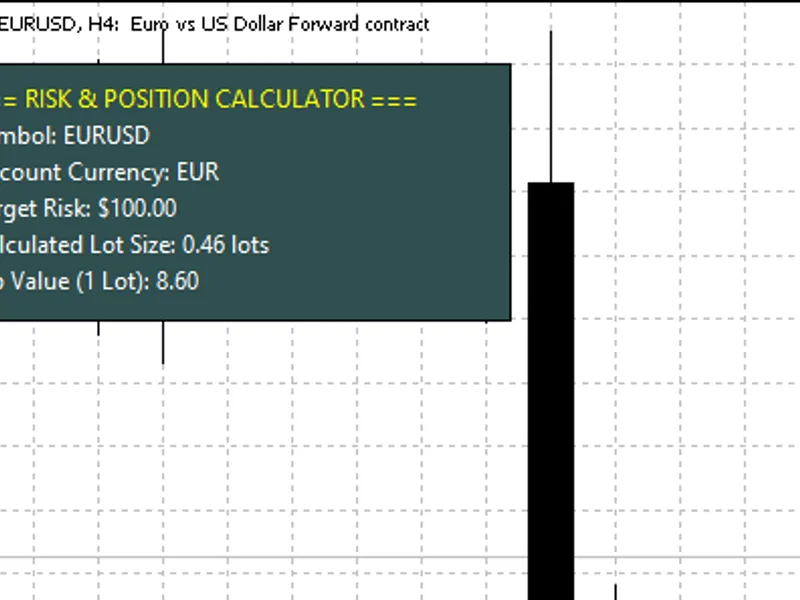
info[0] = "=== RISK & POSITION CALCULATOR ===";
info[1] = "Symbol: " + symbol;
info[2] = "Account Currency: " + AccountInfoString(ACCOUNT_CURRENCY);
info[3] = "Target Risk: $" + DoubleToString(riskAmount, 2);
info[4] = "Calculated Lot Size: " + DoubleToString(lotSize, 2) + " lots";
info[5] = "Pip Value (1 Lot): " + DoubleToString(pipValPerLot, 2);
// Display GUI panel on chart
DrawChartPanel(info);
}
Class Reference
Method
Return Type
Description
GetPipValuePerLot(string symbol)
double
Returns the monetary value of 1 pip for 1 standard lot in the account currency.
GetPipValue(string symbol, double volume)
double
Returns the total monetary value of 1 pip for a specified volume.
CalculateLotSize(string symbol, double riskAmount, double slPips)
double
Calculates and normalizes the lot size for a target cash risk and Stop Loss in pips.
Need Custom Development or EA Integration?
For custom Expert Advisors, indicators, or advanced risk management systems for MetaTrader 5, contact us via MQL5 Freelance.
👉 Romeo Luvisotto — MQL5 Developer Profile & Freelance Services (2026)
You may also like: ks fair value gap ea with regime detection and dual sl/tp modes - excellent alternative for expert users on MetaTrader 5.
Source Code
#include <CRiskCalculator.mqh>
void DrawChartPanel(const string &lines[])
  {
   int x = 20, y = 30;
   int width = 280, lineHeight = 18;
   int height = (ArraySize(lines) * lineHeight) + 20;
   string bgName = "RiskCalc_BG";
   if(ObjectFind(0, bgName) < 0)
      ObjectCreate(0, bgName, OBJ_RECTANGLE_LABEL, 0, 0, 0);
   ObjectSetInteger(0, bgName, OBJPROP_CORNER, CORNER_LEFT_UPPER);
.......
⚠ Limitations & Risk Warning
- This tool is provided for educational and testing purposes only.
- Past performance does not guarantee future results.
- Trading involves substantial risk of loss. Use on a demo account first.
- Results may vary depending on market conditions, broker, and settings.
- We recommend thorough backtesting and forward testing before using with real funds.