




Currency Strength Meter
Info
The Currency Strength Meter is a Indicator for MetaTrader 5 that currency strength meterthe idea behind ita single currency pair only indicates the performance of two currencies against each other, which can be misleading. For instance, EURUSD might appear stable simply because both EUR and USD are simultaneously weak or strong.
Usage
This tool is typically used for enhancing chart analysis and decision making.
Platform
This Indicator works exclusively on MetaTrader 5 (both build 600+ and newer versions).
Setup
Place the downloaded file in MQL5/Indicators folder via File ? Open Data Folder in MetaTrader 5.
How to Install and Use Currency Strength Meter
1. Installation: Place your file in the MQL/Indicators folder via "Open Data Folder" and restart your terminal.
2. Loading: Find the indicator in the Navigator, drag it onto your chart, and configure the input parameters in the popup window.
3. Customization: Press Ctrl+I to open the indicator list, select your tool, and click "Properties" to change colors, levels, or visual styles.
4. Updating: Replace the old file in the Indicators folder with the new version and restart the platform to apply changes.
Frequently Asked Questions
Q: Why is my indicator not showing? A: Verify the file is in the MQL/Indicators folder, or try right-clicking the "Indicators" tree in the Navigator and clicking "Refresh."
Q: Do custom indicators slow down the platform? A: Too many complex indicators can impact performance; remove unused ones via the "Indicator List" (Ctrl+I).
Q: Can I use MT4 indicators on MT5? A: No, MQL4 and MQL5 are distinct languages; ensure the indicator is compiled specifically for your platform version.
What this tool does
Currency Strength MeterThe idea behind itA single currency pair only indicates the performance of two currencies against each other, which can be misleading.
Typical Use Case
This Indicator excels in automated trading and technical analysis on MetaTrader 5.
Compatible Platform & Setup
This Indicator works on MetaTrader 5. Place the file in the MQL5/Indicators folder and restart the terminal.
Description & Settings
Related: ADX Auto Range: Automated Trend Strength and Consolidation Detection - another powerful indicator for MetaTrader 5 traders.
Currency Strength MeterAlso recommended: Fractal Dimension Trend Strength Index - similar indicator with strong performance on MetaTrader 5.
The idea behind it
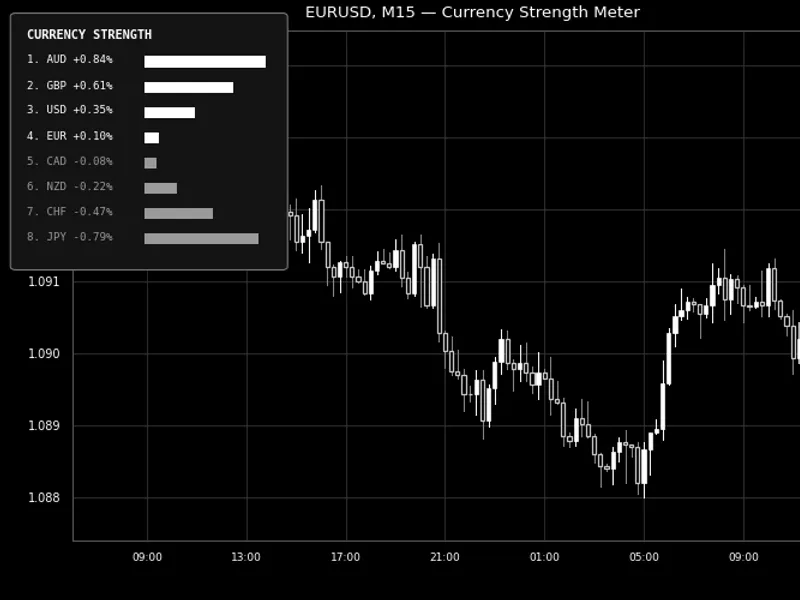
A single currency pair only indicates the performance of two currencies against each other, which can be misleading. For instance, EURUSD might appear stable simply because both EUR and USD are simultaneously weak or strong. This indicator addresses this by analyzing all currency pairs offered by the broker among the 8 major currencies (USD, EUR, GBP, JPY, CHF, AUD, CAD, NZD). It measures the percentage change for each pair over a defined lookback period and then calculates an average score for each currency based on its participation across all available pairs. The outcome is a true relative strength score for each currency, moving beyond a simple two-way comparison.
Since the base currency of a pair gains precisely what the quote currency loses, the calculation remains straightforward and consistent. Each pair contributes a positive change to its base currency's score and a negative change to its quote currency's score. The final score for each currency is the average of all its associated pair performances. Pairs not offered by the broker are automatically excluded from the calculation, allowing the ranking to adapt gracefully without failure.
How to interpret it
The ranked list
- All 8 currencies, sorted from strongest to weakest, updated with each panel refresh. The strongest currency is consistently displayed in the first row.
The percentage value
- Represents each currency's average percentage change across all its available pairs within the selected lookback window. A positive value indicates strengthening, while a negative value signifies weakening.
Bar length
- The bars are scaled proportionally to the currency with the largest absolute score during each refresh. This ensures that the strongest and weakest currencies are visually distinct, even when the numerical differences are minor.
Bar/text color
- Uses a specified color for positive (strengthening) scores and another color for negative (weakening) scores.
Refresh timing
- When the 'Update on New Bar Only' option is enabled (default setting), the panel recalculates once per new bar on the chart to which it is attached. Disabling this option will cause the panel to recalculate on every tick.
External variables (inputs)
Input
Default
Purpose
InpCalcTimeframe
H1
The timeframe used to measure the percentage change of each currency pair. This is independent of the chart's own timeframe.
InpLookbackBars
24
The number of past bars (on the InpCalcTimeframe) used to compare against the current price of each pair.
InpUpdateOnNewBarOnly
true
When set to true, recalculation occurs once per new chart bar. When false, recalculation occurs on every tick.
InpPanelCorner
Left Upper
The corner of the chart where the panel is anchored.
InpPanelXDistance / InpPanelYDistance
12 / 18
The offset of the panel from the selected corner, measured in pixels.
InpBarMaxWidth
100
The maximum pixel width of the bar for the currency that currently has the largest absolute score.
InpBarHeight
14
The height of each currency's display bar, in pixels.
InpFontSize
8
The font size used for the text displayed within the panel.
InpStrongColor / InpWeakColor
Lime / Red
The colors for bars and text corresponding to positive and negative strength scores, respectively.
InpPanelTextColor / InpPanelBgColor
White / Dark Gray
The colors for the panel's text and background.
Recommended use
This indicator can be attached to any chart of any symbol and timeframe. The strength ranking is independent of the chart it runs on, as it retrieves data directly from each currency pair using iClose(). It is recommended to attach only one instance per chart layout, as running it on multiple charts simultaneously will yield identical panel content.
The accuracy of the indicator depends on the number of the 28 possible currency crosses offered by the broker. While most retail brokers provide all 8-currency crosses, missing pairs will result in affected currencies' scores being averaged over fewer pairs. This is intentionally designed as a graceful degradation behavior. This indicator only reads price data and does not place, modify, or close any orders, making it safe for all account types.
All chart objects are created under a single internal name prefix and are completely removed using ObjectsDeleteAll() in OnDeinit() when the indicator is detached, ensuring no residual elements are left on the chart.
Fig. 1. The ranked currency strength panel displayed on EURUSD M15, showing currencies from strongest to weakest with proportional bars. Rendered in black and white as per the Code Base image guidelines (750x500 px).
You may also like: Support and Resistance Channels Ranked by Strength - excellent alternative for indicator users on MetaTrader 5.
Source Code
#property copyright "RobotFX"
#property link "https://robotfx.org"
#property version   "1.00"
#property description "This code is educational. Feel free to use, modify and upgrade as you wish. Visit ROBOTFX.ORG for professional trading tools"
#property indicator_chart_window
#property indicator_buffers 0
#property indicator_plots   0
#property strict
input group "=== Strength Calculation ==="
input ENUM_TIMEFRAMES InpCalcTimeframe    = PERIOD_H1;
.......
⚠ Limitations & Risk Warning
- This tool is provided for educational and testing purposes only.
- Past performance does not guarantee future results.
- Trading involves substantial risk of loss. Use on a demo account first.
- Results may vary depending on market conditions, broker, and settings.
- We recommend thorough backtesting and forward testing before using with real funds.