




Auto Zig Zag Fibonacci Golden Zone Indicator for MT5
Info
The Auto Zig Zag Fibonacci Golden Zone Indicator for MT5 is a Indicator for MetaTrader 5 that the auto zig zag fibonacci golden zone indicator is a sophisticated technical analysis tool for metatrader 5. This indicator automatically identifies high-probability pullback entry zones by applying Fibonacci retracement levels to the most recent market swings.
Usage
This tool is typically used for enhancing chart analysis and decision making.
Platform
This Indicator works exclusively on MetaTrader 5 (both build 600+ and newer versions).
Setup
Place the downloaded file in MQL5/Indicators folder via File ? Open Data Folder in MetaTrader 5.
How to Install and Use Auto Zig Zag Fibonacci Golden Zone Indicator for MT5
1. Installation: Place your file in the MQL/Indicators folder via "Open Data Folder" and restart your terminal.
2. Loading: Find the indicator in the Navigator, drag it onto your chart, and configure the input parameters in the popup window.
3. Customization: Press Ctrl+I to open the indicator list, select your tool, and click "Properties" to change colors, levels, or visual styles.
4. Updating: Replace the old file in the Indicators folder with the new version and restart the platform to apply changes.
Frequently Asked Questions
Q: Why is my indicator not showing? A: Verify the file is in the MQL/Indicators folder, or try right-clicking the "Indicators" tree in the Navigator and clicking "Refresh."
Q: Do custom indicators slow down the platform? A: Too many complex indicators can impact performance; remove unused ones via the "Indicator List" (Ctrl+I).
Q: Can I use MT4 indicators on MT5? A: No, MQL4 and MQL5 are distinct languages; ensure the indicator is compiled specifically for your platform version.
What this tool does
The Auto Zig Zag Fibonacci Golden Zone Indicator is a sophisticated technical analysis tool for MetaTrader 5.
Typical Use Case
This Indicator excels in automated trading and technical analysis on MetaTrader 5.
Compatible Platform & Setup
This Indicator works on MetaTrader 5. Place the file in the MQL5/Indicators folder and restart the terminal.
Description & Settings
Related: ADX Auto Range: Automated Trend Strength and Consolidation Detection - another powerful indicator for MetaTrader 5 traders.
The Auto Zig Zag Fibonacci Golden Zone Indicator is a sophisticated technical analysis tool for MetaTrader 5.Also recommended: Trend Buy/Sell Zones with Automated Lot Sizing and Risk Panel for MT5 - similar indicator with strong performance on MetaTrader 5.
This indicator automatically identifies high-probability pullback entry zones by applying Fibonacci retracement levels to the most recent market swings.
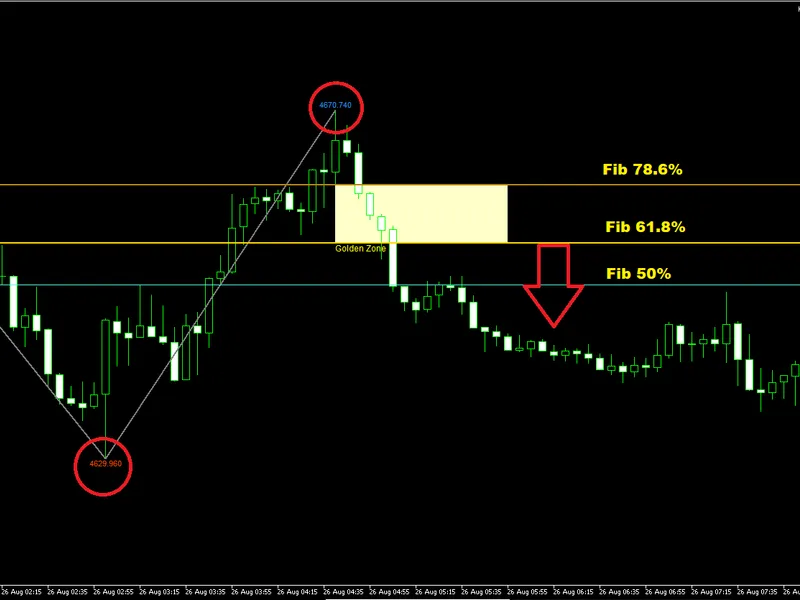
It employs an internal ZigZag algorithm to pinpoint the latest significant swing high and swing low. Based on these points, it calculates and draws key Fibonacci retracement levels: 50%, 61.8%, and 78.6%. The region between the 61.8% and 78.6% levels is designated as the Golden Zone, recognized by traders as an optimal area for pullback entries.
The indicator is designed to assist traders in identifying entries aligned with the larger trend direction. In an uptrend, the expectation is for price to pull back into the Golden Zone before resuming its upward movement. Conversely, in a downtrend, price is expected to retract into the Golden Zone before continuing its descent.
Key Features:
- Automated ZigZag Detection: The indicator scans historical chart data to identify the most recent swing high and swing low without manual intervention.
- Fibonacci Retracement Levels: Automatically draws horizontal lines for the 50%, 61.8%, and 78.6% Fibonacci levels. The 50% level is distinguished by a unique color, while the 61.8% and 78.6% levels are highlighted for clarity.
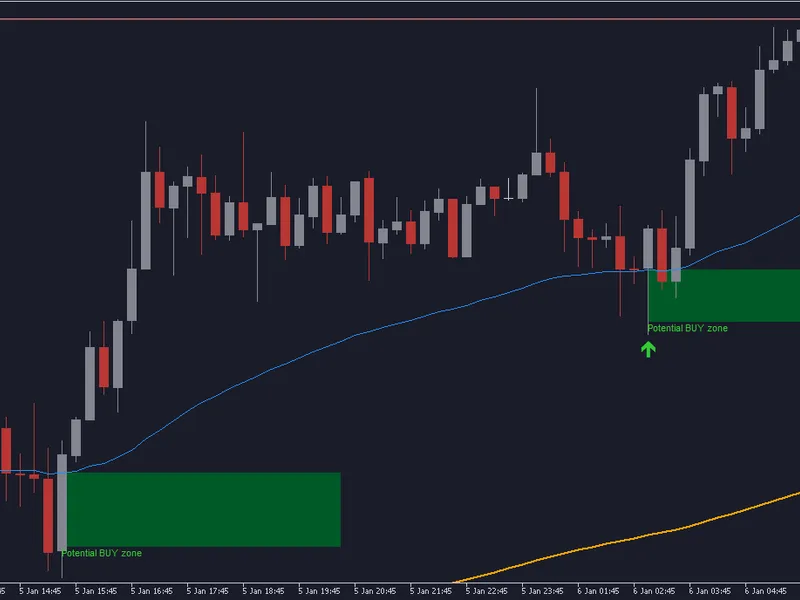
- Golden Zone Highlighting: A semi-transparent rectangle visually marks the area between the 61.8% and 78.6% levels, labeled as "Golden Zone" directly on the chart, facilitating quick identification of the prime entry zone.
- Dashboard Panel: A concise dashboard located in the top-left corner of the chart provides real-time data, including current price, the latest swing high and low values, exact Fibonacci levels, and operational instructions. This feature aids in rapid decision-making.
- Optional Buy and Sell Signals: When activated, the indicator can display "Buy Pullback" or "Sell Pullback" labels on the chart when the price closes within the Golden Zone, streamlining the entry search process.
- Price Labels on Swings: An optional setting to display the precise price values of the swing high and swing low, enabling easy verification of Fibonacci calculations.
- Customizable Appearance: All colors for ZigZag lines, Fibonacci levels, Golden Zone fill, and labels can be adjusted to suit individual chart preferences.
Usage Guide:
1. Apply the indicator to any chart and timeframe. It is compatible with all trading instruments, including forex, indices, commodities, and cryptocurrencies.
2. Allow the ZigZag to identify a new swing high and swing low. The Fibonacci levels and Golden Zone will be automatically generated.
3. Monitor price action as it pulls back towards the Golden Zone.
4. In uptrends, observe for bullish reversal signals upon price entering the Golden Zone.
5. In downtrends, look for bearish reversal indications when price enters the Golden Zone.
6. Position your stop loss outside the Golden Zone to allow trade development.
7. Set profit targets at the opposite swing point or according to your preferred risk-to-reward ratio.
Input Parameters Explained:
- Zig Zag Length: Controls the sensitivity of the ZigZag detection. Lower values identify more swings; higher values focus on larger swings. Default is 13.
- Show Swing Prices: If enabled, displays the exact price of swing highs and lows on the chart. Default is true.
- Golden Zone Length: Determines the horizontal extent of the Golden Zone rectangle from the current swing. Default is 15.
- Show Buy/Sell Signals: If enabled, prints "Buy Pullback" or "Sell Pullback" labels on the chart when price closes within the Golden Zone. Default is false.
- Zig Zag Top Label Color: Color for the price label at the swing high. Default is DodgerBlue.
- Zig Zag Trend Line Color: Color for the ZigZag lines connecting swings. Default is Gray.
- Zig Zag Bottom Label Color: Color for the price label at the swing low. Default is OrangeRed.
- Fib 50% Line Color: Color for the 50% Fibonacci level line. Default is custom cyan.
- Fib 61.8% Line Color: Color for the 61.8% Fibonacci level line. Default is Gold.
- Fib 78.6% Line Color: Color for the 78.6% Fibonacci level line. Default is Darkgoldenrod.
- Golden Zone Fill Color: Fill color for the Golden Zone rectangle. Default is light yellow.
- Golden Zone Text Color: Color for the "Golden Zone" label. Default is Yellow.
Technical Notes:
- Non-Repainting: The indicator does not repaint. All calculations are based on confirmed closed candles. Once a ZigZag swing or Fibonacci level is plotted, it remains fixed unless a new swing is identified.
- Fibonacci Ratios: Uses standard Fibonacci ratios: 50%, 61.8%, and 78.6%.
- Uptrend Measurement: In an uptrend, Fibonacci levels are calculated from the swing low to the swing high, with the Golden Zone between 61.8% and 78.6% measured from the bottom.
- Downtrend Measurement: In a downtrend, Fibonacci levels are calculated from the swing high to the swing low, with the Golden Zone between 61.8% and 78.6% measured from the top.
Recommended Usage:
- Optimal Timeframes: The indicator performs best on higher timeframes such as H1, H4, and Daily, where Fibonacci levels tend to hold more significance. It is, however, functional on any timeframe.
- Confirmation: For enhanced results, combine the Golden Zone indicator with complementary tools like trend lines, support/resistance levels, or candlestick patterns.
- Demo Trading: Always test the indicator thoroughly on a demo account before implementing it in live trading environments. All rights reserved 2026.
You may also like: RJO Daily Pivot Levels Indicator with Classic and Fibonacci Calculations for MT5 - excellent alternative for indicator users on MetaTrader 5.
Source Code
#property copyright "RobotFX"
#property version   "1.10"
#property strict
#property indicator_chart_window
#property indicator_buffers 0
#property indicator_plots   0
#property description "This code is educational. Feel free to use, modify and upgrade as you wish. Visit ROBOTFX.ORG for professional trading tools"
input group "=== ZigZag Settings ==="
input int    InpLength            = 13;
input bool   InpShowPrices        = true;
.......
⚠ Limitations & Risk Warning
- This tool is provided for educational and testing purposes only.
- Past performance does not guarantee future results.
- Trading involves substantial risk of loss. Use on a demo account first.
- Results may vary depending on market conditions, broker, and settings.
- We recommend thorough backtesting and forward testing before using with real funds.