

ATR Trailing Stop Line (Chandelier Exit)
Info
The ATR Trailing Stop Line (Chandelier Exit) is a Indicator for MetaTrader 5 that atr trailing stop line (chandelier exit) the idea behind it the chandelier exit, popularized by charles le beau and alexander elder, is a trailing stop that "hangs" from the highest point reached by price, like a chandelier from a ceiling. Instead of using a fixed number of points, the distance is a multiple of the Average True Range (ATR).
Usage
This tool is typically used for enhancing chart analysis and decision making.
Platform
This Indicator works exclusively on MetaTrader 5 (both build 600+ and newer versions).
Setup
Place the downloaded file in MQL5/Indicators folder via File ? Open Data Folder in MetaTrader 5.
How to Install and Use ATR Trailing Stop Line (Chandelier Exit)
1. Installation: Place your file in the MQL/Indicators folder via "Open Data Folder" and restart your terminal.
2. Loading: Find the indicator in the Navigator, drag it onto your chart, and configure the input parameters in the popup window.
3. Customization: Press Ctrl+I to open the indicator list, select your tool, and click "Properties" to change colors, levels, or visual styles.
4. Updating: Replace the old file in the Indicators folder with the new version and restart the platform to apply changes.
Frequently Asked Questions
Q: Why is my indicator not showing? A: Verify the file is in the MQL/Indicators folder, or try right-clicking the "Indicators" tree in the Navigator and clicking "Refresh."
Q: Do custom indicators slow down the platform? A: Too many complex indicators can impact performance; remove unused ones via the "Indicator List" (Ctrl+I).
Q: Can I use MT4 indicators on MT5? A: No, MQL4 and MQL5 are distinct languages; ensure the indicator is compiled specifically for your platform version.
What this tool does
ATR Trailing Stop Line (Chandelier Exit) The idea behind it The Chandelier Exit, popularized by Charles Le Beau and Alexander Elder, is a trailing stop that "hangs" from the highest point reached by price, like a chandelier from a ceiling.
Typical Use Case
This Indicator excels in automated trading and technical analysis on MetaTrader 5.
Compatible Platform & Setup
This Indicator works on MetaTrader 5. Place the file in the MQL5/Indicators folder and restart the terminal.
Description & Settings
Related: Risk Lot Panel — drag the stop line, read the lot size for your risk percentage - another powerful indicator for MetaTrader 5 traders.
Also recommended: ATR Stop Distance and Risk-Based Lot Size Calculator Panel - similar indicator with strong performance on MetaTrader 5.
ATR Trailing Stop Line (Chandelier Exit)
The idea behind it
The Chandelier Exit, popularized by Charles Le Beau and Alexander Elder, is a trailing stop that "hangs" from the highest point reached by price, like a chandelier from a ceiling. Instead of using a fixed number of points, the distance is a multiple of the Average True Range (ATR). In quiet markets the stop sits close to price; in volatile markets it moves further away, so normal noise does not stop you out too early.
The two stop levels are calculated as follows:
Long stop = Highest High (Lookback) - Multiplier * ATR Short stop = Lowest Low (Lookback) + Multiplier * ATR
Two rules turn these levels into a usable trailing stop line:
Ratchet
– while the trend continues, a stop may only move in the direction of the trade. The long stop never moves down and the short stop never moves up, even if ATR expands.
Flip
– the trend changes when the
close
breaks the opposite stop: a close above the short stop turns the trend up, a close below the long stop turns it down. Using closes instead of intrabar spikes makes false flips less frequent.
ATR is calculated inside the indicator with Wilder smoothing (the first value is the simple average of the first
InpATRPeriod
true ranges), so no indicator handle is needed.
How to interpret it
Long stop line
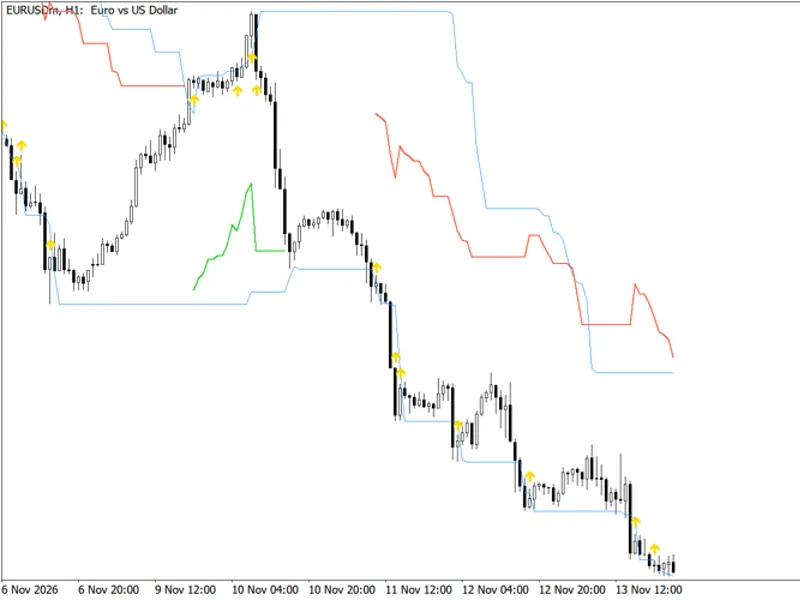
– drawn below price while the trend is up (default: thick white line). It rises step by step and never falls. A long position is protected by this level.
Short stop line
– drawn above price while the trend is down (default: thick gray line). It falls step by step and never rises. A short position is protected by this level.
Only one line at a time
– the line that is not active is hidden, so the chart always shows a single trailing stop. A gap between the two lines marks the flip.
Buy arrow
– an up arrow below the bar on which the close breaks above the short stop (trend flips from down to up).
Sell arrow
– a down arrow above the bar on which the close breaks below the long stop (trend flips from up to down).
Flat sections
– when price consolidates the line stays horizontal because of the ratchet. This is normal and means the stop is waiting.
Status label
– shows the trend (
LONG
or
SHORT
), the stop level and the distance between the current price and the stop in points. Trend and stop level are taken from the last
closed
bar, so they do not flicker; the level is the one to use for the next bar. The label is a chart object that is deleted when the indicator is removed.
The indicator draws only in the main chart window. For iCustom() the buffers are: 0 – long stop, 1 – short stop, 2 – buy arrow price, 3 – sell arrow price (EMPTY_VALUE where nothing is drawn).
External variables (inputs)
Input
Default
Purpose
InpLookback
22
Number of bars used to find the highest high and the lowest low.
InpATRPeriod
22
ATR period (Wilder smoothing).
InpMultiplier
3.0
ATR multiplier: the distance of the stop from the extreme. Must be greater than 0.
InpUseClose
false
If true, the highest and lowest
closes
are used for the extremes instead of highs and lows.
InpShowArrows
true
Show buy/sell arrows on trend flips.
InpLongColor
clrWhite
Color of the long stop line and of the buy arrow.
InpShortColor
clrDarkGray
Color of the short stop line and of the sell arrow.
InpShowStatus
true
Show or hide the on-chart status label.
InpCorner
CORNER_LEFT_UPPER
Chart corner in which the status label is placed.
InpStatusColor
clrWhite
Color of the status label text.
InpAlertPopup
false
Show a popup alert when the trend flips on a closed bar.
InpAlertPush
false
Send a push notification when the trend flips on a closed bar (requires MetaQuotes ID in the terminal settings).
Invalid parameters (periods below 1 or a multiplier not greater than 0) stop the initialization and a message is printed to the Experts tab.
Recommended use
Symbols and timeframes
– works on any symbol and timeframe. It suits trending instruments and H1–D1 charts best. On very low timeframes spread and noise make the ATR small relative to costs, so the stop may be too tight to be practical.
As a trailing stop
– after entering by your own method, move the stop to the line value of the last closed bar. The line never moves against the position.
As a trend filter
– trade only in the direction of the active line (long when the white line is shown, short when the gray line is shown).
Tuning
– a larger multiplier (for example 3.5–4) gives more room and fewer flips but larger losses on reversals; a smaller one (2–2.5) reacts faster but is more sensitive to noise. A shorter lookback follows price closely, a longer one anchors the stop to older extremes.
Caveats
– like every trend-following stop, it produces repeated flips (whipsaws) in sideways markets and gives back part of the profit before a reversal is confirmed. The values of closed bars do not change, but the forming bar changes with every tick, so a signal is confirmed only when the bar closes. The first bar of the history starts in an up-trend by definition, so ignore the very first flip after the warm-up period.
Alerts
– alerts are raised once, when a new bar opens, for the bar that has just closed. No alert is raised for the history that is loaded when the indicator is attached.
Account types
– the indicator only reads price data and does not trade, so it works the same on netting and hedging accounts. For real trading, add spread and slippage to the stop distance.
Performance
– the whole history is calculated once; afterwards only the forming and the new bars are recalculated ( prev_calculated ). The status label is created once and removed in OnDeinit() .
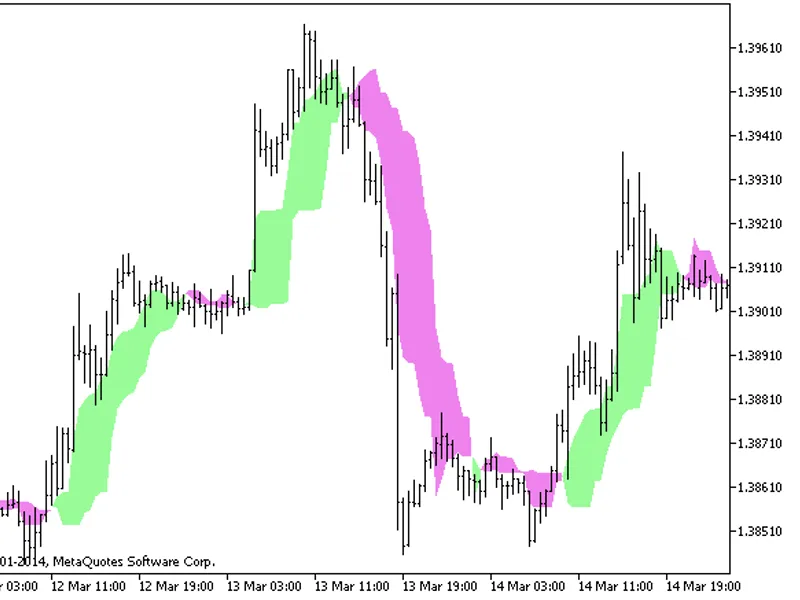
Fig. 1. ATR Trailing Stop Line (Chandelier Exit) with default inputs: long stop (white), short stop (gray), flip arrows and the status label; black & white image according to the Code Base image guidelines.
You may also like: Donchian Breakout Channel with ATR Trailing Stop - excellent alternative for indicator users on MetaTrader 5.
Source Code
#property copyright "RobotFX"
#property link "https://robotfx.org"
#property version     "1.00"
#property description "This code is educational. Feel free to use, modify and upgrade as you wish. Visit ROBOTFX.ORG for professional trading tools"
#property indicator_chart_window
#property indicator_buffers 8
#property indicator_plots   4
#property indicator_label1  "Long stop"
#property indicator_type1   DRAW_LINE
#property indicator_style1  STYLE_SOLID
.......
⚠ Limitations & Risk Warning
- This tool is provided for educational and testing purposes only.
- Past performance does not guarantee future results.
- Trading involves substantial risk of loss. Use on a demo account first.
- Results may vary depending on market conditions, broker, and settings.
- We recommend thorough backtesting and forward testing before using with real funds.