
Arixis Backtest Robustness Analyzer
Info
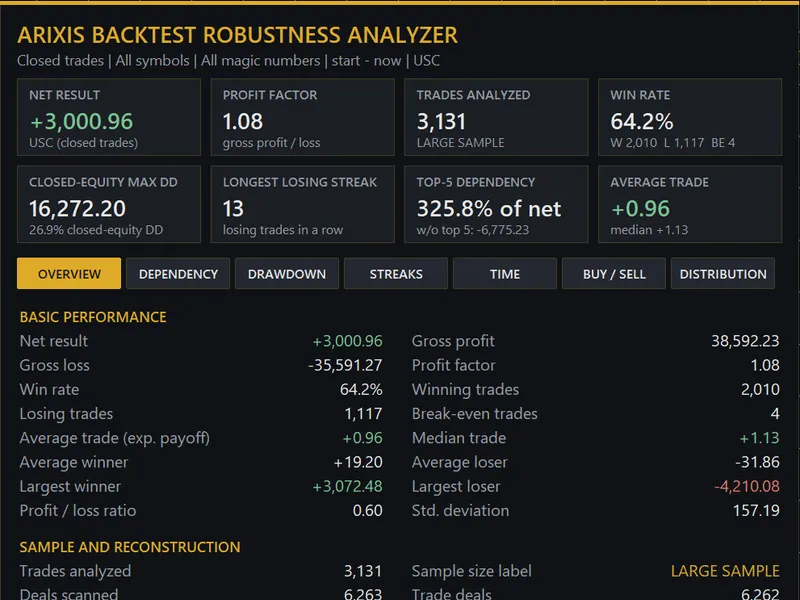
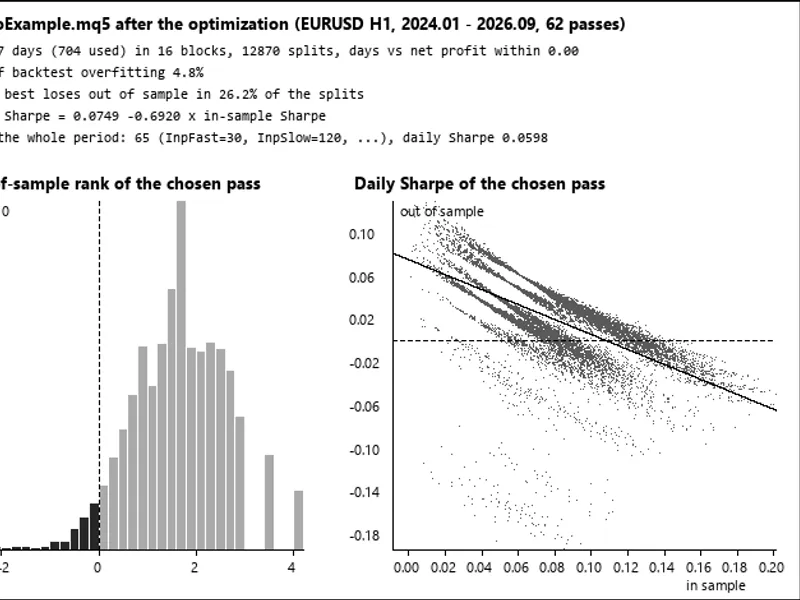
The Arixis Backtest Robustness Analyzer is a Indicator for MetaTrader 5 that arixis backtest robustness analyzerarixis backtest robustness analyzer is a free and open-source analytical utility for metatrader 5 designed to examine historical trading performance beyond headline statistics such as profit factor, net profit and win rate. The analyzer works with closed trading history and provides additional information about how historical results were produced.
Usage
This tool is typically used for enhancing chart analysis and decision making.
Platform
This Indicator works exclusively on MetaTrader 5 (both build 600+ and newer versions).
Setup
Place the downloaded file in MQL5/Indicators folder via File ? Open Data Folder in MetaTrader 5.
How to Install and Use Arixis Backtest Robustness Analyzer
1. Installation: Place your file in the MQL/Indicators folder via "Open Data Folder" and restart your terminal.
2. Loading: Find the indicator in the Navigator, drag it onto your chart, and configure the input parameters in the popup window.
3. Customization: Press Ctrl+I to open the indicator list, select your tool, and click "Properties" to change colors, levels, or visual styles.
4. Updating: Replace the old file in the Indicators folder with the new version and restart the platform to apply changes.
Frequently Asked Questions
Q: Why is my indicator not showing? A: Verify the file is in the MQL/Indicators folder, or try right-clicking the "Indicators" tree in the Navigator and clicking "Refresh."
Q: Do custom indicators slow down the platform? A: Too many complex indicators can impact performance; remove unused ones via the "Indicator List" (Ctrl+I).
Q: Can I use MT4 indicators on MT5? A: No, MQL4 and MQL5 are distinct languages; ensure the indicator is compiled specifically for your platform version.
What this tool does
Arixis Backtest Robustness AnalyzerArixis Backtest Robustness Analyzer is a free and open-source analytical utility for MetaTrader 5 designed to examine historical trading performance beyond headline statistics such as Profit Factor, net profit and win rate.
Typical Use Case
This Indicator excels in automated trading and technical analysis on MetaTrader 5.
Compatible Platform & Setup
This Indicator works on MetaTrader 5. Place the file in the MQL5/Indicators folder and restart the terminal.
Description & Settings
Related: Arixis Market Regime Map: Trend, Range, and Volatility Classifier - another powerful indicator for MetaTrader 5 traders.
Arixis Backtest Robustness AnalyzerAlso recommended: precision sniper: multi-confluent signal indicator with backtest dashboard - similar indicator with strong performance on MetaTrader 5.
Arixis Backtest Robustness Analyzer is a free and open-source analytical utility for MetaTrader 5 designed to examine historical trading performance beyond headline statistics such as Profit Factor, net profit and win rate.
The analyzer works with closed trading history and provides additional information about how historical results were produced.
Main Features
- Net result, gross profit and gross loss
- Profit Factor and win rate
- Average and median trade
- Best/worst trade analysis
- Top 1, 3, 5 and 10 trade dependency
- Historical sensitivity after removing extreme trades
- Winning and losing streak analysis
- Reconstructed closed-equity drawdown
- Underwater periods and recovery information
- Performance by year, month, weekday and hour
- Separate BUY and SELL statistics
- Trade-result percentiles and standard deviation
- Sample-size information
- Optional CSV export
Profit Dependency
The Dependency section recalculates the historical result after removing the strongest observations. This can help reveal whether historical performance was broadly distributed or concentrated in a small number of trades.
If total net profit is zero or negative, dependency percentages are displayed as N/A because expressing the strongest trades as a percentage of net profit could be misleading. The analyzer still displays the resulting net value after those trades are removed.
Historical Sensitivity
The analyzer also performs the inverse experiment by removing the worst historical trades and periods.
This does not modify the original trading history and should not be interpreted as an improved backtest. It is simply a sensitivity analysis showing how extreme observations influenced the historical result.
Drawdown
The utility reconstructs a closed-equity curve from completed historical trades and analyzes drawdown depth, underwater periods and recovery.
Closed-equity drawdown is not the same as intratrade floating-equity drawdown. Floating losses that occurred while positions were still open cannot necessarily be reconstructed from completed trading history alone.
Time Analysis
Historical performance can be examined by year, month, weekday and hour. The number of observations is displayed together with the statistics so that small samples remain visible.
BUY / SELL Analysis
BUY and SELL operations are displayed separately without automatically ranking either direction.
Distribution
The analyzer displays the mean, median, standard deviation and several percentiles of historical trade results.
Filters
The utility supports date-range, symbol and Magic Number filtering.
Read-only Operation
Arixis Backtest Robustness Analyzer is completely read-only. It does not open, close or modify trades and does not interfere with other Expert Advisors.
Important
All measurements describe historical observations only. They do not predict future profitability and should not be interpreted as future risk limits.
The complete MQL5 source code is provided for educational and research purposes. Updated for 2026.
You may also like: manual backtest bar replay simulator - excellent alternative for indicator users on MetaTrader 5.
Source Code
#property copyright "RobotFX"
#property link "https://robotfx.org"
#property version     "1.00"
#property description "This code is educational. Feel free to use, modify and upgrade as you wish. Visit ROBOTFX.ORG for professional trading tools"
#ifndef ABRA_SELFTEST_BUILD
#property indicator_chart_window
#property indicator_buffers 0
#property indicator_plots   0
#endif
enum ENUM_ABRA_BUCKET_TIME
.......
⚠ Limitations & Risk Warning
- This tool is provided for educational and testing purposes only.
- Past performance does not guarantee future results.
- Trading involves substantial risk of loss. Use on a demo account first.
- Results may vary depending on market conditions, broker, and settings.
- We recommend thorough backtesting and forward testing before using with real funds.