Download ALL MT5 indicators (5742)

Similar MetaTrader Tools










precision sniper: multi-confluent signal indicator with backtest dashboard
Info
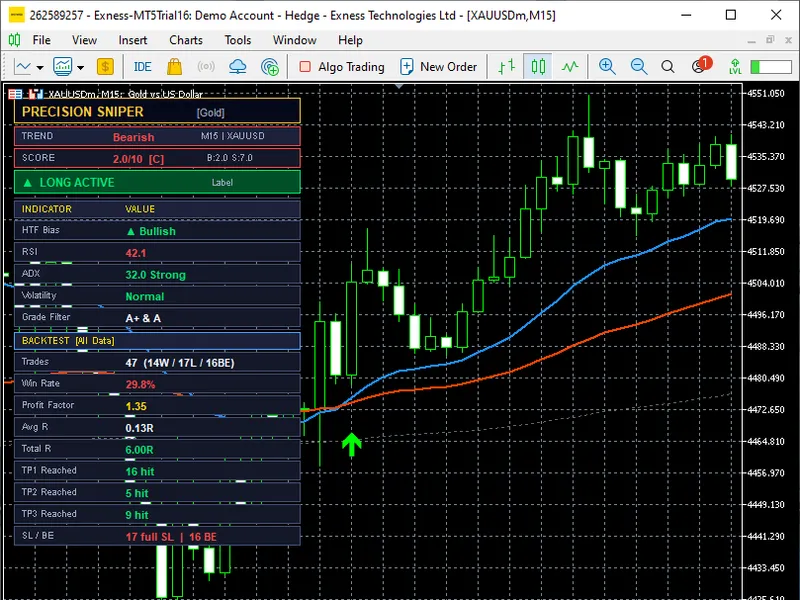
The precision sniper: multi-confluent signal indicator with backtest dashboard is a Indicator for MetaTrader 5 that precisionsniper is a sophisticated metatrader 5 indicator designed to identify high-probability long and short trade opportunities by integrating multiple technical confluences into a weighted scoring system. instead of relying on individual indicators, precisionsniper assesses up to eight independent conditions per bar, assigns scores, and triggers signals when the combined score meets or surpasses a customizable threshold.
Usage
This tool is typically used for enhancing chart analysis and decision making.
Platform
This Indicator works exclusively on MetaTrader 5 (both build 600+ and newer versions).
Setup
Place the downloaded file in MQL5/Indicators folder via File ? Open Data Folder in MetaTrader 5.
How to Install and Use precision sniper: multi-confluent signal indicator with backtest dashboard
1. Installation: Place your file in the MQL/Indicators folder via "Open Data Folder" and restart your terminal.
2. Loading: Find the indicator in the Navigator, drag it onto your chart, and configure the input parameters in the popup window.
3. Customization: Press Ctrl+I to open the indicator list, select your tool, and click "Properties" to change colors, levels, or visual styles.
4. Updating: Replace the old file in the Indicators folder with the new version and restart the platform to apply changes.
Frequently Asked Questions
Q: Why is my indicator not showing? A: Verify the file is in the MQL/Indicators folder, or try right-clicking the "Indicators" tree in the Navigator and clicking "Refresh."
Q: Do custom indicators slow down the platform? A: Too many complex indicators can impact performance; remove unused ones via the "Indicator List" (Ctrl+I).
Q: Can I use MT4 indicators on MT5? A: No, MQL4 and MQL5 are distinct languages; ensure the indicator is compiled specifically for your platform version.
What this tool does
precisionsniper is a sophisticated metatrader 5 indicator designed to identify high-probability long and short trade opportunities by integrating multiple technical confluences into a weighted scoring system.
Typical Use Case
This Indicator excels in automated trading and technical analysis on MetaTrader 5.
Compatible Platform & Setup
This Indicator works on MetaTrader 5. Place the file in the MQL5/Indicators folder and restart the terminal.
Description & Settings
Related: precision trend - another powerful indicator for MetaTrader 5 traders.
precisionsniper is a sophisticated metatrader 5 indicator designed to identify high-probability long and short trade opportunities by integrating multiple technical confluences into a weighted scoring system.Also recommended: precision trend (histo) - similar indicator with strong performance on MetaTrader 5.
instead of relying on individual indicators, precisionsniper assesses up to eight independent conditions per bar, assigns scores, and triggers signals when the combined score meets or surpasses a customizable threshold. this approach significantly reduces noise, emphasizing setups with strong, multi-factor confirmation.
the indicator's core utilizes three exponential moving averages (ema fast, ema slow, ema trend) for trend analysis, complemented by rsi momentum, macd histogram direction, adx trend strength, vwap position, tick volume surge, and an optional higher-timeframe (htf) bias filter. the htf bias filter carries the highest weight, making it ideal for traders seeking alignment with the larger-frame trend.
signals are categorized as a+, a, b, or c based on the total score, and the grade filter input allows users to display preferred grades only.
precisionsniper offers a range of built-in features beyond signal generation: automatic plotting of entry, stop loss, and three take profit levels, an adaptive trailing stop, a structure-aware stop loss, and an on-chart dashboard. the dashboard displays real-time market context and a backtest performance summary calculated from historical price data. it supports all-loaded history, fixed date range, and rolling window backtesting.
the indicator provides nine trading presets (auto, scalping, aggressive, default, conservative, swing, crypto, gold, custom) to adjust ema periods, rsi length, atr length, minimum score, and sl multiplier for various instruments and timeframes. the auto mode automatically selects the appropriate preset based on the chart's timeframe.
indicator inputs:
- the table below details each input parameter, its default value, and its function.
scoring system:
- each bar is assessed against eight conditions, with the table listing each condition's maximum points and direction.
signal grade thresholds:
- 8.0 or above: a+
- 6.5 to 7.9: a
- 5.0 to 6.4: b
- below 5.0: c
the grade filter and hidecgrade inputs control the displayed grades on the chart.
built-in preset configurations:
- the table presents the parameter values for each preset, with the custom preset using c_ prefixed inputs.
the auto preset automatically selects presets based on the chart's timeframe:
- 5 minutes or less: scalping
- 6 minutes to 1 hour: default
- 1 hour to 4 hours: aggressive
- above 4 hours: swing
dashboard and backtest statistics:
the on-chart dashboard (controlled by the show dashboard input) consists of two sections. the upper section displays live market context, including trend direction (bullish, bearish, neutral), signal score and grade, active signal status (long active, short active, waiting), htf bias, rsi with labels, adx with strength label, volatility regime (high, normal, low), and grade filter setting.
the lower section presents backtest statistics derived from historical signals on the loaded chart, including total trade count, wins, losses, breakeven outcomes, win rate percentage, profit factor, average r per trade, total accumulated r, and tp/sl breakdown.
important:
the dashboard's backtest statistics are calculated from historical bars and do not account for real-world trading conditions. always test performance on a demo account before live trading.
usage:
attach precisionsniper to metatrader 5 charts and select a preset based on the instrument and timeframe. for forex pairs on h1 or h4, start with the default preset. for lower timeframes like m5 or m15, consider scalping or aggressive. for xauusd on the daily chart, use the gold preset.
enhance signal quality by setting the htf timeframe input to higher timeframes. for h1 charts, set htf to h4 or d1. this ensures a-grade or better signals when the larger-frame trend aligns. adjust the grade filter for higher-confidence setups.
when signals appear, entry, stop loss, and tp levels are drawn. the adaptive trailing stop adjusts as tp levels are reached. use the backtest dashboard to review signal statistics and fine-tune min score or grade filter for optimal signal frequency.
You may also like: em a deviation - excellent alternative for indicator users on MetaTrader 5.
Source Code
#property copyright "robotfx"
#property version   "1.0"
#property indicator_chart_window
#property indicator_buffers 5
#property indicator_plots   5
#property indicator_label1  "ema fast"
#property indicator_type1   draw_line
#property indicator_color1  clrdodgerblue
#property indicator_width1  2
#property indicator_label2  "ema slow"
.......
⚠ Limitations & Risk Warning
- This tool is provided for educational and testing purposes only.
- Past performance does not guarantee future results.
- Trading involves substantial risk of loss. Use on a demo account first.
- Results may vary depending on market conditions, broker, and settings.
- We recommend thorough backtesting and forward testing before using with real funds.