








Quantifying Backtest Overfitting with Probability of Backtest Overfitting (PBO)
Info
The Quantifying Backtest Overfitting with Probability of Backtest Overfitting (PBO) is a Expert Advisor for MetaTrader 5 that backtestoverfitting. mqh calculates the Probability of Backtest Overfitting (PBO) for trading strategy optimizations.
Usage
This tool is typically used for automated trading on major forex pairs and gold.
Platform
This Expert Advisor works exclusively on MetaTrader 5 (both build 600+ and newer versions).
Setup
Place the downloaded file in MQL5/Experts folder via File ? Open Data Folder in MetaTrader 5.
How to Install and Use Quantifying Backtest Overfitting with Probability of Backtest Overfitting (PBO)
1. Installation: Open the "File" menu, select "Open Data Folder," navigate to MQL/Experts, paste your file, and restart the terminal.
2. Activation: Drag the EA from the Navigator onto a chart, ensure "Allow live trading" is checked in the Common tab, and verify the AutoTrading button is green.
3. Optimization: Right-click your chart, choose "Expert List," click "Properties" to adjust inputs, and save your preferred setup as a set file for future use.
4. Maintenance: Regularly check the "Experts" tab in the terminal window to monitor trade logs and potential execution errors.
Frequently Asked Questions
Q: Why is my EA not opening trades? A: Check the "AutoTrading" button, ensure "Allow live trading" is enabled, and verify your broker allows automated trading on your account type.
Q: Can I run multiple EAs on one chart? A: No, each chart can only host one active EA; however, you can open multiple charts for different currency pairs to run several EAs.
Q: What does the "smiley face" icon mean? A: A smiley face in the top-right corner of the chart indicates the EA is successfully running; a frowny face means it is disabled.
What this tool does
BacktestOverfitting.
Typical Use Case
This Expert Advisor excels in automated trading and technical analysis on MetaTrader 5.
Compatible Platform & Setup
This Expert Advisor works on MetaTrader 5. Place the file in the MQL5/Experts folder and restart the terminal.
Description & Settings
Related: Stochastic Daily Breakout for Gold: Backtested Performance to 2026 - another powerful expert for MetaTrader 5 traders.
BacktestOverfitting.mqh calculates the Probability of Backtest Overfitting (PBO) for trading strategy optimizations. The PBO measures how frequently the top-performing trading pass from one historical period ends up in the lower half of all performing passes when tested on another historical period. A high PBO indicates that the best-performing pass was likely selected due to luck rather than robust performance.Also recommended: Gold Breakout EA for XAUUSD H4: +90% Backtest Performance (2020-2026) - similar expert with strong performance on MetaTrader 5.
This method is based on the combinatorially symmetric cross-validation technique developed by Bailey, Borwein, Lopez de Prado, and Zhu (2026).
The library facilitates the collection of necessary data from a standard MT5 optimization process. Each optimization pass submits its daily trading results via the OnTester() function. Upon completion of all passes, the OnTesterDeinit() function consolidates this data into a matrix.
Usage
#include <BacktestOverfitting\BacktestOverfitting.mqh>
double OnTester()
{
double days[];
CPboFrames::DailyResults(days); // Collects daily closed results, Monday through Friday.
CPboFrames::Send(days, TesterStatistics(STAT_PROFIT));
return(TesterStatistics(STAT_PROFIT));
}
void OnTesterInit() {}
void OnTesterDeinit()
{
matrix results; // Matrix structure: one row per day, one column per pass.
ulong passes[];
double values[];
CPboFrames::Collect(results, passes, values);
SPboResult r;
if(CPbo::Run(results, 16, r)) // Using 16 blocks results in 12,870 splits.
PrintFormat("PBO %.1f%%", 100.0 * r.pbo);
}
How it Works
The historical data is divided into a specified number of blocks (S). Any blocks that do not form a complete block are excluded. A 'split' is generated by designating half of the blocks as the in-sample period and the other half as the out-of-sample period. For S=16, there are C(16, 8) = 12,870 possible splits.
Within each split, the trading pass that achieved the highest in-sample Sharpe ratio (calculated as the mean divided by the standard deviation of daily results, or simply the mean if PBO_MEAN is used) is identified. This selected pass is then ranked against all other passes in the out-of-sample period. The result is 'w', which is the rank divided by (N + 1), where N is the total number of passes. The logit of 'w' is calculated as ln(w / (1 - w)). The PBO represents the proportion of splits where this logit is at or below 0, meaning the selected pass ranked at or below the median in the out-of-sample period.
The SPboResult structure also provides the proportion of splits where the selected pass performed worse in the out-of-sample period compared to the in-sample period. Additionally, it offers a scatter plot of the out-of-sample Sharpe ratio against the in-sample Sharpe ratio for each split. A negative slope indicates that a better in-sample Sharpe ratio corresponds to a worse out-of-sample Sharpe ratio.
The sums for each block are pre-computed once, and the splits aggregate these sums. This optimization allows for the processing of 12,870 splits across 120 passes in approximately 40 milliseconds.
The DailyResults() function extracts trading deals from the initial deposit date to the final day of the test, accounting for trades from Monday to Friday. Any trades occurring on a Saturday or Sunday are attributed to the preceding Friday, ensuring consistency in the daily data across all passes. When the 'percent' parameter is set to true, the results are reported as a percentage of the account balance prior to the first trade of that day.
Optimization passes that are read from the cache do not execute OnTester() and therefore do not send any data. To measure such optimizations, delete the cache file located in the Tester\cache directory before running the optimization.
Example
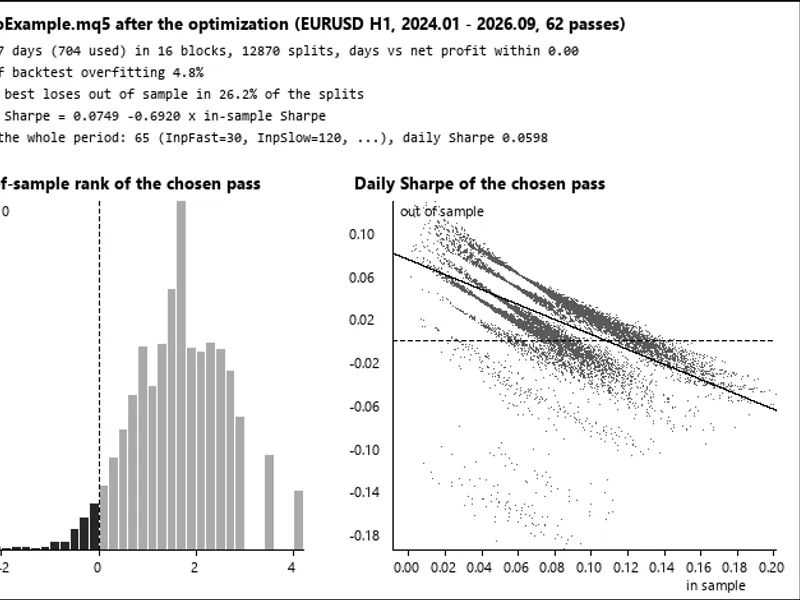
The PboExample.mq5 script demonstrates the application of this library with a moving average crossover strategy. By optimizing the two period parameters using the "Slow complete algorithm", the Expert log at the end of the optimization will display the PBO, the percentage of splits where the best pass lost money, the slope of the out-of-sample versus in-sample Sharpe ratios, the overall best-performing pass, and the saved daily split data in the Common\Files\PBO directory (refer to picture 1 for visualization).
For instance, testing on EURUSD H1 from January 2026 to September 2026 (encompassing 62 valid passes) yielded a PBO of 4.8%. This suggests that the chosen slow moving average periods were generally favored in most splits and maintained a position in the upper half of performance in the out-of-sample tests. The leading pass still resulted in losses in 26% of the splits, and a slope of -0.69 indicated an inverse relationship between in-sample and out-of-sample Sharpe ratios.
It is important to note that a low PBO value signifies that the relative ranking of passes is consistent across different historical periods, but it does not guarantee profitability for the top-ranked pass.
Verification
The results from this library have been verified against an independent Python implementation utilizing itertools, numpy, and scipy. On a dataset comprising 1,003 days and 120 columns (including duplicate and trade-less columns), with S set to 16, 10, 8 (PBO_MEAN), and 4, the selected trading pass remained consistent across all splits. The calculated logits showed agreement within 5e-13, and the PBO, loss share, and Sharpe ratio slope values were identical. Furthermore, the daily data saved by PboExample after optimization produced the same 12,870 logits in Python, with the sum of daily results for each pass correctly accumulating to its net profit.
You may also like: Obtain M1 OHLC Data for MetaTrader 4 Backtesting - excellent alternative for expert users on MetaTrader 5.
Source Code
#property copyright "RobotFX"
#property version   "1.00"
#include <BacktestOverfitting\BacktestOverfitting.mqh>
#include <Trade\Trade.mqh>
input int    InpFast    = 10;
input int    InpSlow    = 50;
input double InpLots    = 0.1;
input double InpSL      = 2.0;
input double InpTP      = 3.0;
input int    InpBlocks  = 16;
.......
⚠ Limitations & Risk Warning
- This tool is provided for educational and testing purposes only.
- Past performance does not guarantee future results.
- Trading involves substantial risk of loss. Use on a demo account first.
- Results may vary depending on market conditions, broker, and settings.
- We recommend thorough backtesting and forward testing before using with real funds.