
play do o m
Info
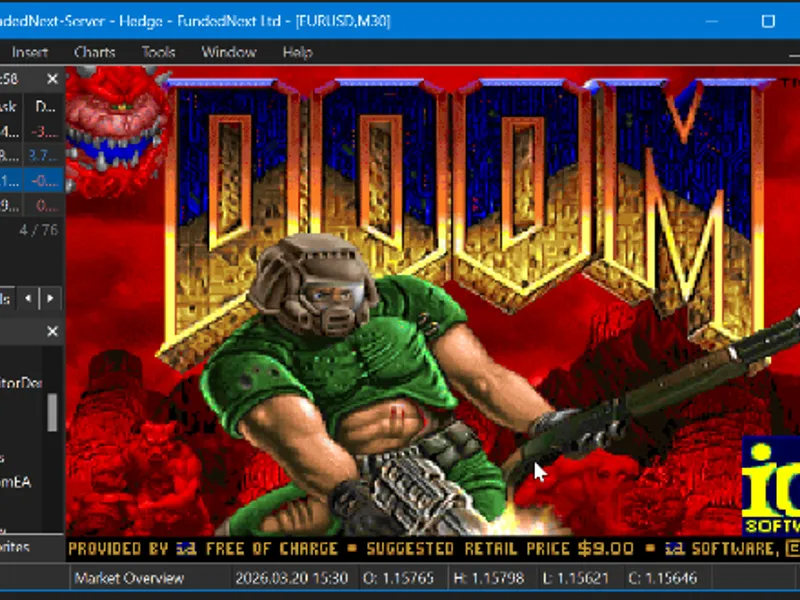
The play do o m is a Expert Advisor for MetaTrader 5 that this expert advisor integrates the classic doom (1993) game into metatrader 5's chart window, offering a unique gaming experience within the trading platform. important — read before use:the doomea.
Usage
This tool is typically used for automated trading on major forex pairs and gold.
Platform
This Expert Advisor works exclusively on MetaTrader 5 (both build 600+ and newer versions).
Setup
Place the downloaded file in MQL5/Experts folder via File ? Open Data Folder in MetaTrader 5.
How to Install and Use play do o m
1. Installation: Open the "File" menu, select "Open Data Folder," navigate to MQL/Experts, paste your file, and restart the terminal.
2. Activation: Drag the EA from the Navigator onto a chart, ensure "Allow live trading" is checked in the Common tab, and verify the AutoTrading button is green.
3. Optimization: Right-click your chart, choose "Expert List," click "Properties" to adjust inputs, and save your preferred setup as a set file for future use.
4. Maintenance: Regularly check the "Experts" tab in the terminal window to monitor trade logs and potential execution errors.
Frequently Asked Questions
Q: Why is my EA not opening trades? A: Check the "AutoTrading" button, ensure "Allow live trading" is enabled, and verify your broker allows automated trading on your account type.
Q: Can I run multiple EAs on one chart? A: No, each chart can only host one active EA; however, you can open multiple charts for different currency pairs to run several EAs.
Q: What does the "smiley face" icon mean? A: A smiley face in the top-right corner of the chart indicates the EA is successfully running; a frowny face means it is disabled.
What this tool does
this expert advisor integrates the classic doom (1993) game into metatrader 5's chart window, offering a unique gaming experience within the trading platform.
Typical Use Case
This Expert Advisor excels in automated trading and technical analysis on MetaTrader 5.
Compatible Platform & Setup
This Expert Advisor works on MetaTrader 5. Place the file in the MQL5/Experts folder and restart the terminal.
Description & Settings
Related: the playground series to - a combination of trading concepts - another powerful expert for MetaTrader 5 traders.
this expert advisor integrates the classic doom (1993) game into metatrader 5's chart window, offering a unique gaming experience within the trading platform.Also recommended: display open positions total stoploss and takeprofit value mt5 - similar expert with strong performance on MetaTrader 5.
important — read before use:
the doomea.mq5 file is just the starting point. to run the game, you must download the mql5.zip file provided with this publication. this zip file contains essential components: the precompiled dll (doomlib.dll), the doom shareware wad file (doom1.wad), source code, and build instructions.
how it works:
the project consists of two main parts. the first is a windows dll that encapsulates the doom engine, which is a single-header, zero-dependency, pure c source port of the original doom designed for cross-platform compatibility. this dll manages the game loop on a background thread, maintains a double-buffered framebuffer, and provides functions for initialization, framebuffer access, and key input. the second part is the mql5 expert advisor, which communicates with the dll every ~33ms, retrieves the doom framebuffer (320x200 argb pixels), and displays it on the chart using a bitmap resource. it also captures keyboard events from the chart and forwards them to the engine.
to address the absence of chartevent_keyup events in mql5, the solution employs a common technique in the mql5 community: polling getasynckeystate from user32.dll on each timer tick to detect key releases. this approach ensures a smooth gameplay experience at ~30 fps, closely matching doom's original 35hz tick rate.
setup instructions:
follow these steps to set up doom on your chart:
- download mql5.zip from the attached files.
- extract the zip file. you will find the following contents:
- libraries\doomlib.dll
- experts\
- doom\doom1.wad
- "for devs" source code folder (for developers only)
- copy doomlib.dll to the mql5\libraries\ folder in your terminal.
- create a folder named doom inside mql5\experts\ and copy doom1.wad into it.
- compile doomea.mq5 in metaeditor.
- attach the ea to any chart and enable "allow dll imports" in the ea settings dialog.
the doom title screen should now be visible on the chart. press enter to begin a new game.
dll imports required:
this ea relies on dll imports, and the dll is open source. you can find the full c source code and cmakelists.txt build configuration in mql5.zip, allowing you to compile the dll yourself if you prefer not to use the provided binary. building requires cmake and a c compiler (visual studio or mingw).
controls and technical details:
- engine: puredoom, a single-header c port of the original doom source code (id software, 1993), with no external dependencies.
- rendering: the dll generates a 320x200 argb framebuffer for each frame, which the ea writes to a chart bitmap object using resourcecreate with color_format_argb_normalize.
- threading: the doom game loop operates on a dedicated background thread within the dll. double buffering with critical_section synchronization ensures safe framebuffer access by the ea at any time.
- input: keyboard events are captured in onchartevent for key-down events and polled via getasynckeystate from user32.dll for key-up events. a ring buffer within the dll manages input events for the game thread.
reminder: mql5.zip is essential for the ea to function. you must download it and place doomlib.dll in your libraries folder and doom1.wad in your experts\doom folder.
You may also like: display trade history on charts (mt5) - excellent alternative for expert users on MetaTrader 5.
Source Code
#property copyright "robotfx"
#property version   "1.00"
#property strict
#ifdef use_doom_dll
#import "doomlib.dll"
int  doominit(string waddir);
void doomshutdown();
int  doomgetframebuffer(uint &buf[], int buflen);
int  doomgetscreenwidth();
int  doomgetscreenheight();
.......
⚠ Limitations & Risk Warning
- This tool is provided for educational and testing purposes only.
- Past performance does not guarantee future results.
- Trading involves substantial risk of loss. Use on a demo account first.
- Results may vary depending on market conditions, broker, and settings.
- We recommend thorough backtesting and forward testing before using with real funds.