










Playground Series: Combining Trading Concepts
Info
The Playground Series: Combining Trading Concepts is a Expert Advisor for MetaTrader 5 that playground ea series - complete documentationimportant notice:this code is provided as-is for educational and experimental purposes. It is not optimized and serves as a foundation for understanding encroachment-based trading strategies and liquidity targeting.
Usage
This tool is typically used for automated trading on major forex pairs and gold.
Platform
This Expert Advisor works exclusively on MetaTrader 5 (both build 600+ and newer versions).
Setup
Place the downloaded file in MQL5/Experts folder via File ? Open Data Folder in MetaTrader 5.
How to Install and Use Playground Series: Combining Trading Concepts
1. Installation: Open the "File" menu, select "Open Data Folder," navigate to MQL/Experts, paste your file, and restart the terminal.
2. Activation: Drag the EA from the Navigator onto a chart, ensure "Allow live trading" is checked in the Common tab, and verify the AutoTrading button is green.
3. Optimization: Right-click your chart, choose "Expert List," click "Properties" to adjust inputs, and save your preferred setup as a set file for future use.
4. Maintenance: Regularly check the "Experts" tab in the terminal window to monitor trade logs and potential execution errors.
Frequently Asked Questions
Q: Why is my EA not opening trades? A: Check the "AutoTrading" button, ensure "Allow live trading" is enabled, and verify your broker allows automated trading on your account type.
Q: Can I run multiple EAs on one chart? A: No, each chart can only host one active EA; however, you can open multiple charts for different currency pairs to run several EAs.
Q: What does the "smiley face" icon mean? A: A smiley face in the top-right corner of the chart indicates the EA is successfully running; a frowny face means it is disabled.
What this tool does
Playground EA Series - Complete DocumentationImportant Notice:This code is provided as-is for educational and experimental purposes.
Typical Use Case
This Expert Advisor excels in automated trading and technical analysis on MetaTrader 5.
Compatible Platform & Setup
This Expert Advisor works on MetaTrader 5. Place the file in the MQL5/Experts folder and restart the terminal.
Description & Settings
Related: EXP EMA-Crossover Signal - another powerful expert for MetaTrader 5 traders.
Playground EA Series - Complete DocumentationImportant Notice:
This code is provided as-is for educational and experimental purposes. It is not optimized and serves as a foundation for understanding encroachment-based trading strategies and liquidity targeting.
Also recommended: F2A AO Expert Advisor - similar expert with strong performance on MetaTrader 5.
Overview
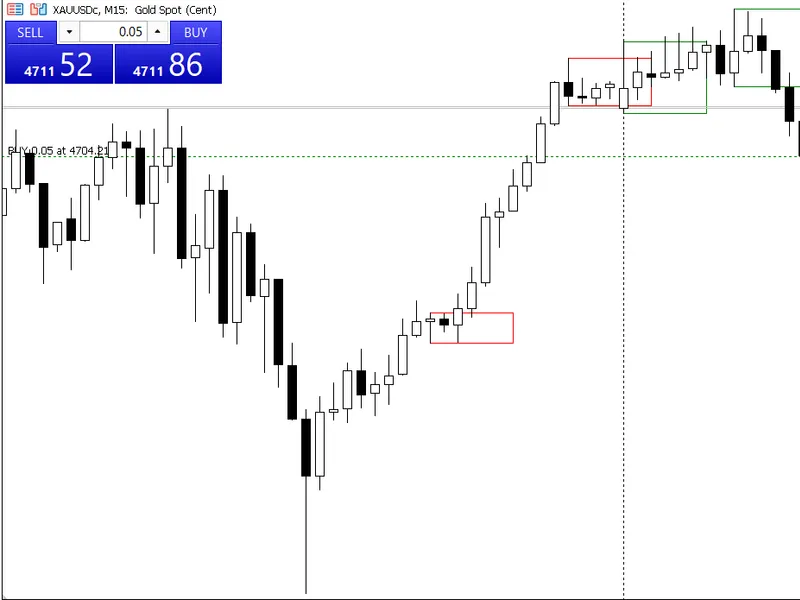
Trade based on Fair Value Gap (FVG) encroachment points.
Entry Logic:
Close above Enc = Buy, Close below Enc = Sell
Multiple experimental trading modes tested
Version History
Playground EA v1.00
Status:
Initial experimental release with dual-mode functionality
Key Features:
- Dual trading mode system (encroachment scalp / liquidity scalp)
- Dynamic lot sizing based on volatility (ATR, range, or volume-based)
- Encroachment-based entries using FVG Enc point
- Liquidity sweep detection and trading
- Multiple volatility calculation methods
- Session filtering for liquidity scalping
- Configurable filters and trend alignment checks
- Trailing stop loss functionality
- Fixed and FVG-based stop loss options
Trading Modes:
playground_encroachment_scalp:
Trades when price closes above/below FVG encroachment point
playground_liquidity_scalp:
Trades on liquidity level sweeps with reversal expectations
Input Parameters:
- Base lot size with optional dynamic sizing
- Profit target and loss threshold in account currency
- FVG detection settings (timeframe, minimum gap size, accuracy mode)
- Encroachment filters (minimum gap, trend checking)
- Liquidity scalping settings (session filter, minimum distance)
- Volatility-based lot adjustment
- Stop loss configuration (fixed or trailing)
Known Issues:
- Liquidity function did not work as intended
- Trades closed immediately in some conditions
- Required refinement for practical use
Magic Number:
9999
Playground EA v1.01
Status:
Simplified and functional - liquidity mode removed
Changes from v1.00:
- Removed liquidity scalping mode entirely
- Removed liquidity library dependency
- Fixed immediate trade closure issue
- Simplified code structure
- Focused exclusively on FVG encroachment logic
- Removed dynamic lot sizing complexity
- Removed trailing stop functionality
- Cleaner position management
Key Features:
- Single trading mode: encroachment scalping
- Simple profit/loss management using dollar targets
- Optional filters for entry validation
- Trend alignment checking (optional)
- FVG visualization on chart
- Streamlined execution
Trading Logic:
- Detects FVG formation
- Waits for encroachment point touch
- Enters buy if close above enc point
- Enters sell if close below enc point
- Exits at fixed profit target or loss threshold
Input Parameters:
- Fixed lot size
- Profit target (Eprofit) in dollars
- Loss threshold (Eloss) in dollars
- FVG settings (timeframe, gap size, accuracy)
- Optional filters (minimum gap, trend check)
Improvements:
- Stable execution
- Reliable profit/loss management
- No premature trade closures
- Works well in testing
Magic Number:
9999
Playground EA v1.02
Status:
Dual-mode reintroduction with Silver Bullet timing
Changes from v1.01:
- Reintroduced dual-mode functionality
- Added Silver Bullet encroachment mode
- Introduced timed trading windows (Silver Bullet 1, 2, 3)
- Added liquidity library back for DOL (Draw on Liquidity) targeting
- Mode selection via enumeration (not separate toggles)
- Different magic numbers for each mode
- Added partial profit taking for Silver Bullet trades
- Session-based liquidity targeting
Key Features:
- Two distinct trading modes (enum-based selection)
- Silver Bullet time windows (3-4am, 10-11am, 2-3pm GMT)
- DOL targeting
- Partial profit taking at multiple targets
- Session filtering and priority lists
- GMT offset configuration
Trading Modes:
mode_silver_bullet_enc:
- Trades only during Silver Bullet windows
- Targets liquidity zones (PDH/PDL, PWH/PWL, session highs/lows)
- Multiple profit targets as percentage to DOL
- Partial closing at target 1 (50%), full close at target 2
mode_simple_enc:
- One trade at a time
- Fixed profit/loss targets in dollars
- No time restrictions
- Simple entry/exit logic
Silver Bullet Features:
- Configurable time windows with GMT offset
- Minimum distance to DOL requirement
- Two-stage profit targets (50% and 80% to DOL)
- Session-based priority lists
- Liquidity sweep tracking
Input Parameters:
- Mode selection (Silver Bullet or simple)
- GMT offset for session timing
- Silver Bullet window toggles (SB1, SB2, SB3)
- DOL distance and target percentages
- Standard FVG and filter settings
- Separate profit/loss settings per mode
Known Issues:
- Confusing default timeframe handling
- Enumeration-based mode selection less intuitive
- Did not properly implement session DOL mapping
- Time window calculations needed refinement
Magic Numbers:
- Silver Bullet: 1002
- Simple Mode: 1003
Playground EA v1.03
Status:
Parallel mode execution with proper DOL implementation
Changes from v1.02:
- Changed from enum selection to dual boolean toggles
- Both modes can now run at the same time
- Each mode uses separate magic numbers for independent tracking
- Fixed Silver Bullet time windows (7-8am, 2-3pm, 6-7pm GMT+0)
- Improved session DOL targeting
- Better session data retrieval from liquidity library
- Clearer configuration output
Key Features:
- Simultaneous dual-mode operation
- Independent trade management per mode
- Corrected Silver Bullet timing windows
- Proper session-based DOL targeting
- Clean separation of mode logic
- Better session high/low tracking
Trading Modes:
silver bullet mode
(inpusesilverbulletmode):
- SB1: 7-8am GMT+0 targeting session liquidity
- SB2: 2-3pm GMT+0 targeting session liquidity
- SB3: 6-7pm GMT+0 targeting session liquidity
- Multiple trades possible (one per window)
- DOL-based profit targets
simple mode
(inpusesimplemode):
- One trade at a time restriction
- Dollar-based profit/loss targets
- No time restrictions
- Independent of Silver Bullet trades
Improvements:
- Both modes can be enabled simultaneously
- Better error checking for mode activation
- Clearer logging and trade identification
- Improved session data handling
- More intuitive configuration
Session DOL Mapping:
- Each Silver Bullet window targets specific session liquidity
- Proper priority lists for DOL selection
- Session high/low tracking
- Fallback to alternative DOL if primary unavailable
Input Parameters:
- Boolean toggles for each mode
- GMT offset (0 for GMT+0, -4 for New York, etc.)
- Individual Silver Bullet window toggles
- DOL distance and percentage settings
- Standard FVG and filter configurations
Magic Numbers:
- Silver Bullet: 1002
- Simple Mode: 1003
Playground EA v1.04
Changes from v1.03:
- Session-specific DOL targeting (each SB window targets different session)
- SB1 (3-4am) targets Sydney session H/L
- SB2 (10-11am) targets Tokyo session H/L
- SB3 (2-3pm) targets London session H/L
- Added Silver Bullet sub-mode toggle (fixed vs DOL targets)
- Implemented one-trade-per-window rule for Silver Bullet
- Removed partial profit taking logic (full close only)
- Added stop loss buffer below FVG boundaries
- Better window status tracking
- Improved position management
- Fixed time zone handling
Key Features:
- Session-specific liquidity targeting for each window
- Dual target mode for Silver Bullet (fixed profit/loss or DOL-based)
- One active trade per Silver Bullet window maximum
- Stop loss placed below FVG boundaries with buffer
- Window-based trade tracking
- Full position closure (no partial takes)
Trading Modes:
silver bullet mode:
- Fixed target sub-mode (inpsbusefixedtargets = true):
- Uses Eprofit/Eloss like simple mode
- Trades during Silver Bullet windows only
- One trade per window allowed
- DOL target sub-mode (inpsbusefixedtargets = false):
- Targets session-specific liquidity levels
- Profit target as percentage to DOL
- Minimum distance check to DOL
- One trade per window allowed
simple mode:
- Unchanged from v1.03
- One trade at a time globally
- Fixed profit/loss targets
Session DOL Targeting:
- SB1 (3-4am GMT): Sydney session high or low
- SB2 (10-11am GMT): Tokyo session high or low
- SB3 (2-3pm GMT): London session high or low
- Intelligent selection (high if price below, low if price above)
Stop Loss Implementation:
- Placed below FVG bottom (for buys) or above FVG top (for sells)
- Configurable buffer in points (default 5 points)
- Protects against adverse moves
- Loss threshold still applies in dollar terms
One-Trade-Per-Window Rule:
- Each Silver Bullet window can have a maximum of one active trade
- Once a window's trade is filled, no new trades in that window
- Window becomes available when trade is closed
- Prevents over-trading within sessions
Input Parameters:
- Silver Bullet sub-mode toggle (fixed vs DOL)
- Stop loss buffer points
- DOL target percentage
- Minimum DOL distance
- Session-specific window toggles
- All standard FVG and filter settings
Improvements:
- More disciplined trade management
- Better risk control with SL buffers
- Clearer session targeting
- Prevents window over-trading
- Flexible profit target methods
- Better logging and status tracking
Magic Numbers:
- Silver Bullet: 1004
- Simple Mode: 1005
Common Features Across All Versions
FVg Detection:
- Detects three-candle fair value gaps
- Configurable minimum gap size
- Optional accuracy mode using lower timeframe
- Visual plotting of FVG dots
- Encroachment point calculation (mid-point of gap)
- Reset detection for inverse candles
Entry Logic:
- Core rule: Close above Enc = Buy, Close below Enc = Sell
- Optional filters (minimum gap size, trend alignment)
- FVG type validation
- Encroachment confirmation
Position Management:
- Dollar-based profit targets
- Dollar-based loss thresholds
- Trade tracking with FVG association
- Proper position closure handling
- Error handling and logging
Visual Elements:
- FVG formation dots (green for bullish, red for bearish)
- Encroachment dots (orange for bullish bias, blue for bearish bias)
- Optional liquidity level lines (v1.00, v1.02-v1.04)
Technical Specifications
Library Dependencies:
liquiditylibrary.mqh:
Required for v1.00, v1.02, v1.03, v1.04 compatibility
Platform: MetaTrader 5
Language: MQL5
Performance Notes:
- Not optimized for speed
- Suitable for experimentation and learning
- May generate volume or margin errors in testing
- Code prioritizes readability over efficiency
Usage Recommendations:
- Start with v1.01 to understand basic encroachment logic
- Use v1.04 for production testing with enhanced features
- Adjust lot sizes conservatively
- Monitor margin requirements in testing
- Review logs to understand trade decisions
Known Limitations
General:
- Volume errors may occur during testing
- Margin errors possible with certain broker configurations
- Not optimized for high-frequency trading
- Requires proper FVG and liquidity library setup
Version-Specific:
v1.00: Liquidity mode non-functional, immediate closures
v1.02: Confusing mode selection, time zone issues
Future Development Ideas:
- Implement risk-based position sizing
- Add session volatility adjustments
- Create composite liquidity targeting
- Develop multi-timeframe FVG confirmation
- Add correlation filters
- Implement partial profit strategies
- Create backtesting optimization tools
Disclaimer
The code represents experimental work and learning exercises. Use at your own risk.
Version Summary Table
Contact & Contributions
This code is open for community use and improvement. Feel free to:
- Modify and enhance the code
- Share improvements with the community
- Report bugs or issues
- Suggest new features or modes
Series: Playground EA (Experimental FVG & Liquidity Testing)
End of Documentation
You may also like: sv - excellent alternative for expert users on MetaTrader 5.
Source Code
яю/.......
⚠ Limitations & Risk Warning
- This tool is provided for educational and testing purposes only.
- Past performance does not guarantee future results.
- Trading involves substantial risk of loss. Use on a demo account first.
- Results may vary depending on market conditions, broker, and settings.
- We recommend thorough backtesting and forward testing before using with real funds.