





Money Fixed Risk Lot Calculation
Info
The Money Fixed Risk Lot Calculation is a Expert Advisor for MetaTrader 5 that an example for calculating the lot value in accordance with the risk per trade. What's New:Added two methods for outputting (printing) the calculated lot.
Usage
This tool is typically used for automated trading on major forex pairs and gold.
Platform
This Expert Advisor works exclusively on MetaTrader 5 (both build 600+ and newer versions).
Setup
Place the downloaded file in MQL5/Experts folder via File ? Open Data Folder in MetaTrader 5.
How to Install and Use Money Fixed Risk Lot Calculation
1. Installation: Open the "File" menu, select "Open Data Folder," navigate to MQL/Experts, paste your file, and restart the terminal.
2. Activation: Drag the EA from the Navigator onto a chart, ensure "Allow live trading" is checked in the Common tab, and verify the AutoTrading button is green.
3. Optimization: Right-click your chart, choose "Expert List," click "Properties" to adjust inputs, and save your preferred setup as a set file for future use.
4. Maintenance: Regularly check the "Experts" tab in the terminal window to monitor trade logs and potential execution errors.
Frequently Asked Questions
Q: Why is my EA not opening trades? A: Check the "AutoTrading" button, ensure "Allow live trading" is enabled, and verify your broker allows automated trading on your account type.
Q: Can I run multiple EAs on one chart? A: No, each chart can only host one active EA; however, you can open multiple charts for different currency pairs to run several EAs.
Q: What does the "smiley face" icon mean? A: A smiley face in the top-right corner of the chart indicates the EA is successfully running; a frowny face means it is disabled.
What this tool does
An example for calculating the lot value in accordance with the risk per trade.
Typical Use Case
This Expert Advisor excels in automated trading and technical analysis on MetaTrader 5.
Compatible Platform & Setup
This Expert Advisor works on MetaTrader 5. Place the file in the MQL5/Experts folder and restart the terminal.
Description & Settings
Related: Smart Money Concept Expert Advisor: Market Structure, FVG, and Pullback Trading - another powerful expert for MetaTrader 5 traders.
An example for calculating the lot value in accordance with the risk per trade.Also recommended: SMC Gold EA: Smart Money Concepts for XAUUSD M15 with Liquidity Sweep and Order Blocks - similar expert with strong performance on MetaTrader 5.
What's New:
Added two methods for outputting (printing) the calculated lot. Method 1 — when setting stoploss to zero.
Method 1: stoploss=0.0
sl=0.0;
check_open_long_lot=m_money.checkopenlong(m_symbol.ask(),sl);
print("sl=0.0", " checkopenlong: ",doubletostring(check_open_long_lot,2), ", balance: ", doubletostring(m_account.balance(),2), ", equity: ", doubletostring(m_account.equity(),2), ", freemargin: ", doubletostring(m_account.freemargin(),2));
Method 2 — see the code listing below:
Method 2: stoploss!=0.0
sl=m_symbol.bid()-extstoploss;
check_open_long_lot=m_money.checkopenlong(m_symbol.ask(),sl);
print("sl=",doubletostring(sl,m_symbol.digits()), " checkopenlong: ",doubletostring(check_open_long_lot,2), ", balance: ", doubletostring(m_account.balance(),2), ", equity: ", doubletostring(m_account.equity(),2), ", freemargin: ", doubletostring(m_account.freemargin(),2));
Additionally, the result of a trading operation is now checked:
First check: If the method operation completed successfully but returned "0" (this can happen with requotes), the "count" counter should be decreased by one.
Second check: If the method returned "false", the "count" counter should be decreased by one.
Why decrease "count" by one? In this case, we do not have to wait for 980 ticks again; we can try to enter on the next tick.
How it Works:
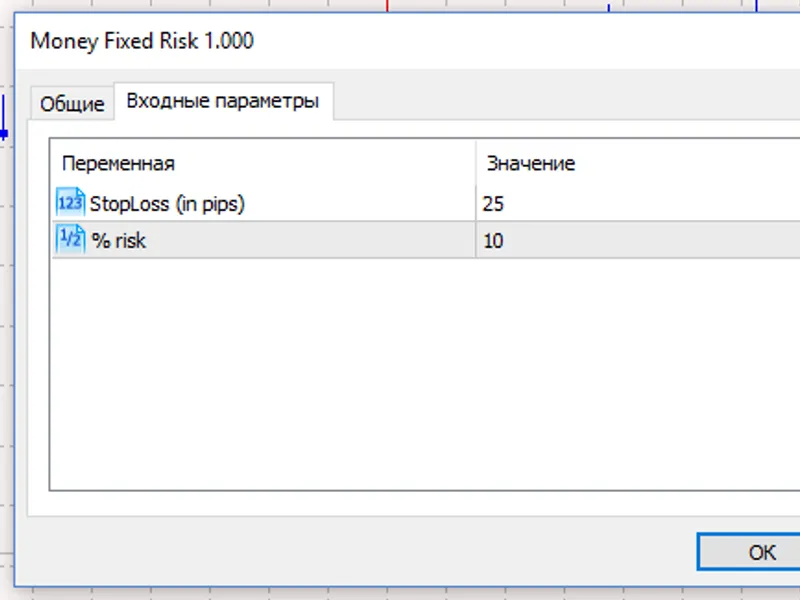
Set the risk percentage per trade (the % risk parameter) and stop loss (stoploss (in pips) parameter). This defines the parameters of possible deposit loss.
The following loop is implemented to simulate trading:
An initial value of count=-21 is set to "warm up" the strategy tester. Then, the remainder after dividing count by 980 (this number was chosen arbitrarily) is calculated. This means that every 980 ticks, the lot calculation cycle starts, in which the lot is calculated taking into account the risks per trade.
Lot Calculation Cycle Depending on Risk Per Trade (Calculation for a Buy Position):
Step One
// Getting lot size for open long position (cmoneyfixedrisk)
double sl=0.0;
double check_open_long_lot=0.0;
// Variant #1: stoploss=0.0
sl=0.0;
check_open_long_lot=m_money.checkopenlong(m_symbol.ask(),sl);
print("sl=0.0", ", checkopenlong: ",doubletostring(check_open_long_lot,2), ", balance: ", doubletostring(m_account.balance(),2), ", equity: ", doubletostring(m_account.equity(),2), ", freemargin: ", doubletostring(m_account.freemargin(),2));
// Variant #2: stoploss!=0.0
sl=m_symbol.bid()-extstoploss;
check_open_long_lot=m_money.checkopenlong(m_symbol.ask(),sl);
print("sl=",doubletostring(sl,m_symbol.digits()), ", checkopenlong: ",doubletostring(check_open_long_lot,2), ", balance: ", doubletostring(m_account.balance(),2), ", equity: ", doubletostring(m_account.equity(),2), ", freemargin: ", doubletostring(m_account.freemargin(),2));
if(check_open_long_lot==0.0) return;
Then, the calculated lot value for a buy position, taking stoploss into account, is received into the check_open_long_lot variable using the class method:
double check_open_long_lot=m_money.checkopenlong(m_symbol.ask(),m_symbol.bid()-extstoploss);
The following parameters are printed to the experts journal: stoploss, calculated lot value in accordance with the risk per trade, trade account balance at the time of calculation, margin at the moment of calculation.
If the calculation returns "0.0", exit:
if(check_open_long_lot==0.0) return;
Step Two
Then, we receive the lot value of the buy position for which we have sufficient funds; the value is received into the chek_volime_lot variable using the checkvolume method of the class. The following parameters are passed here: m_symbol.name() — symbol name, check_open_long_lot — position volume we want to open (this parameter was calculated earlier):
// Check volume before ordersend to avoid "not enough money" error (ctrade)
double chek_volime_lot=m_trade.checkvolume(m_symbol.name(),check_open_long_lot,m_symbol.ask(),order_type_buy);
Step Three
If the checkvolume method returns a value other than "0.0", then we check the condition: do we have enough money to open a position with the lot calculated in accordance with the risk.
if(chek_volime_lot!=0.0) if(chek_volime_lot>=check_open_long_lot) m_trade.buy(chek_volime_lot,null,m_symbol.ask(),m_symbol.bid()-extstoploss,m_symbol.bid()+extstoploss); else print("cmoneyfixedrisk lot = ",doubletostring(check_open_long_lot,2), ", ctrade lot = ",doubletostring(chek_volime_lot,2));
If we have enough money, open the position. If not, the lot value calculated in accordance with the risk per trade (doubletostring(check_open_long_lot,2)) and the lot value for which we have enough funds (doubletostring(chek_volime_lot,2)) are printed to the experts journal.
Example (when you test in the strategy tester, choose EURUSD, M1, testing period from 2026.11.28, deposit $3000):
A buy position was opened (extract from the tester journal) — the calculated lot based on risk per trade is 2.23.
money fixed risk (eurusd,m1) 2026.11.28 00:03:24 sl=0.0 checkopenlong: 0.01, balance: 3000.00, equity: 3000.00, freemargin: 3000.00
money fixed risk (eurusd,m1) 2026.11.28 00:03:24 sl=1.05942 checkopenlong: 2.23, balance: 3000.00, equity: 3000.00, freemargin: 3000.00
trade 2026.11.28 00:03:32 instant buy 2.23 eurusd at 1.06076 sl: 1.05942 tp: 1.06142 (1.06042 / 1.06076 / 1.06042)
trades 2026.11.28 00:03:32 deal #2 buy 2.23 eurusd at 1.06076 done (based on order #2)
trade 2026.11.28 00:03:32 deal performed [#2 buy 2.23 eurusd at 1.06076]
trade 2026.11.28 00:03:32 order performed buy 2.23 at 1.06076 [#2 buy 2.23 eurusd at 1.06076]
money fixed risk (eurusd,m1) 2026.11.28 00:03:32 ctrade::ordersend: instant buy 2.23 eurusd at 1.06076 sl: 1.05942 tp: 1.06142 [done at 1.06076]
money fixed risk (eurusd,m1) 2026.11.28 00:48:32 sl=0.0 checkopenlong: 0.01, balance: 3000.00, equity: 2828.29, freemargin: 462.80
money fixed risk (eurusd,m1) 2026.11.28 00:48:32 sl=1.05899 checkopenlong: 2.60, balance: 3000.00, equity: 2828.29, freemargin: 462.80
money fixed risk (eurusd,m1) 2026.11.28 00:48:32 cmoneyfixedrisk lot = 2.60, ctrade lot = 0.43
trade 2026.11.28 00:53:15 stop loss triggered #2 buy 2.23 eurusd 1.06076 sl: 1.05942 tp: 1.06142 [#3 sell 2.23 eurusd at 1.05942]
trades 2026.11.28 00:53:15 deal #3 sell 2.23 eurusd at 1.05942 done (based on order #3)
trade 2026.11.28 00:53:15 deal performed [#3 sell 2.23 eurusd at 1.05942]
trade 2026.11.28 00:53:15 order performed sell 2.23 at 1.05942 [#3 sell 2.23 eurusd at 1.05942]
It turned out that funds are not enough to open the second position.
Pay attention to the fact that when stoploss is not specified (stoploss=0.0), the calculated lot is equal to the minimum allowed lot value.
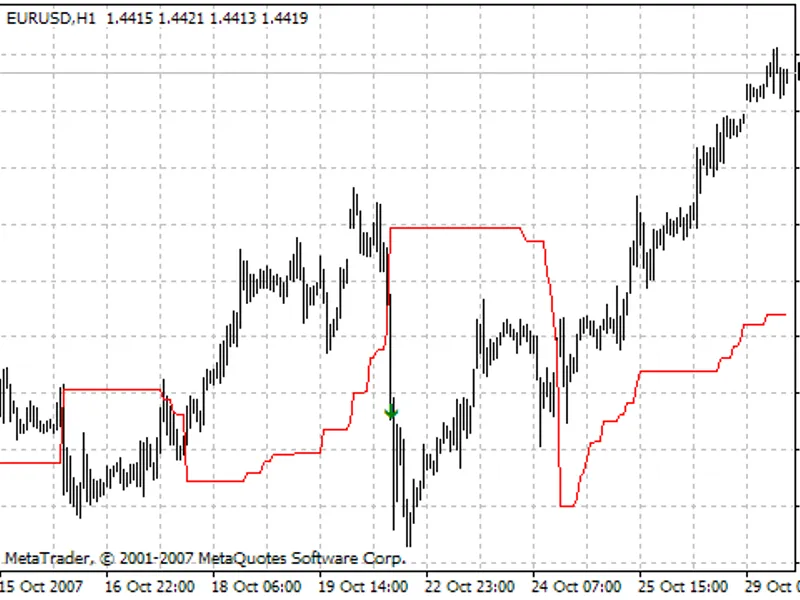
As a result, the first position was closed by stop loss with a loss of 298.82:
This corresponds to almost 10% risk of a $3000 deposit.
You may also like: EA Money Management Strategy - excellent alternative for expert users on MetaTrader 5.
Source Code
/.......
⚠ Limitations & Risk Warning
- This tool is provided for educational and testing purposes only.
- Past performance does not guarantee future results.
- Trading involves substantial risk of loss. Use on a demo account first.
- Results may vary depending on market conditions, broker, and settings.
- We recommend thorough backtesting and forward testing before using with real funds.