
Gold London Breakout EA
Info
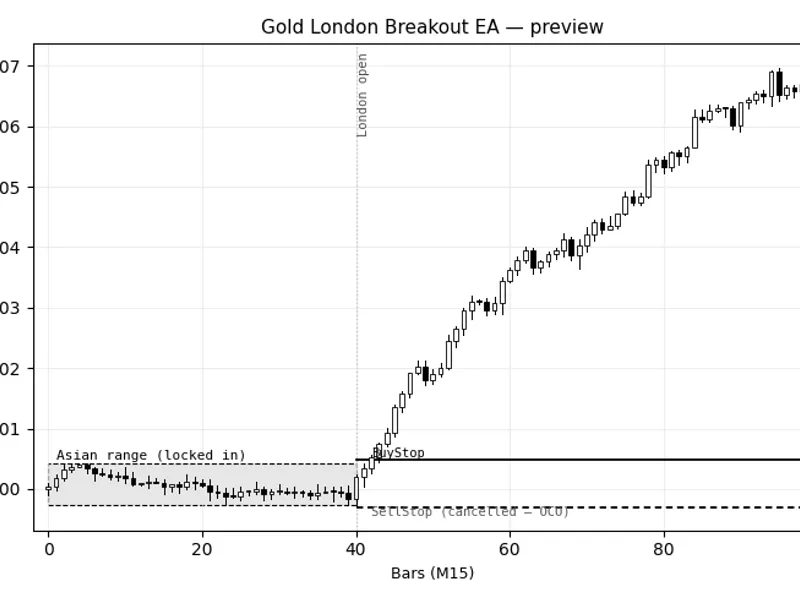
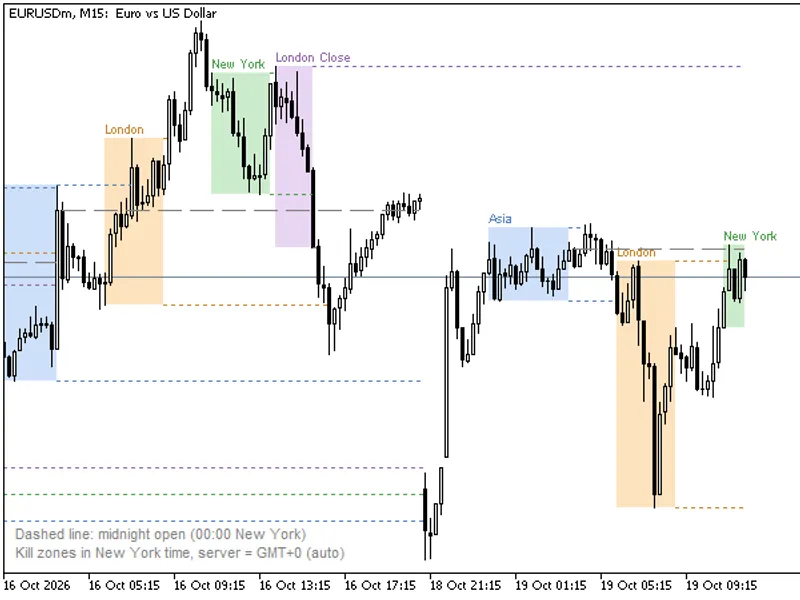
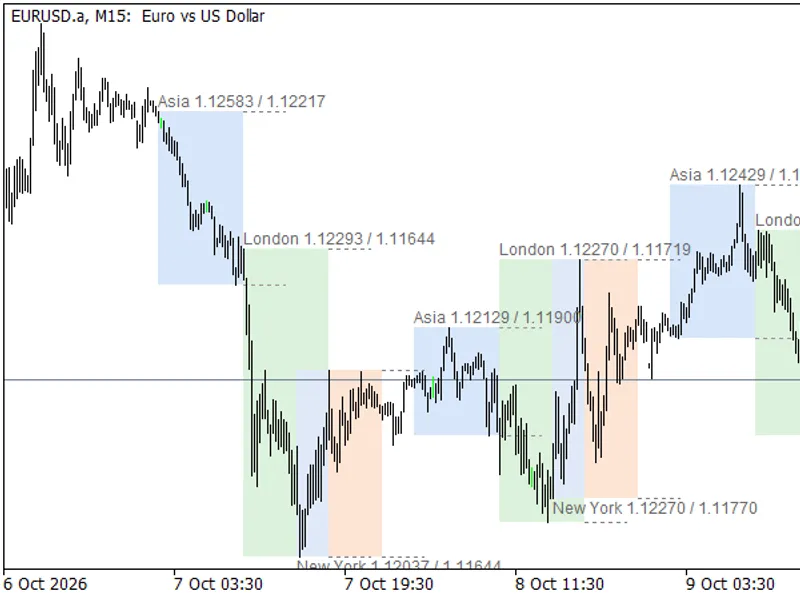
The Gold London Breakout EA is a Expert Advisor for MetaTrader 5 that gold london breakout ea the idea behind it gold has a well-worn behavioural pattern: it tends to compress during the asian session and then expand hard once london desks come online. This EA does not predict that expansion — it measures the Asian range for the day, then places a pending BuyStop just above it and a pending SellStop just below it, so whichever direction the market actually breaks is the one that gets traded.
Usage
This tool is typically used for breakout trading when price moves beyond key support/resistance levels.
Platform
This Expert Advisor works exclusively on MetaTrader 5 (both build 600+ and newer versions).
Setup
Place the downloaded file in MQL5/Experts folder via File ? Open Data Folder in MetaTrader 5.
How to Install and Use Gold London Breakout EA
1. Installation: Open the "File" menu, select "Open Data Folder," navigate to MQL/Experts, paste your file, and restart the terminal.
2. Activation: Drag the EA from the Navigator onto a chart, ensure "Allow live trading" is checked in the Common tab, and verify the AutoTrading button is green.
3. Optimization: Right-click your chart, choose "Expert List," click "Properties" to adjust inputs, and save your preferred setup as a set file for future use.
4. Maintenance: Regularly check the "Experts" tab in the terminal window to monitor trade logs and potential execution errors.
Frequently Asked Questions
Q: Why is my EA not opening trades? A: Check the "AutoTrading" button, ensure "Allow live trading" is enabled, and verify your broker allows automated trading on your account type.
Q: Can I run multiple EAs on one chart? A: No, each chart can only host one active EA; however, you can open multiple charts for different currency pairs to run several EAs.
Q: What does the "smiley face" icon mean? A: A smiley face in the top-right corner of the chart indicates the EA is successfully running; a frowny face means it is disabled.
What this tool does
Gold London Breakout EA The idea behind it Gold has a well-worn behavioural pattern: it tends to compress during the Asian session and then expand hard once London desks come online.
Typical Use Case
This Expert Advisor excels in automated trading and technical analysis on MetaTrader 5.
Compatible Platform & Setup
This Expert Advisor works on MetaTrader 5. Place the file in the MQL5/Experts folder and restart the terminal.
Description & Settings
Related: Gold MT5 Fractal Breakout EA - another powerful expert for MetaTrader 5 traders.
Gold London Breakout EA The idea behind it Gold has a well-worn behavioural pattern: it tends to compress during the Asian session and then expand hard once London desks come online. This EA does not predict that expansion — it measures the Asian range for the day, then places a pending BuyStop just above it and a pending SellStop just below it, so whichever direction the market actually breaks is the one that gets traded. The two orders are OCO (one-cancels-other): the moment either one fills, the EA cancels its twin, so you are never carrying both sides at once. Symbol and timeframe matter more here than in most EAs, because the whole idea depends on the instrument actually having this session-compression behaviour: it is written and intended for XAUUSD (Gold), on a M15 chart. M15 is recommended specifically because the hour-boundary checks that lock in the range and open the trading window need enough resolution to catch the transition cleanly without processing every single tick. How to interpret it The Asian range window — from InpAsianStartHour to InpAsianEndHour, server time. The EA watches every bar in that window and records the session high and low the moment the window closes. The range filter — the Asian range is compared against the symbol's own daily ATR rather than a fixed point count, so the filter self-calibrates to whatever price level and volatility regime the instrument is currently in instead of needing manual recalibration every time gold (or any symbol) moves to a new price range. If the session range comes in below InpMinRangeATRFrac or above InpMaxRangeATRFrac of daily ATR, the EA sits out for the day. A range that tight usually means a dead session with no real breakout to trade; a range that wide usually means the compression the strategy depends on never happened. The breakout orders — placed once the clock reaches InpLondonStartHour, sitting a small ATR-scaled buffer outside the locked range. Stops and targets are set from ATR at the moment of placement, not from the range width, so trade risk stays consistent regardless of how wide or narrow that day's range was. The expiry — if neither pending order has triggered by InpLondonEndHour, both are cancelled. The strategy only wants the breakout while London is actually opening; a move that starts hours later is a different setup entirely. External variables (inputs) Input Default Purpose InpAsianStartHour / InpAsianEndHour 0 / 7 The window the Asian range is measured over, broker/server time. InpDailyAtrPeriod 14 Period of the Daily-timeframe ATR used purely to scale the range filter — independent of the ATR used for stops below. InpMinRangeATRFrac / InpMaxRangeATRFrac 0.15 / 0.70 Filters out days where the Asian range is too small a fraction of daily ATR (no real compression) or too large (compression already broke down), expressed relative to the instrument's own current volatility rather than a fixed point count. InpLondonStartHour / InpLondonEndHour 7 / 11 Window during which the breakout orders are live; they are cancelled at the end hour if untouched. InpAtrPeriod 14 ATR period used for the entry buffer and the stop distance. InpBreakoutBufferATR 0.15 How far outside the range, in ATR, the pending orders sit — enough to avoid triggering on noise right at the range edge. InpStopATRMult 1.2 Stop-loss distance from entry, in ATR. Independent of range width, so risk stays consistent day to day. InpRewardMultiple 1.8 Take-profit as a multiple of the stop distance (R). InpRiskPercent 1.0 Risk per trade as a percentage of account equity; position size is derived from this and the actual stop distance. InpMaxSpreadPoints 350 Skips placing orders for the day if the spread is wider than this at the moment of placement — gold spreads can run wide around the open. InpMagicNumber / InpDeviationPoints 20260801 / 50 Standard trade-identification and slippage tolerance settings. Recommended use Built for XAUUSD on M15. It will compile and run on other symbols and timeframes, but the whole premise — Asian compression, London expansion — is a gold-specific pattern, so results elsewhere should not be expected to carry the same logic. Check your broker's server time against London's actual opening hour before trusting the default session inputs; server time offsets vary by broker and by daylight-saving changes on each side. One account-type note worth flagging honestly: this was written assuming a hedging-enabled account, where the EA's own position is unambiguous. On a netting account, if another position already exists on the same symbol when a breakout order fills, MetaTrader nets it into the existing position rather than opening a separate one, which can affect how cleanly the EA's own magic-number tracking reflects what is actually open. If you run a netting account, keep this EA on a symbol nothing else is trading.Also recommended: Stochastic Daily Breakout for Gold: Backtested Performance to 2026 - similar expert with strong performance on MetaTrader 5.
You may also like: Gold Breakout EA for XAUUSD H4: +90% Backtest Performance (2020-2026) - excellent alternative for expert users on MetaTrader 5.
Source Code
#property copyright "RobotFX"
#property link "https://robotfx.org"
#property version   "1.00"
#property strict
#include <Trade\Trade.mqh>
input group "=== Asian Range Window (server time) ==="
input int    InpAsianStartHour   = 0;
input int    InpAsianEndHour     = 7;
input int    InpDailyAtrPeriod   = 14;
input double InpMinRangeATRFrac  = 0.15;
.......
⚠ Limitations & Risk Warning
- This tool is provided for educational and testing purposes only.
- Past performance does not guarantee future results.
- Trading involves substantial risk of loss. Use on a demo account first.
- Results may vary depending on market conditions, broker, and settings.
- We recommend thorough backtesting and forward testing before using with real funds.