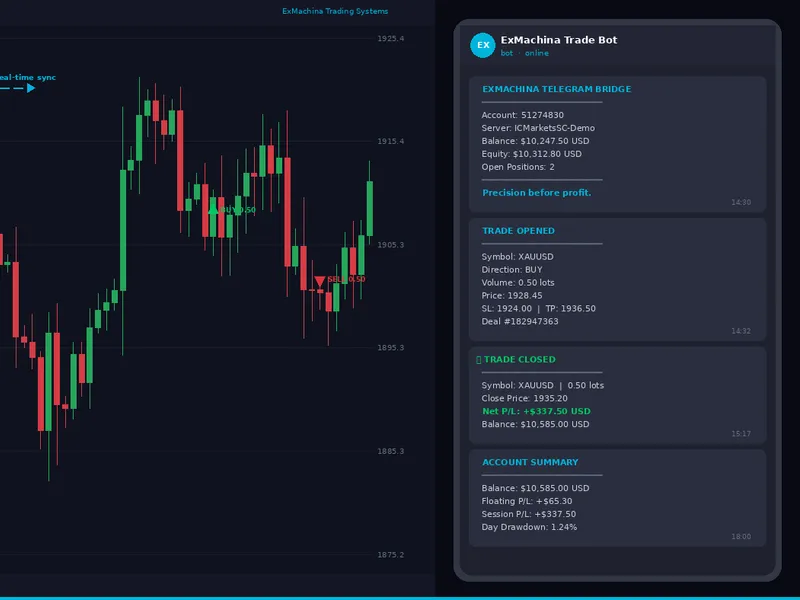


ex machina telegram bridge
Info
The ex machina telegram bridge is a Expert Advisor for MetaTrader 5 that what it doesthe ea detects trade events through two mechanisms: real-time detection via the ontradetransaction handler and periodic deal history scans as a fallback. a deduplication system ensures you don't receive duplicate notifications for the same event.
Usage
This tool is typically used for automated trading on major forex pairs and gold.
Platform
This Expert Advisor works exclusively on MetaTrader 5 (both build 600+ and newer versions).
Setup
Place the downloaded file in MQL5/Experts folder via File ? Open Data Folder in MetaTrader 5.
How to Install and Use ex machina telegram bridge
1. Installation: Open the "File" menu, select "Open Data Folder," navigate to MQL/Experts, paste your file, and restart the terminal.
2. Activation: Drag the EA from the Navigator onto a chart, ensure "Allow live trading" is checked in the Common tab, and verify the AutoTrading button is green.
3. Optimization: Right-click your chart, choose "Expert List," click "Properties" to adjust inputs, and save your preferred setup as a set file for future use.
4. Maintenance: Regularly check the "Experts" tab in the terminal window to monitor trade logs and potential execution errors.
Frequently Asked Questions
Q: Why is my EA not opening trades? A: Check the "AutoTrading" button, ensure "Allow live trading" is enabled, and verify your broker allows automated trading on your account type.
Q: Can I run multiple EAs on one chart? A: No, each chart can only host one active EA; however, you can open multiple charts for different currency pairs to run several EAs.
Q: What does the "smiley face" icon mean? A: A smiley face in the top-right corner of the chart indicates the EA is successfully running; a frowny face means it is disabled.
What this tool does
what it doesthe ea detects trade events through two mechanisms: real-time detection via the ontradetransaction handler and periodic deal history scans as a fallback.
Typical Use Case
This Expert Advisor excels in automated trading and technical analysis on MetaTrader 5.
Compatible Platform & Setup
This Expert Advisor works on MetaTrader 5. Place the file in the MQL5/Experts folder and restart the terminal.
Description & Settings
Related: mt5 telegram trade notifier (bot ap i) — deal alerts - another powerful expert for MetaTrader 5 traders.
what it doesthe ea detects trade events through two mechanisms: real-time detection via the ontradetransaction handler and periodic deal history scans as a fallback. a deduplication system ensures you don't receive duplicate notifications for the same event.
Also recommended: exp caudate xperiod candle tm plus - similar expert with strong performance on MetaTrader 5.
supported notifications:- trade opened: symbol, direction (buy/sell), volume, price, sl, tp, magic number, deal ticket
- trade closed: symbol, volume, close price, gross p/l, commission, swap, net p/l, updated balance
- sl/tp modified: displays old and new values side by side
- pending orders placed: type, price, volume
- position reversal: new direction, closed p/l
- deposits and withdrawals: amount and updated balance
- periodic account summaries: balance, equity, free margin, floating p/l, session p/l, open positions, day high/low equity, drawdown percentage
- connection and disconnection messages with session statistics
setup
step 1: create a telegram bot
step 2: get your chat id
step 3: start a conversation with your bot
step 4: allow webrequest in metatrader 5
step 5: install the ea
step 6: attach to a chart
input parameters
- bot token: your api token from @botfather (required)
- chat id: your numeric chat id (required, can be a group id)
notification settings:
- notify on trade open: true/false (default: true)
- notify on trade close: true/false (default: true)
- notify on sl/tp modify: true/false (default: true)
- notify on pending orders: true/false (default: true)
- notify on deposit/withdrawal: true/false (default: true)
account summary:
- summary report interval: off, every 1 hour, every 4 hours, every 8 hours, every 24 hours (default: every 4 hours)
- include equity in summary: true/false (default: true)
- include drawdown info: true/false (default: true)
display & style:
- message style: minimal (compact), detailed (labeled), or emoji-rich (default).
- show dashboard on chart: true/false (default: true)
filters:
- symbol filter: comma-separated list of symbols to monitor. leave empty for all. example: "eurusd,xauusd"
- min lot size to notify: minimum volume for notification. 0 = no filter.
- magic number filter: notify only for trades with this magic number. -1 = all trades.
message styles
minimal - compact format:
xauusd | buy | 0.50 lots @ 1928.45
detailed - structured with labels:
trade closed
━━━━━━━━━━━━━━━━━━━━
symbol: xauusd
close: sell (close buy)
volume: 0.50 lots
price: 1935.20
───────────────────
gross p/l: +$340.00
commission: -$2.50
swap: -$0.00
net p/l: +$337.50
balance: $10,585.00 usd
deal #182947363
emoji-rich - detailed with unicode icons.
filters
the magic number filter is useful for specific ea notifications. set it to an ea's magic number or -1 for all trades.
the symbol filter accepts a list: "xauusd,eurusd,gbpusd". notifications are generated only for these symbols.
account summaries
summaries include: balance, equity, free margin, open positions, floating p/l, session p/l, day high/low equity, drawdown percentage.
useful for remote monitoring of daily drawdown limits. set the interval to 1 hour during active sessions.
on-chart dashboard
a status panel shows:
- connection status: connected (green) or disconnected (red)
- bot username
- message counters: sent and failed
- exmachina tagline
the dashboard uses the exmachina steel palette (background c'8,10,18', accent c'0,180,220') and can be customized.
testing
step 1: open a small market order (e.g. 0.01 lots eurusd). expect a "trade opened" notification.
step 2: modify sl/tp of the open position. check for "sl/tp modified" notification.
step 3: close the position. look for a "trade closed" notification with p/l details.
step 4: place a pending order. you should receive a "pending order placed" notification.
step 5: remove the ea from the chart. a "disconnected" message with statistics should appear.
quick browser test: verify token and chat id by pasting this url in a browser:
quick smoke test script: save as a script in mql5/scripts/, compile, and run on a demo chart:
#include
void onstart()
ctrade trade;
trade.buy(0.01, "eurusd");
sleep(3000);
for(int i = positionstotal()-1; i >= 0; i--)
if(positiongetsymbol(i) == "eurusd")
trade.positionclose(positiongetticket(i));
note: this ea doesn't work in the strategy tester due to webrequest limitations. it requires a live or demo chart with internet access.
running with other eas
use the magic number filter to specify notifications for a particular ea.
troubleshooting
no messages:
1. ensure bot token and chat id are correct.
2. check for error messages in the experts tab.
3. if ea shows init_parameters_incorrect, ensure both bot token and chat id are provided.
4. for dashboard issues, confirm "show dashboard on chart" is enabled.
technical details
- trade detection: ontradetransaction and deal history polling every 2 seconds.
- deduplication: tracks last 500 deals.
- sl/tp detection: compares position snapshots on each tick.
- connection test: validates token via /getme endpoint.
- summary timer: eventsettimer(60) checks configured intervals.
- chart objects: dashboard objects use "extb_" prefix and are removed on deinit.
this ea is open source. feedback and suggestions are welcome.
exmachina trading systems — precision first.
You may also like: breakdown - excellent alternative for expert users on MetaTrader 5.
Source Code
#property copyright "robotfx"
#property link "https://robotfx.org"
#property version     "1.00"
#property description "This code is provided AS IS and intended for educational purposes only. Professional trading EAs and indicators - robotfx www.robotfx.org"
#property description "This code is provided AS IS and intended for educational purposes only. Professional trading EAs and indicators - robotfx www.robotfx.org"
#property description "This code is provided AS IS and intended for educational purposes only. Professional trading EAs and indicators - robotfx www.robotfx.org"
#property description "This code is provided AS IS and intended for educational purposes only. Professional trading EAs and indicators - robotfx www.robotfx.org"
#property description "This code is provided AS IS and intended for educational purposes only. Professional trading EAs and indicators - robotfx www.robotfx.org"
#property description "This code is provided AS IS and intended for educational purposes only. Professional trading EAs and indicators - robotfx www.robotfx.org"
#property description "This code is provided AS IS and intended for educational purposes only. Professional trading EAs and indicators - robotfx www.robotfx.org"
.......
⚠ Limitations & Risk Warning
- This tool is provided for educational and testing purposes only.
- Past performance does not guarantee future results.
- Trading involves substantial risk of loss. Use on a demo account first.
- Results may vary depending on market conditions, broker, and settings.
- We recommend thorough backtesting and forward testing before using with real funds.