











ex machina heikin ashi enhanced v3.0
Info
The ex machina heikin ashi enhanced v3.0 is a Indicator for MetaTrader 5 that exmachina heikin ashi enhanced v3. 0 — part of the exmachina trading systems free code base collection.
Usage
This tool is typically used for enhancing chart analysis and decision making.
Platform
This Indicator works exclusively on MetaTrader 5 (both build 600+ and newer versions).
Setup
Place the downloaded file in MQL5/Indicators folder via File ? Open Data Folder in MetaTrader 5.
How to Install and Use ex machina heikin ashi enhanced v3.0
1. Installation: Place your file in the MQL/Indicators folder via "Open Data Folder" and restart your terminal.
2. Loading: Find the indicator in the Navigator, drag it onto your chart, and configure the input parameters in the popup window.
3. Customization: Press Ctrl+I to open the indicator list, select your tool, and click "Properties" to change colors, levels, or visual styles.
4. Updating: Replace the old file in the Indicators folder with the new version and restart the platform to apply changes.
Frequently Asked Questions
Q: Why is my indicator not showing? A: Verify the file is in the MQL/Indicators folder, or try right-clicking the "Indicators" tree in the Navigator and clicking "Refresh."
Q: Do custom indicators slow down the platform? A: Too many complex indicators can impact performance; remove unused ones via the "Indicator List" (Ctrl+I).
Q: Can I use MT4 indicators on MT5? A: No, MQL4 and MQL5 are distinct languages; ensure the indicator is compiled specifically for your platform version.
What this tool does
exmachina heikin ashi enhanced v3.
Typical Use Case
This Indicator excels in automated trading and technical analysis on MetaTrader 5.
Compatible Platform & Setup
This Indicator works on MetaTrader 5. Place the file in the MQL5/Indicators folder and restart the terminal.
Description & Settings
Related: SHK Heikin Ashi MACD Signal Arrows for MT5 - another powerful indicator for MetaTrader 5 traders.
exmachina heikin ashi enhanced v3.0 — part of the exmachina trading systems free code base collection. this is the most feature-rich free heikin ashi indicator available on the mql5 code base as of 2026.Also recommended: ex machina candle timer lite - similar indicator with strong performance on MetaTrader 5.
features:
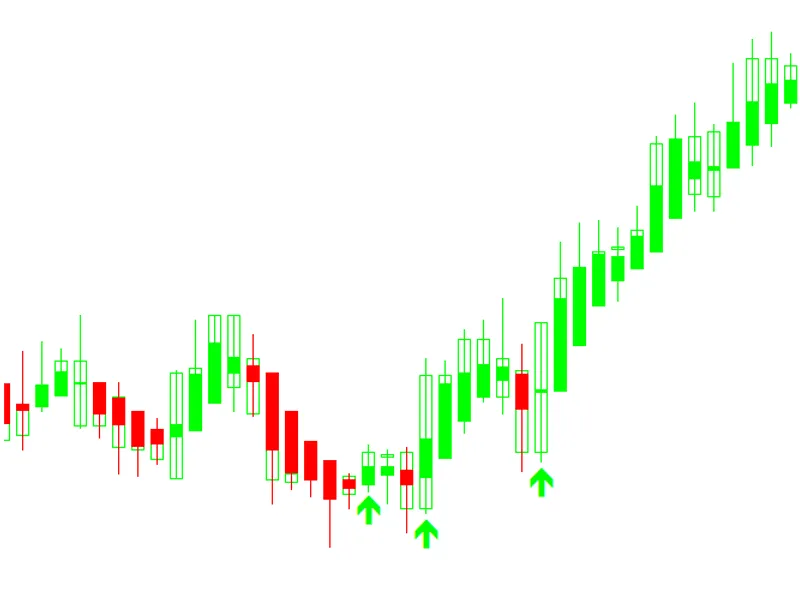
- two draw modes: color-coded ha candles (ohlc with proper high/low) or smoothed color line overlay.
- five smoothing methods: sma, ema, double-smoothed ema (vervoort-style dema), smma, and lwma, all with configurable periods.
- step filter: noise reduction in pips. ignores ha changes smaller than a configurable threshold, similar to mladen's approach but with the added flexibility of 5 smoothing methods.
- signal arrows: wingdings arrows (▲/▼) plotted on the chart at every color change. arrow codes and offset are customizable.
- multi-timeframe (mtf): displays higher-timeframe ha data mapped onto the current chart.
- full ha calculation: proper recursive ha open, high, low, and close.
- consecutive bar counter: tracks the streak of same-color bars in real time.
- strength meter: body-to-range ratio with visual bar (████░░░░░░) and percentage.
- ha delta: shows close − open difference with signed color.
- dashboard panel: a comprehensive 9-row data panel displaying trend, smoothing, step filter, ha close, ha open, ha delta, consecutive, strength %, and strength bar.
- fully customizable: 8 input groups and 30+ inputs allow for extensive customization, including colors, dashboard position/fonts, arrow codes, and more.
- clean chart management: all objects use the exha_ prefix for easy and safe removal.
architecture:
- 14 buffers (3 plots + 5 calculation buffers).
- dema uses a dedicated dual-buffer approach, ensuring stability without fragile static variables.
- modular design: calcstandard, calcmtf, applysmoothing, applystepfilter, and assignbar.
- 829 lines of code, with zero external dependencies.
input groups:
- general: draw mode and mtf timeframe.
- smoothing: method (none/sma/ema/dema/smma/lwma) and period.
- step filter: threshold in pips.
- signal arrows: enable/disable, bull/bear arrow codes, and offset.
- colors: bull, bear, and neutral.
- dashboard: position, font size, and 4 color inputs.
works on all symbols and timeframes. no repaint on closed bars.
this indicator is suitable for professional traders seeking precision and reliability in their trading tools.
You may also like: ex machina smart money concepts - excellent alternative for indicator users on MetaTrader 5.
Source Code
#property copyright "robotfx"
#property link "https://robotfx.org"
#property version     "3.00"
#property description "This code is provided AS IS and intended for educational purposes only. Professional trading EAs and indicators - robotfx www.robotfx.org"
#property description "This code is provided AS IS and intended for educational purposes only. Professional trading EAs and indicators - robotfx www.robotfx.org"
#property description "This code is provided AS IS and intended for educational purposes only. Professional trading EAs and indicators - robotfx www.robotfx.org"
#property description "This code is provided AS IS and intended for educational purposes only. Professional trading EAs and indicators - robotfx www.robotfx.org"
#property description "This code is provided AS IS and intended for educational purposes only. Professional trading EAs and indicators - robotfx www.robotfx.org"
#property description "This code is provided AS IS and intended for educational purposes only. Professional trading EAs and indicators - robotfx www.robotfx.org"
#property indicator_chart_window
.......
⚠ Limitations & Risk Warning
- This tool is provided for educational and testing purposes only.
- Past performance does not guarantee future results.
- Trading involves substantial risk of loss. Use on a demo account first.
- Results may vary depending on market conditions, broker, and settings.
- We recommend thorough backtesting and forward testing before using with real funds.