

EMA Trend Cross Strategy for XAUUSD M30
Info
The EMA Trend Cross Strategy for XAUUSD M30 is a Expert Advisor for MetaTrader 5 that strategy logictrend-following ema crossover system on closed m30 bars, distributed for xauusd. Single-position design: a new signal is ignored while any strategy position or pending order is still open.
Usage
This tool is typically used for trend following strategies across multiple currency pairs.
Platform
This Expert Advisor works exclusively on MetaTrader 5 (both build 600+ and newer versions).
Setup
Place the downloaded file in MQL5/Experts folder via File ? Open Data Folder in MetaTrader 5.
How to Install and Use EMA Trend Cross Strategy for XAUUSD M30
1. Installation: Open the "File" menu, select "Open Data Folder," navigate to MQL/Experts, paste your file, and restart the terminal.
2. Activation: Drag the EA from the Navigator onto a chart, ensure "Allow live trading" is checked in the Common tab, and verify the AutoTrading button is green.
3. Optimization: Right-click your chart, choose "Expert List," click "Properties" to adjust inputs, and save your preferred setup as a set file for future use.
4. Maintenance: Regularly check the "Experts" tab in the terminal window to monitor trade logs and potential execution errors.
Frequently Asked Questions
Q: Why is my EA not opening trades? A: Check the "AutoTrading" button, ensure "Allow live trading" is enabled, and verify your broker allows automated trading on your account type.
Q: Can I run multiple EAs on one chart? A: No, each chart can only host one active EA; however, you can open multiple charts for different currency pairs to run several EAs.
Q: What does the "smiley face" icon mean? A: A smiley face in the top-right corner of the chart indicates the EA is successfully running; a frowny face means it is disabled.
What this tool does
Strategy LogicTrend-following EMA crossover system on closed M30 bars, distributed for XAUUSD.
Typical Use Case
This Expert Advisor excels in trend following on MetaTrader 5.
Compatible Platform & Setup
This Expert Advisor works on MetaTrader 5. Place the file in the MQL5/Experts folder and restart the terminal.
Description & Settings
Related: Supertrend Scalper with Breakeven Win Rate Panel - another powerful expert for MetaTrader 5 traders.
Strategy LogicTrend-following EMA crossover system on closed M30 bars, distributed for XAUUSD.
Also recommended: Fx Craft Example EA: MA Cross Strategy Explained - similar expert with strong performance on MetaTrader 5.
Single-position design: a new signal is ignored while any strategy position or pending order is still open. No pyramiding.
Intraday trading: entries are restricted to a broker server-time window (07:00–19:00 by default).
Entries
Signals are evaluated once per new bar, using only completed bars. Entries never repaint.
Buy Signal: The fast EMA (20) crosses above the slow EMA (50) between the last two closed bars. The latest close must be above both the fast EMA and the 200 EMA trend line.
Sell Signal: The exact mirror image of the buy signal (cross below, close below fast EMA and below EMA 200).
Entries are executed as market orders at the current ask/bid price.
Exits
Each position has a stop-loss set at a fixed percentage of the entry price (1% by default).
No take-profit is used (TP = 0). Trades run until stopped out or until the daily close.
Once per day at a configurable server time (20:00 by default), all open strategy positions are closed, and all pending orders are deleted.
Capital Protection
Risk-based position sizing: a fixed percentage of the account balance (1% by default) is risked per trade. The lot size is derived from the stop-loss distance, considering tick size, tick value, and lot step. It is then clamped to the broker's minimum and maximum volume limits.
Preflight Order Check: This check is performed on every order. New orders are rejected if free margin is insufficient. No-change Stop Loss/Take Profit modifications are rejected, while position-reducing and closing orders are always permitted.
MagicNumber and comment tags ensure the Expert Advisor (EA) only manages its own positions and orders.
What Beginners Can Learn
How to subclass CTrade and implement a preflight check (OrderCheck) that rejects specific SL/TP modifications, blocks new orders on insufficient free margin, but still allows position-reducing and closing orders when margin is low.
How to use MagicNumber and comment tags as ownership identifiers, ensuring the EA only manages its own positions and pending orders.
How to calculate position size based on a fixed stop-loss percentage and a per-trade account risk percentage, using tick size, tick value, and lot step.
How to restrict entries to a specific broker server-time window (including windows that span across midnight) and to schedule a daily exit.
How to detect an EMA crossover using only closed bars, preventing signals from repainting.
How to delete leftover pending orders after a fill using the OnTradeTransaction function.
Inputs
FastEmaPeriod: Period for the fast EMA (default: 20).
SlowEmaPeriod: Period for the slow EMA (default: 50); must be greater than FastEmaPeriod.
TrendEmaPeriod: Period for the trend filter EMA (default: 200).
EntryStartHour / EntryStartMinute: Start time for the entry window, server time (default: 7:00).
EntryEndHour / EntryEndMinute: End time for the entry window, server time (default: 19:00).
ExitHour / ExitMinute: Time for the daily close-all function, server time (default: 20:00).
RiskPercent: Account risk per trade, in percent (default: 1.0, meaning 1% of balance).
StopLossPercent: Stop-loss distance as a percentage of the entry price (default: 1%).
Constants (Not User Inputs)
MagicNumber: 568330.
Strategy comment: "EmaTrendCross_V1__XAUUSD_M30".
One strategy position at a time; take-profit is not used (TP = 0).
Symbol and timeframe are determined by the chart the EA is attached to (_Symbol / PERIOD_CURRENT); the product is distributed for XAUUSD M30.
Setup
Attach the EA to an XAUUSD M30 chart. The EA trades the symbol and timeframe of the attached chart.
The EA works on both hedging and netting accounts. The preflight check correctly identifies position-reducing orders in either margin mode.
Recommended broker: Any broker offering XAUUSD M30 history (e.g., IC Markets).
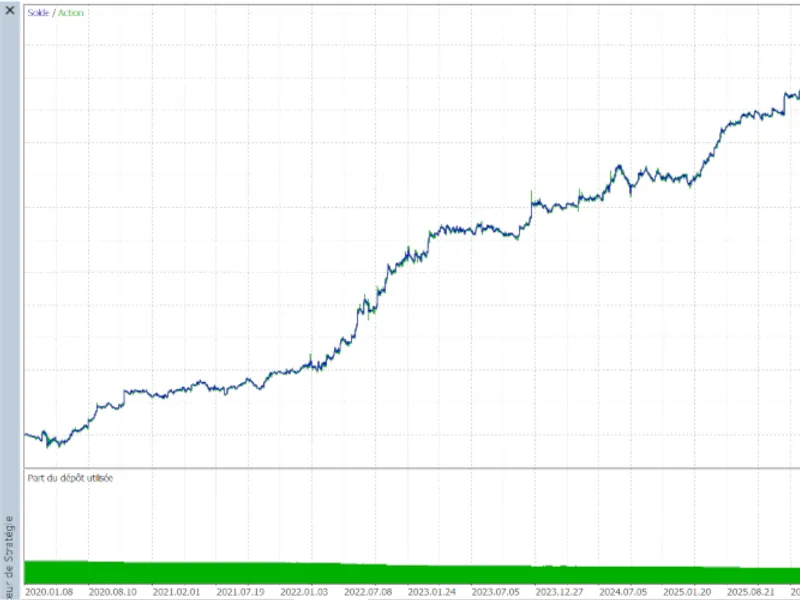
Backtest using the "Every tick" model on XAUUSD M30. The report below covers the period from 2020.01.01 to 2026.10.01.
Backtest Results — XAUUSD M30, 2020.01.01 – 2026.10.01
Broker: IC Markets (EU) Ltd · USD account · initial deposit 1,000.00 · leverage 1:50 · "Every tick" model · history quality 99% (79,801 bars / 9,542,122 ticks) · all inputs at defaults.
Metric
Value
Total net profit
+1,107.33 USD (+110.73% on the 1,000 USD deposit)
Profit factor
1.46 (gross profit 3,522.91 vs gross loss −2,415.58)
Win rate
52.80% — 264 of 500 trades (longs 51.45% won, shorts 54.46% won)
Expected payoff
+2.21 USD per trade
Max drawdown
Balance: 136.08 USD (8.07%) · Equity: 145.25 USD (8.59%)
Recovery factor / Sharpe ratio
7.62 / 4.13
Largest win / largest loss
+105.28 / −51.81 USD (avg win +13.34 vs avg loss −10.24)
Max consecutive losses
8 trades (−28.41 USD total)
Average holding time
6h 08m (min 5m 40s, max 34h 30m)
Margin level at end
1,046.29% (low margin usage thanks to 1% risk sizing)
What the numbers show:
Positive expectancy: profit factor 1.46 with average win (+13.34 USD) clearly larger than average loss (−10.24 USD). The edge comes from payoff asymmetry, not from a high win rate.
Balanced long/short activity: 276 long trades and 224 short trades, with both long and short trades showing approximately 52–54% win rates. This indicates the logic is not overfitted to a single direction.
Drawdown stayed in single digits (maximum 8.59% of equity) over approximately 6.8 years. This is consistent with the 1%-per-trade risk sizing and the daily close-all exit strategy.
AHPR 1.0016 / GHPR 1.0015 with LR correlation 0.96: The equity curve demonstrates steady growth hour-by-hour and day-by-day, without reliance on a single lucky trade.
Note: These results are derived from a single broker, symbol, timeframe, and input set, using a 1,000 USD demo-style backtest. They illustrate the EA's behavior in the Strategy Tester and do not guarantee future results (refer to the Risk Warning below). An equity curve image is available at the bottom of this post.
Risk Warning
This is an educational code sample, not a production-ready signal service. Past backtest performance does not guarantee future results. No trading system wins every trade. Use demo accounts first. No liability is assumed for live trading losses.
You may also like: Moving Average Crossover Expert Advisor - excellent alternative for expert users on MetaTrader 5.
Source Code
#property copyright "RobotFX"
#property link "https://robotfx.org"
#property version "1.0"
#property description "This code is educational. Feel free to use, modify and upgrade as you wish. Visit ROBOTFX.ORG for professional trading tools"
#include <Trade/Trade.mqh>
bool MetaMindSingleReject(MqlTradeResult &result, uint code, string reason)
  {
   ZeroMemory(result);
   result.retcode = code;
   result.comment = reason;
.......
⚠ Limitations & Risk Warning
- This tool is provided for educational and testing purposes only.
- Past performance does not guarantee future results.
- Trading involves substantial risk of loss. Use on a demo account first.
- Results may vary depending on market conditions, broker, and settings.
- We recommend thorough backtesting and forward testing before using with real funds.