
money manager graphic tool
Info
The money manager graphic tool is a Indicator for MetaTrader 4 that changelog: v1. 03: correction for more stability.
Usage
This tool is typically used for enhancing chart analysis and decision making.
Platform
This Indicator works exclusively on MetaTrader 4 (both build 600+ and newer versions).
Setup
Place the downloaded file in MQL4/Indicators folder via File ? Open Data Folder in MetaTrader 4.
How to Install and Use money manager graphic tool
1. Installation: Place your file in the MQL/Indicators folder via "Open Data Folder" and restart your terminal.
2. Loading: Find the indicator in the Navigator, drag it onto your chart, and configure the input parameters in the popup window.
3. Customization: Press Ctrl+I to open the indicator list, select your tool, and click "Properties" to change colors, levels, or visual styles.
4. Updating: Replace the old file in the Indicators folder with the new version and restart the platform to apply changes.
Frequently Asked Questions
Q: Why is my indicator not showing? A: Verify the file is in the MQL/Indicators folder, or try right-clicking the "Indicators" tree in the Navigator and clicking "Refresh."
Q: Do custom indicators slow down the platform? A: Too many complex indicators can impact performance; remove unused ones via the "Indicator List" (Ctrl+I).
Q: Can I use MT4 indicators on MT5? A: No, MQL4 and MQL5 are distinct languages; ensure the indicator is compiled specifically for your platform version.
What this tool does
changelog: v1.
Typical Use Case
This Indicator excels in automated trading and technical analysis on MetaTrader 4.
Compatible Platform & Setup
This Indicator works on MetaTrader 4. Place the file in the MQL4/Indicators folder and restart the terminal.
Description & Settings
Related: trend manager open2: enhancing trading efficiency - another powerful indicator for MetaTrader 4 traders.
changelog:
v1.03:
Also recommended: institutional anchored vwap (smart money benchmark) - similar indicator with strong performance on MetaTrader 4.
correction for more stability.
works now fine with symbols with 1 digit.
correction on the ea, better information on error, correct the open order.
v1.02:
added magic number.
added button stop loss on/off.
correction on the indicator and the ea, pending order correction (don't forget to update the ea).
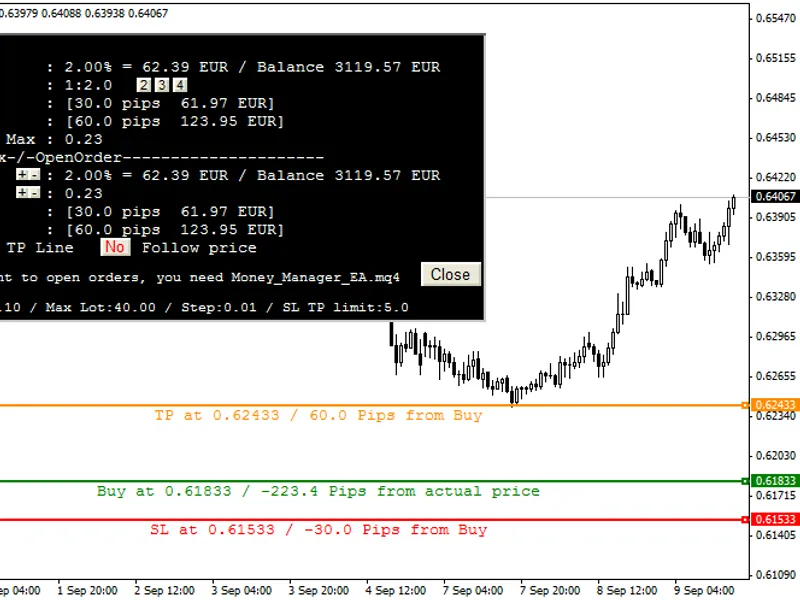
money manager graphic tool shows lot size, ratio, risk and opens orders (buy, sell, buy stop, buy limit, sell stop, sell limit).
hit "
b
"
key
to open the
money manager graphic tool
, a buy line with is sl and tp will appear at the mouse position.
if you want to sell hit "
s
". you can change the letter if you want.
if you want the sell or buy line to
follow the price
, just click "follow price" button.
if you don't want a
tp,
it's easy to make it disappear.
you can move all the line, the money manager graphic tool will
automatically update
.
you can change the
risk
or the
lot size
in the
sandbox section
.
at the bottom, you can see
your broker limits.
if you reach one of these limits, the relevant line will
turn red
.
you can move the dialog box on the screen, use the left-up rectangle, if you don't want to move, double-click on it.
how to install:
load indicator as usual;
add money_manager_ea to your chart;
check to allow opening trades;
enable "autotrading".
the steps 2,3,4 are needed to activate the button of the
money manager graphic tool,
the button allows you to open a trade with all the information you have selected.
parameters:
in the previous image, the "b" was hit and the mouse was at 0.61833. the button to order doesn't appear because the money_manager_ea.mq4 is not loaded.
the money_manager_ea.mq4 is loaded, but "autotrading" is not activated.
yes, the button is here, but the smiley at top-right corner is not happy, you need to activate "allow live trading" in the money_manager_ea options.
now you can play. move the tp, sl or buy/sell line. use the ratio button to go faster. change the lot size and see how much risk you will take. change the risk and see how much lot you can have.
buy, sell, buy limit, sell limit, buy stop, sell stop will be automatically chosen. if a tp or sl information goes red, you reach your broker sl/tp limit. if the lot size information goes red, you reach your broker min or max lot.
choose to follow price, you will open a simple buy or sell, the buy line will automatically move with the price, and the tp and sl will follow too.
recommendations:
sometimes the price moves too fast, so the order will not be opened, an alert will pop up, you can click again on the order button if you want.
i used it for more than a week without any worries. if you have any problems, please let me know.
You may also like: Money Flow Index (MFI) Price Indicator - excellent alternative for indicator users on MetaTrader 4.
Source Code
#property copyright "robotfx"
#property link "https://robotfx.org"
#property version   "1.03"
#property script_show_inputs
#property indicator_chart_window
#property strict
enum lot
  {
   standardlot,     //standard lot 1
   minilot,         //mini lot 0.1
.......
⚠ Limitations & Risk Warning
- This tool is provided for educational and testing purposes only.
- Past performance does not guarantee future results.
- Trading involves substantial risk of loss. Use on a demo account first.
- Results may vary depending on market conditions, broker, and settings.
- We recommend thorough backtesting and forward testing before using with real funds.