

dollar index tracker - see the dollar index right below your chart
Info
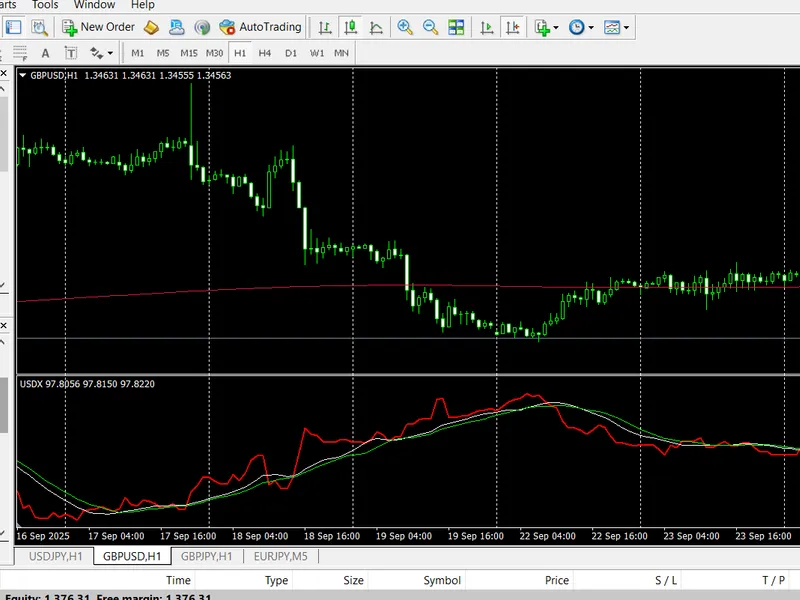
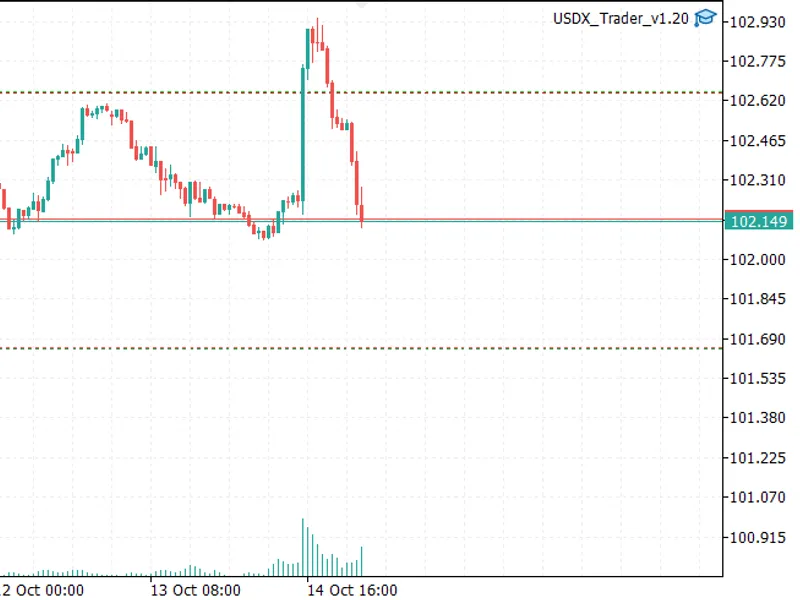
The dollar index tracker - see the dollar index right below your chart is a Indicator for MetaTrader 4 that dollar index tracker calculates and displays the us dollar index (usdx / dxy) directly below the chart of your current trading pair. this makes it easy to compare the strength of the us dollar against a basket of major currencies while analyzing your pair at the same time.
Usage
This tool is typically used for enhancing chart analysis and decision making.
Platform
This Indicator works exclusively on MetaTrader 4 (both build 600+ and newer versions).
Setup
Place the downloaded file in MQL4/Indicators folder via File ? Open Data Folder in MetaTrader 4.
How to Install and Use dollar index tracker - see the dollar index right below your chart
1. Installation: Place your file in the MQL/Indicators folder via "Open Data Folder" and restart your terminal.
2. Loading: Find the indicator in the Navigator, drag it onto your chart, and configure the input parameters in the popup window.
3. Customization: Press Ctrl+I to open the indicator list, select your tool, and click "Properties" to change colors, levels, or visual styles.
4. Updating: Replace the old file in the Indicators folder with the new version and restart the platform to apply changes.
Frequently Asked Questions
Q: Why is my indicator not showing? A: Verify the file is in the MQL/Indicators folder, or try right-clicking the "Indicators" tree in the Navigator and clicking "Refresh."
Q: Do custom indicators slow down the platform? A: Too many complex indicators can impact performance; remove unused ones via the "Indicator List" (Ctrl+I).
Q: Can I use MT4 indicators on MT5? A: No, MQL4 and MQL5 are distinct languages; ensure the indicator is compiled specifically for your platform version.
What this tool does
dollar index tracker calculates and displays the us dollar index (usdx / dxy) directly below the chart of your current trading pair.
Typical Use Case
This Indicator excels in automated trading and technical analysis on MetaTrader 4.
Compatible Platform & Setup
This Indicator works on MetaTrader 4. Place the file in the MQL4/Indicators folder and restart the terminal.
Description & Settings
Related: commodity channel index (cci) - another powerful indicator for MetaTrader 4 traders.
dollar index tracker calculates and displays the us dollar index (usdx / dxy) directly below the chart of your current trading pair. this makes it easy to compare the strength of the us dollar against a basket of major currencies while analyzing your pair at the same time.
Also recommended: mass index - similar indicator with strong performance on MetaTrader 4.
the usdx is based on six major pairs:eur/usd, usd/jpy, gbp/usd, usd/cad, usd/chf, and usd/sek
. each pair has a weight in the formula, with eur/usd having the largest share. the index was introduced in
1973
at a base value of 100 and has been one of the most followed measures of dollar strength ever since.
how it works
dollar index tracker runs the usdx calculation formula in the background:
usdx = 50.14348112 × eurusd^-0.576 × usdjpy^0.136 × gbpusd^-0.119 × usdcad^0.091 × usdsek^0.042 × usdchf^0.036
it then displays the result in a
separate sub-window below your chart
. you can customize the display with two moving averages to smooth the index and highlight trends.
input parameters core settings
indexpairs
– default: "eurusd, usdjpy, gbpusd, usdcad, usdsek, usdchf" → currency pairs to use for usdx calculation.
indexcoefficients
– default: "-0.576, 0.136, -0.119, 0.091, 0.036, 0.042" → weight of each pair in the calculation.
indexinitialvalue
– default: 50.14348112 → base value for usdx formula.
moving averages
ma_period1 (default = 13)
– period of the first moving average. (set 0 to disable.)
ma_period2 (default = 17)
– period of the second moving average. (set 0 to disable.)
ma_mode1 / ma_mode2
– method of calculation (sma, ema, smma, lwma).
example strategies
1. divergence detection
usdx rising but eur/usd also rising → signal that eur is much stronger than other usdx basket currencies.
usdx falling but usd/jpy not dropping → shows jpy weakness compared to others.
2. trend confirmation
if usdx is trending up and your usd pair is also moving in favor, you have extra confirmation to hold trades longer.
3. multi-timeframe context
use the usdx on higher timeframes (h4/d1) while trading your pair on lower ones (m15/h1) to stay aligned with overall dollar strength.
why choose dollar index tracker?
unlike standard ma or rsi tools,
dollar index tracker
gives you
direct insight into the world’s most important currency
. it acts as a correlation filter for usd trades, helping you:
avoid false signals in majors.
confirm the real strength of the dollar.
identify divergence setups before the crowd.
by combining
broad usdx data
with your pair’s chart, you gain an edge in decision-making and risk control.
⚠️
important note
:make sure all six pairs used in the usdx formula (
eurusd, usdjpy, gbpusd, usdcad, usdsek, usdchf
) are visible in your
market watch
window, otherwise the indicator may not calculate correctly.
if the display looks incorrect, try refreshing the chart (e.g., switch to another timeframe and back).
You may also like: accumulative swing index (asi) - excellent alternative for indicator users on MetaTrader 4.
Source Code
#property copyright "RobotFX"
#property link "https://robotfx.org"
#property version   "1.04"
#property strict
#property description "Educational code - RobotFX www.robotfx.org"
#property description "Educational code - RobotFX www.robotfx.org"
#property description "Educational code - RobotFX www.robotfx.org"
#property description "Educational code - RobotFX www.robotfx.org"
#property description "Educational code - RobotFX www.robotfx.org"
#property description "Educational code - RobotFX www.robotfx.org"
.......
⚠ Limitations & Risk Warning
- This tool is provided for educational and testing purposes only.
- Past performance does not guarantee future results.
- Trading involves substantial risk of loss. Use on a demo account first.
- Results may vary depending on market conditions, broker, and settings.
- We recommend thorough backtesting and forward testing before using with real funds.