




Repaint Checker MT4 - Indicator Repainting Detection
Info
The Repaint Checker MT4 - Indicator Repainting Detection is a Expert Advisor for MetaTrader 4 that many indicators may appear reliable in historical tests but fail in live trading due to value or signal changes after bar closure. Repaint Checker is a powerful tool that evaluates any MT4 indicator, providing a detailed analysis of its repainting behavior.
Usage
This tool is typically used for automated trading on major forex pairs and gold.
Platform
This Expert Advisor works exclusively on MetaTrader 4 (both build 600+ and newer versions).
Setup
Place the downloaded file in MQL4/Experts folder via File ? Open Data Folder in MetaTrader 4.
How to Install and Use Repaint Checker MT4 - Indicator Repainting Detection
1. Installation: Open the "File" menu, select "Open Data Folder," navigate to MQL/Experts, paste your file, and restart the terminal.
2. Activation: Drag the EA from the Navigator onto a chart, ensure "Allow live trading" is checked in the Common tab, and verify the AutoTrading button is green.
3. Optimization: Right-click your chart, choose "Expert List," click "Properties" to adjust inputs, and save your preferred setup as a set file for future use.
4. Maintenance: Regularly check the "Experts" tab in the terminal window to monitor trade logs and potential execution errors.
Frequently Asked Questions
Q: Why is my EA not opening trades? A: Check the "AutoTrading" button, ensure "Allow live trading" is enabled, and verify your broker allows automated trading on your account type.
Q: Can I run multiple EAs on one chart? A: No, each chart can only host one active EA; however, you can open multiple charts for different currency pairs to run several EAs.
Q: What does the "smiley face" icon mean? A: A smiley face in the top-right corner of the chart indicates the EA is successfully running; a frowny face means it is disabled.
What this tool does
Many indicators may appear reliable in historical tests but fail in live trading due to value or signal changes after bar closure.
Typical Use Case
This Expert Advisor excels in automated trading and technical analysis on MetaTrader 4.
Compatible Platform & Setup
This Expert Advisor works on MetaTrader 4. Place the file in the MQL4/Experts folder and restart the terminal.
Description & Settings
Related: trading panel - another powerful expert for MetaTrader 4 traders.
Many indicators may appear reliable in historical tests but fail in live trading due to value or signal changes after bar closure. Repaint Checker is a powerful tool that evaluates any MT4 indicator, providing a detailed analysis of its repainting behavior.Also recommended: symbol swap panel utility - similar expert with strong performance on MetaTrader 4.
Functionality
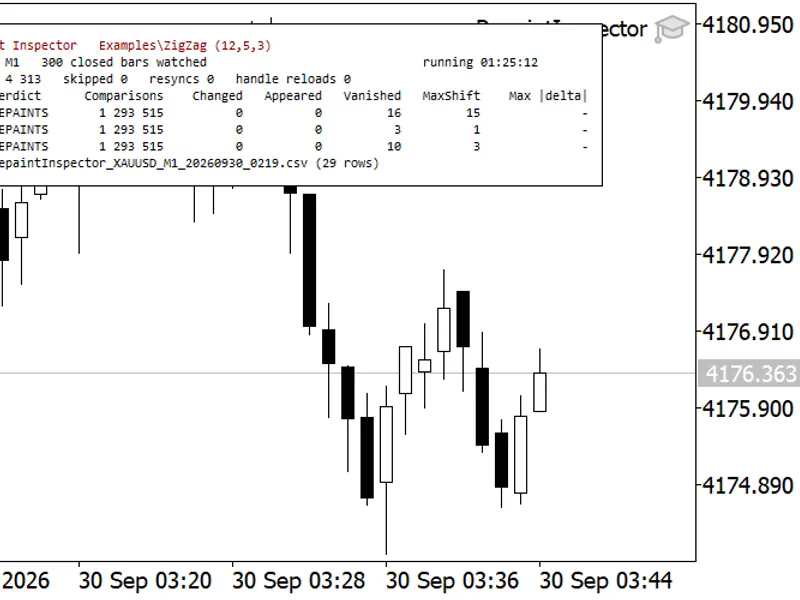
The EA meticulously records the values of each buffer in the tested indicator as each bar closes, mimicking a live trading environment. Subsequently, it re-examines the same bars and conducts a comprehensive comparison.
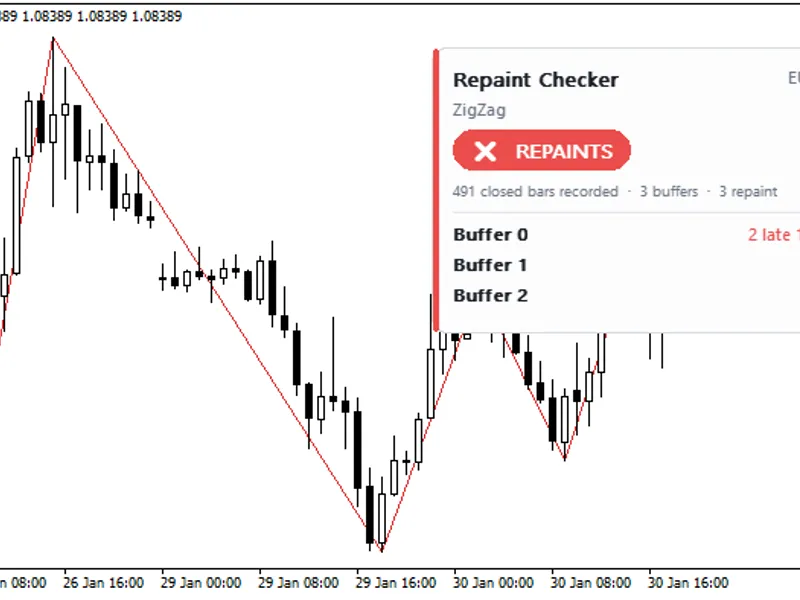
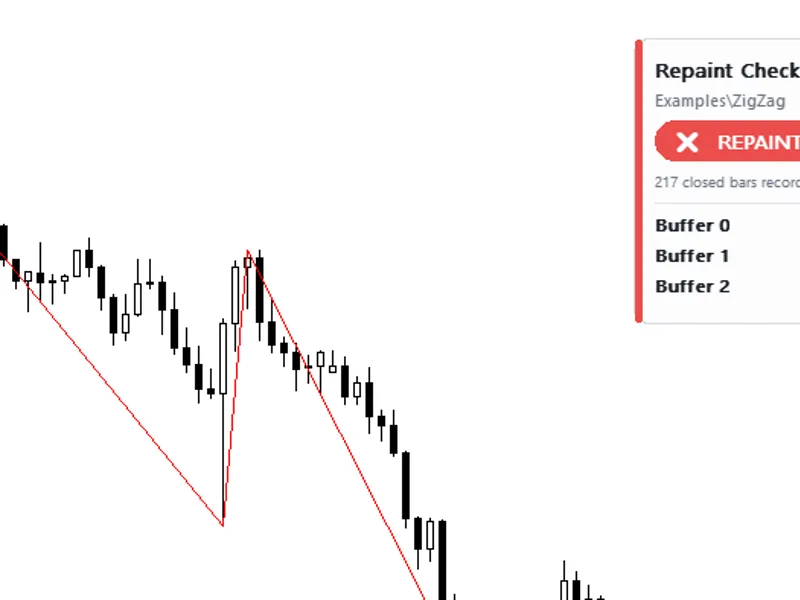
This process involves counting changed values, identifying late-appearing signals (initially empty, later filled), and vanished signals (present at bar close, subsequently gone). The verdict, either 'NO REPAINTING FOUND' or 'REPAINTS', is displayed on a panel and in the journal, accompanied by example dates. A CSV report is generated in the terminal Common\Files folder.
Configuration
Indicator to Test: Specify the indicator's name within MQL4\Indicators, e.g., ZigZag. Leave blank for a demo on built-in Fractals.
Indicator Inputs: Up to 8 numbers or true/false values, comma-separated. Empty inputs default to indicator defaults.
Buffers to Check: MT4 does not reveal the number of buffers, so the first 8 are read, and only buffers with recorded values are reported.
Tolerance: Set a relative change threshold to ignore minor fluctuations.
Result Panel: Show/hide the result panel.
CSV Report: Enable/disable CSV report generation.
Application
Run the EA in the Strategy Tester on any symbol and timeframe with a few months of data. The visual mode displays the panel. Any buffer marked as changed, late, or vanished indicates repainting. Some buffers may hold internal values that change; focus on buffers with lines or signals. MT4's text input limitation requires testing indicators with default settings. The EA does not place trades.
Examples: The built-in Fractals (default demo) are classified as REPAINTS due to the late confirmation of fractals. The standard ZigZag also repaints as its last leg is redrawn during market movements. Non-repainting indicators exhibit no changes across all buffers. An MT5 version is available in CodeBase.
You may also like: read news from forex factory website by web request - excellent alternative for expert users on MetaTrader 4.
Source Code
#property copyright "RobotFX"
#property link "https://robotfx.org"
#property version     "1.00"
#property strict
#property description "This code is educational. Feel free to use, modify and upgrade as you wish. Visit ROBOTFX.ORG for professional trading tools"
#include <Canvas\Canvas.mqh>
input string InpIndicator  = "";
input string InpParams     = "";
input int    InpMaxBuffers = 8;
input double InpTolerance  = 0.0000001;
.......
⚠ Limitations & Risk Warning
- This tool is provided for educational and testing purposes only.
- Past performance does not guarantee future results.
- Trading involves substantial risk of loss. Use on a demo account first.
- Results may vary depending on market conditions, broker, and settings.
- We recommend thorough backtesting and forward testing before using with real funds.