






Repaint Inspector: Unveiling Indicator Repainting
Info
The Repaint Inspector: Unveiling Indicator Repainting is a Expert Advisor for MetaTrader 5 that measures whether an indicator repaints, rather than accepting claims at face value. It attaches to a chart and re-reads indicator buffers on already closed bars, counting every change observed: values that move, appear, or disappear, along with the furthest historical point where these changes occurred.
Usage
This tool is typically used for automated trading on major forex pairs and gold.
Platform
This Expert Advisor works exclusively on MetaTrader 5 (both build 600+ and newer versions).
Setup
Place the downloaded file in MQL5/Experts folder via File ? Open Data Folder in MetaTrader 5.
How to Install and Use Repaint Inspector: Unveiling Indicator Repainting
1. Installation: Open the "File" menu, select "Open Data Folder," navigate to MQL/Experts, paste your file, and restart the terminal.
2. Activation: Drag the EA from the Navigator onto a chart, ensure "Allow live trading" is checked in the Common tab, and verify the AutoTrading button is green.
3. Optimization: Right-click your chart, choose "Expert List," click "Properties" to adjust inputs, and save your preferred setup as a set file for future use.
4. Maintenance: Regularly check the "Experts" tab in the terminal window to monitor trade logs and potential execution errors.
Frequently Asked Questions
Q: Why is my EA not opening trades? A: Check the "AutoTrading" button, ensure "Allow live trading" is enabled, and verify your broker allows automated trading on your account type.
Q: Can I run multiple EAs on one chart? A: No, each chart can only host one active EA; however, you can open multiple charts for different currency pairs to run several EAs.
Q: What does the "smiley face" icon mean? A: A smiley face in the top-right corner of the chart indicates the EA is successfully running; a frowny face means it is disabled.
What this tool does
Measures whether an indicator repaints, rather than accepting claims at face value.
Typical Use Case
This Expert Advisor excels in automated trading and technical analysis on MetaTrader 5.
Compatible Platform & Setup
This Expert Advisor works on MetaTrader 5. Place the file in the MQL5/Experts folder and restart the terminal.
Description & Settings
Related: Ichimoku Oscillator Trading System - another powerful expert for MetaTrader 5 traders.
Measures whether an indicator repaints, rather than accepting claims at face value. It attaches to a chart and re-reads indicator buffers on already closed bars, counting every change observed: values that move, appear, or disappear, along with the furthest historical point where these changes occurred.Also recommended: Kloss Trading Strategy - similar expert with strong performance on MetaTrader 5.
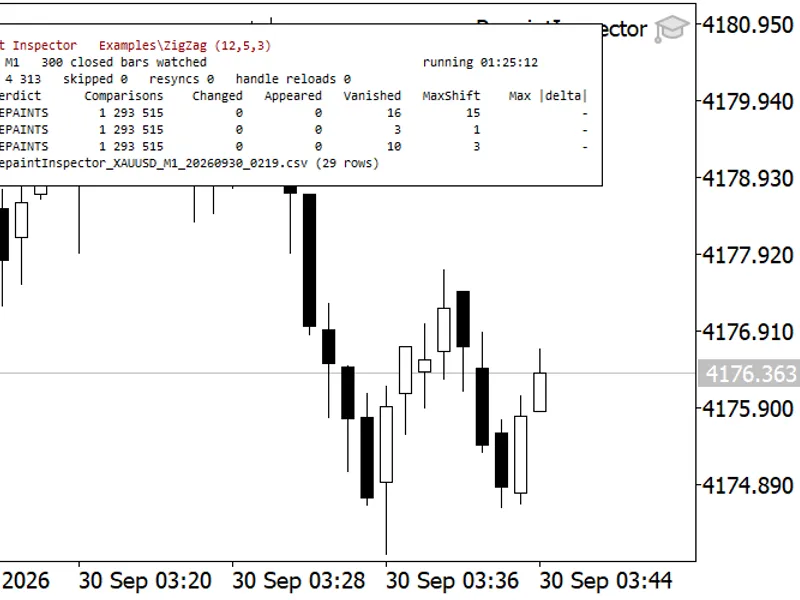
Examples: ZigZag(12,5,3) on XAUUSD M1. The panel was photographed shortly before being stopped, leading to slightly higher totals. Panel colors were adjusted for the screenshot; defaults are light text on a dark panel.
The Problem
"Non-repainting" is a common but difficult claim to verify. The typical test involves visually comparing arrow positions before and after reloading the indicator. However, this method misses two critical scenarios that can lead to losses.
The first is when a value on a previously closed bar changes while the chart remains open. This subtle shift, often by just a few pixels, or the disappearance of an arrow while attention is focused on the chart's edge, can go unnoticed.
The second scenario involves an indicator that behaves correctly during its session but displays a different historical record upon reloading. This can occur after a timeframe switch, terminal restart, or when a fresh chart is loaded.
Both of these issues are measurable. The solution requires a tool that logs the indicator's initial published values and continuously monitors for subsequent changes.
What It Measures
Each bar is identified by its open time, not its shift, ensuring that new bars, scrolling, and history refills are not mistaken for changes.
Only closed bars (shift 1 and higher) are compared. The bar currently forming changes by definition and provides no information about repainting.
The first value recorded for a closed bar serves as the reference. Every subsequent reading is compared against the previous reading (counting an event) and the initial reading (measuring drift).
Three types of events are counted separately due to their varying impact:
Changed: A value has been altered to a different value.
Appeared: An empty slot has received a value, meaning a signal materialized on an already closed bar.
Vanished: A published value has been erased. This is the most critical type, as a signal a trader acted upon may no longer be present in the history for subsequent readers.
The primary metric is MaxShift, representing the largest shift at which any event was detected. An indicator that only redraws the last closed bar differs significantly from one that modifies fifteen bars of history.
Every event is logged to a CSV file, including the bar time, buffer, detection shift, and old/new values, allowing for audited verification rather than mere trust.
The indicator under test is created using IndicatorCreate from a parsed parameter list, enabling the inspection of any custom indicator without modification or recompilation. The parsed parameters are printed to the journal upon startup, making any incorrect parameter list immediately visible.
Optionally, the indicator handle can be released and recreated every N minutes. The recorded history is deliberately not reset, allowing the measurement to capture indicators that are stable during operation but behave differently after a reload.
A check is discarded (counted as skipped, not evidence) if the indicator handle does not exist, the indicator is not yet calculated, there are fewer closed bars than the requested depth, a buffer cannot be copied, or the series shifts between reading times and values.
Sampling limitations exist: a value present for less time than the check interval might be missed. This is a real limitation and is further measured within the report.
Measured Example
The following examples use indicators included with the terminal, allowing anyone to replicate the results.
Live Run, XAUUSD M1, 1 hour 26 minutes
Four instances on four charts within the same terminal and feed, from 2026.09.30 02:19 to 03:46 server time, monitoring 300 closed bars with one check per second.
Indicator Under Test
Buffer
Comparisons
Changed
Appeared
Vanished
MaxShift
Verdict
Examples\ZigZag (12,5,3)
0
1 315 713
0
0
17
15
REPAINTS
Examples\ZigZag (12,5,3)
1
1 315 713
0
0
3
1
REPAINTS
Examples\ZigZag (12,5,3)
2
1 315 713
0
0
10
3
REPAINTS
Examples\Custom Moving Average (13,0,2)
0
1 305 513
0
0
0
-
STABLE
Examples\Fractals, late confirmation
0
1 303 713
0
13
0
3
REPAINTS
Examples\Fractals, late confirmation
1
1 303 713
0
12
0
3
REPAINTS
4387, 4353, and 4347 checks respectively, with 0/0/1 checks skipped, 0 resynchronizations, and 0 handle reloads. The event files contain 30, 0, and 25 rows, matching the sum of the three event columns in each case.
The comparison counts are not round numbers, as expected. During the run, 87 new M1 bars opened, and bars newly opened lack historical closed-bar data. For each instance, (checks - 1) * 300 - 87 accurately reproduces the reported comparison count.
Three distinct signatures observed in one table:
ZigZag deletes its own past: 17 values were erased from the plotted ZigZag buffer, with one deletion occurring 15 bars after that bar had closed. An additional 13 values were affected in the two calculation buffers behind it. No values moved, as a ZigZag extreme is based on a bar's High or Low and cannot drift; instead, it is removed and re-published elsewhere. This explains the Vanished events and the empty delta column.
A moving average of closed bars remains stable: 1 305 513 comparisons were made with zero events recorded.
Fractals present a third case, distinguished from the first: 25 events, all of type Appeared, none Changed, none Vanished, all detected at shift 3. This is not repainting but late confirmation; a fractal requires two additional bars for confirmation, causing the value to legitimately appear three bars back and then remain static. The verdict column still indicates REPAINTS because the tool reports its findings, leaving judgment to the user. An indicator with only Appeared events at a fixed shift is usable with that delay accounted for, whereas an indicator with Vanished events at scattered shifts is not.
Strategy Tester: The Same Measurement in Ten Seconds
Examples\ZigZag(12,5,3), XAUUSD M1, 2026.09.28 to 2026.09.29, 1-minute OHLC modeling, 300 closed bars monitored:
Counter
Value
Verdict
REPAINTS
Checks
5 512
Comparisons on Closed Bars
1 651 923
Changed / Appeared / Vanished
0 / 3 / 342
Distinct Bars That Lost a Value
341
Distinct Bars With at Least One Event
343
MaxShift
28
Skipped Checks / Resynchronizations
0 / 0
CSV Rows
345 (= 342 + 3)
Over one trading day, the ZigZag deleted 342 previously published values on closed bars, with one deletion occurring 28 bars after the bar in question had closed. Three values appeared on already-closed bars. Only one of these three was a returning value: bar 17:06 lost 4126.184, regained the exact same number twenty seconds later, and lost it again a minute after that. This also explains why Max |delta| reads 0.00000000 for the run; it represents a measurement, not a gap.
The 345 events from that day are shown by the shift at which they were detected. Most repainting occurs one or two bars back, highlighting why monitoring only the last closed bar is insufficient.
Examples\Custom Moving Average(13,0,2), same symbol and run window as the ZigZag above: 1 291 114 comparisons were made at the time of the screenshot, with no changed values. The comparison count is deliberately placed next to the verdict—STABLE is only meaningful with its associated count.
Impact of "Treat 0.0 as no value" and Sampling Gap Size
The fourth instance ran the same ZigZag with this option disabled, treating 0.0 as a regular value: 1 308 513 comparisons, 32 events (18 + 3 + 11), all categorized as Changed, with the same MaxShift of 15, and a Max |delta| of 4184.08800000 on the main buffer. This value corresponds to the gold price, as the
You may also like: up3x1 Investor Expert Advisor - excellent alternative for expert users on MetaTrader 5.
Source Code
#property copyright "RobotFX"
#property link "https://robotfx.org"
#property version     "1.00"
#property description "This code is educational. Feel free to use, modify and upgrade as you wish. Visit ROBOTFX.ORG for professional trading tools"
#define RI_MAX_BUFFERS     32
#define RI_MAX_SLOTS       200000
#define RI_MAX_EVENT_LOG   20
#define RI_MAX_ERROR_LOG   5
#define RI_SUMMARY_SECONDS 15
#define RI_RETRY_SECONDS   30
.......
⚠ Limitations & Risk Warning
- This tool is provided for educational and testing purposes only.
- Past performance does not guarantee future results.
- Trading involves substantial risk of loss. Use on a demo account first.
- Results may vary depending on market conditions, broker, and settings.
- We recommend thorough backtesting and forward testing before using with real funds.