







Equivalence Checker: Regression Testing for MQL5 Indicators
Info
The Equivalence Checker: Regression Testing for MQL5 Indicators is a Indicator for MetaTrader 5 that equivalence checker: regression testing for mql5 indicatorsthe idea behind ita custom indicator operates in two distinct modes. When initially attached, the OnCalculate() function processes the entire historical data in a single pass.
Usage
This tool is typically used for enhancing chart analysis and decision making.
Platform
This Indicator works exclusively on MetaTrader 5 (both build 600+ and newer versions).
Setup
Place the downloaded file in MQL5/Indicators folder via File ? Open Data Folder in MetaTrader 5.
How to Install and Use Equivalence Checker: Regression Testing for MQL5 Indicators
1. Installation: Place your file in the MQL/Indicators folder via "Open Data Folder" and restart your terminal.
2. Loading: Find the indicator in the Navigator, drag it onto your chart, and configure the input parameters in the popup window.
3. Customization: Press Ctrl+I to open the indicator list, select your tool, and click "Properties" to change colors, levels, or visual styles.
4. Updating: Replace the old file in the Indicators folder with the new version and restart the platform to apply changes.
Frequently Asked Questions
Q: Why is my indicator not showing? A: Verify the file is in the MQL/Indicators folder, or try right-clicking the "Indicators" tree in the Navigator and clicking "Refresh."
Q: Do custom indicators slow down the platform? A: Too many complex indicators can impact performance; remove unused ones via the "Indicator List" (Ctrl+I).
Q: Can I use MT4 indicators on MT5? A: No, MQL4 and MQL5 are distinct languages; ensure the indicator is compiled specifically for your platform version.
What this tool does
Equivalence Checker: Regression Testing for MQL5 IndicatorsThe Idea Behind ItA custom indicator operates in two distinct modes.
Typical Use Case
This Indicator excels in automated trading and technical analysis on MetaTrader 5.
Compatible Platform & Setup
This Indicator works on MetaTrader 5. Place the file in the MQL5/Indicators folder and restart the terminal.
Description & Settings
Related: XM a Ichimoku Channel - another powerful indicator for MetaTrader 5 traders.
Equivalence Checker: Regression Testing for MQL5 IndicatorsThe Idea Behind It
A custom indicator operates in two distinct modes. When initially attached, the OnCalculate() function processes the entire historical data in a single pass. Subsequently, it functions incrementally: the prev_calculated parameter signals that only the latest bar requires processing, and this same live bar is recalculated on every incoming tick. Most indicator defects manifest in this second mode, while the historical data on the chart appears flawless because it was generated by the first mode. Common issues include adding the same value to a running sum on each tick, initiating a recalculation from a stale state after a new bar opens, and experiencing numerical drift in long-running sums.
Also recommended: Hull Moving Average with Custom Weights - similar indicator with strong performance on MetaTrader 5.
This indicator transforms that challenge into a repeatable test with four key components:
Two Independent Paths.
The incremental path (CalcIncremental()) is the code under scrutiny. It maintains its state within buffers and recalculates the live bar based on the committed state of the preceding bar. The reference path recomputes the same values from scratch: this involves direct summation of the window for the SMA, and a separately stored recursion chain for EMA and Wilder smoothing.
Tick-by-Tick Comparison.
The live bar is compared on every OnCalculate() invocation. The incremental path self-corrects when a bar closes, meaning a defect that only appears during repeated ticks would vanish from the historical record. Consequently, the indicator retains the maximum deviation observed on each live bar and merges it into that bar upon its closure.
A Fixed Dataset.
In the DATASET_FIXED mode, the input series is a pure function of the bar's open time. This ensures that the test data remains consistent across all symbols, brokers, and terminals. Results then become comparable from one code version to the next.
A Regression Digest.
A 32-bit FNV-1a hash is computed over the incremental values within a window anchored at a fixed bar time, rounded to 6 decimal places. Save this hash once as a golden value. After modifying your code, recalculate the digest; it will indicate whether the output has changed.
To demonstrate the checker's ability to detect errors, two defects can be intentionally injected (InpFault): accumulating values on every tick of the live bar, and storing the state with 32-bit float precision. A test that has never failed has never truly been tested.
The test subjects include an SMA calculated on a running sum, an EMA, and Wilder smoothing (RMA). To test your own indicator, replace the body of CalcIncremental() with your logic (ensuring state is kept in buffers) and substitute the reference loop in OnCalculate() with an independent, from-scratch calculation.
How to Interpret It
Error Index Histogram
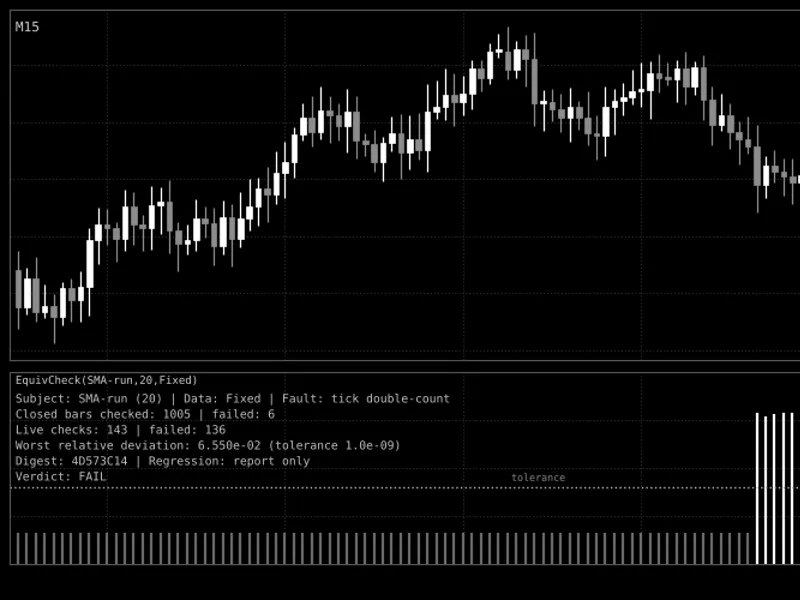
(Displayed in a separate window, with a scale from 0 to 20). Each bar represents 17 + log10(relative deviation), capped within the range of 0 to 20. The relative deviation is calculated as |incremental - reference| / max(1, |reference|). A value of 0 indicates an exact match (within 1e-17 or better), 8 signifies a deviation of approximately 1e-9, and 20 represents a deviation of 1000 or more.
Bar Color.
Gray bars indicate that the bar is within the acceptable tolerance; white bars signify that it is outside the tolerance. The color is determined by the actual deviation, not the plotted height.
Dotted Horizontal Level.
This line marks the tolerance threshold (calculated as 17 + log10(InpTolerance)). With the default value of 1e-9, this level is positioned at 8.
Last Bar.
This displays the most significant deviation observed so far on the current live bar. Closed bars retain the maximum deviation recorded during their live phase, merged with the deviation measured at the time of closure.
Data Window.
Incremental
and
Reference
display the two calculated values for the bar currently under the cursor (no lines are drawn).
Status Panel
(Consists of six text lines within the indicator window):
Subject, period, data source, and any injected fault.
Number of closed bars checked and the count of those that failed.
Number of live checks (one per OnCalculate() call) and the count of those that failed.
The highest relative deviation ever encountered, presented alongside the tolerance level.
Regression digest and its status (report only, PASS, FAIL, waiting, off, or no history before anchor).
Verdict: FAIL if any closed bar, any live check, or the regression digest has failed; otherwise, PASS.
Experts Journal.
The digest line is logged once the digest window is closed. A concise summary is printed when the indicator is removed from the chart.
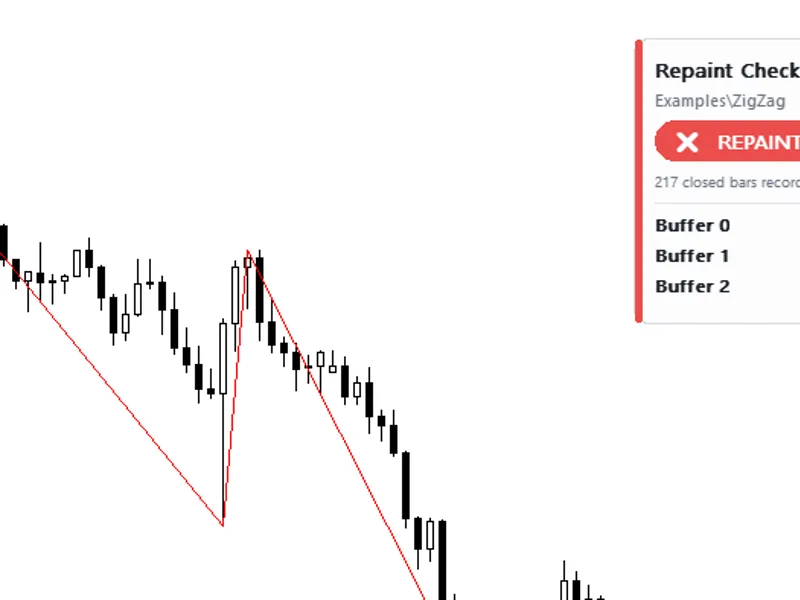
Fig. 1. SMA (running sum) on the fixed dataset with the "Accumulate on every tick of the live bar" fault enabled. Bars verified at the start remain gray; bars that received repeated ticks rise above the dotted tolerance level and turn white. This is a black and white screenshot, adhering to the Code Base image guidelines.
External Variables (Inputs)
Input
Default
Purpose
InpSubject
SMA (running sum)
The algorithm being tested: SMA with a running sum, EMA, or Wilder smoothing (RMA).
InpPeriod
20
Averaging period. Values are restricted to the range of 2 to 5000.
InpDataset
Fixed synthetic series
Data source: either the fixed series (a function of bar open time) or the actual close prices from the chart.
InpTolerance
1.0e-9
Relative tolerance. Deviations exceeding this value are considered failures. Values are limited to the range of 1e-15 to 1e-3.
InpVerifyBars
1000
The number of bars to verify from scratch when the indicator is attached or the history is recalculated. Limited to the range of 50 to 100000.
InpFault
None (normal operation)
An intentionally introduced defect to test the checker: either accumulating on every tick of the live bar, or storing the state using float (32-bit) precision.
InpAnchorTime
2026.01.02 00:00
The open time of the first bar included in the digest window. Setting this to 0 disables the digest functionality.
InpDigestBars
200
The length of the digest window in bars. The entire window must be closed for the digest to be valid.
InpGoldenDigest
(empty)
The expected digest value, represented as 8 hexadecimal digits. If left empty, the indicator will only report; otherwise, the status will be set to PASS or FAIL.
InpShowPanel
true
Determines whether to display or hide the status panel.
InpTextColor
clrSilver
The color of the text displayed in the status panel.
Recommended Use
Normal Run.
Attach the indicator with the default fixed dataset to a highly active symbol (one with frequent quotes). While the calculated values are symbol-independent, the live-bar checks require incoming ticks. Select the desired timeframe for testing, as the fixed series is dependent on the bar open times for that specific timeframe.
Prove the Checker's Functionality.
Set InpFault to the
You may also like: Aroon Filter Oscillator - excellent alternative for indicator users on MetaTrader 5.
Source Code
#property copyright "RobotFX"
#property link "https://robotfx.org"
#property version     "1.00"
#property description "This code is educational. Feel free to use, modify and upgrade as you wish. Visit ROBOTFX.ORG for professional trading tools"
#property tester_everytick_calculate
#property indicator_separate_window
#property indicator_buffers 6
#property indicator_plots   3
#property indicator_minimum 0.0
#property indicator_maximum 20.0
.......
⚠ Limitations & Risk Warning
- This tool is provided for educational and testing purposes only.
- Past performance does not guarantee future results.
- Trading involves substantial risk of loss. Use on a demo account first.
- Results may vary depending on market conditions, broker, and settings.
- We recommend thorough backtesting and forward testing before using with real funds.