





Scale Out Value Analyzer for MT5
Info
The Scale Out Value Analyzer for MT5 is a Script for MetaTrader 5 that analyze the impact of scaling out of positionsscaling out of a trading position is often considered a beneficial strategy. However, no standard MetaTrader report directly compares the blended outcome of scaling out against the potential return if the trader's exit prices were applied differently to the entire position.
Usage
This tool is typically used for enhancing chart analysis and decision making.
Platform
This Script works exclusively on MetaTrader 5 (both build 600+ and newer versions).
Setup
Place the downloaded file in MQL5/Scripts folder via File ? Open Data Folder in MetaTrader 5.
How to Install and Use Scale Out Value Analyzer for MT5
1. Installation: Move your script file into the MQL/Scripts directory and restart the platform.
2. Execution: Drag the script onto a chart; it will perform a one-time action, such as closing all open orders or clearing chart objects.
3. Editing: Use MetaEditor (F4) to modify code, click "Compile," and verify no errors appear in the terminal before running.
4. Removing: Scripts stop automatically, but you can remove them manually by right-clicking the chart and choosing "Remove Script."
Frequently Asked Questions
Q: How are scripts different from EAs? A: Scripts execute a single action and then stop; EAs monitor the market and trade continuously.
Q: Can I assign a hotkey to a script? A: Yes, right-click the script in the Navigator, select "Set Hotkey," and define your preferred keyboard shortcut.
Q: Why did my script stop? A: Scripts are designed to stop immediately after finishing their programmed command; this is normal behavior.
What this tool does
Analyze the Impact of Scaling Out of PositionsScaling out of a trading position is often considered a beneficial strategy.
Typical Use Case
This Script excels in automated trading and technical analysis on MetaTrader 5.
Compatible Platform & Setup
This Script works on MetaTrader 5. Place the file in the MQL5/Scripts folder and restart the terminal.
Description & Settings
Related: tick value compare - another powerful script for MetaTrader 5 traders.
Analyze the Impact of Scaling Out of PositionsScaling out of a trading position is often considered a beneficial strategy. However, no standard MetaTrader report directly compares the blended outcome of scaling out against the potential return if the trader's exit prices were applied differently to the entire position.
Also recommended: exporting indicator values to csv files - similar script with strong performance on MetaTrader 5.
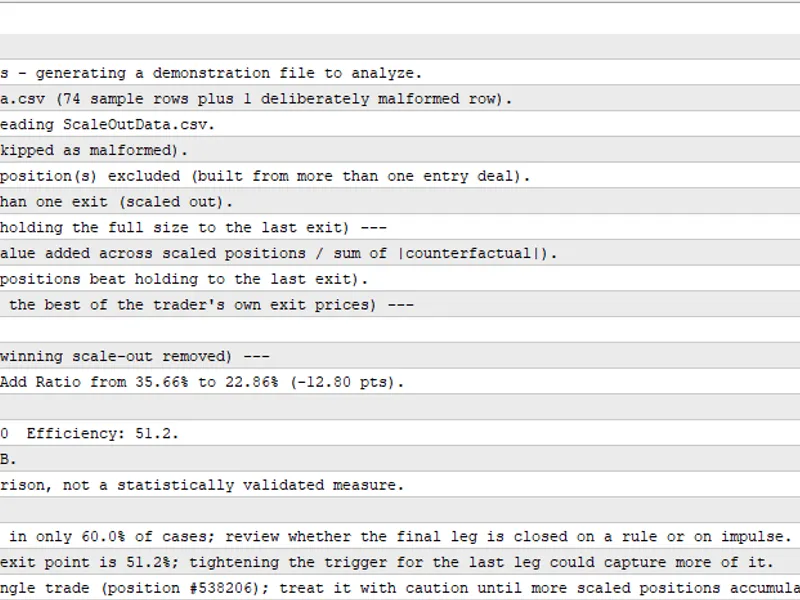
This script processes a CSV file containing closing deal data and generates a comprehensive report in the Experts tab, evaluating the effectiveness of your scaling strategy. The report includes:
- Value-Add Ratio: This metric quantifies the aggregate value gained from scaling out compared to holding the full position until the final exit.
- Scale-Out Win Rate: This indicates the proportion of scaled positions where the scaling-out approach yielded a better result than holding the position to its last exit.
- Scaling Efficiency: This measures the percentage of the best possible outcome, achievable with the trader's own exit prices, that was actually captured.
A composite score, ranging from A+ to F, is provided, which combines these three dimensions. The analysis also includes a single-trade dependence check and offers written recommendations based on the findings.
Input Requirements:
Place a CSV file named according to the `InpFileName` input parameter (default is `ScaleOutData.csv`) into the `terminal MQL5\Files` folder. The CSV file must have the following header row: `PositionID,Symbol,Direction,EntryTime,EntryPrice,EntryCount,TotalVolume,ExitTime,ExitPrice,ExitVolume,ExitProfit,ExitCommission,ExitSwap`, followed by one row of data for each closed deal.
On the first execution, if the specified CSV file is not found, the script will generate a sample dataset and analyze it, ensuring a report is immediately available for review. A companion script, `ScaleOutExport.mq5`, can be used to export your terminal's account history directly into the required CSV format. Run `ScaleOutExport.mq5` once (optionally specifying a date range) and then run `ScaleOutValue.mq5` on the generated file.
Script Parameters:
- `InpFileName`: Specifies the name of the input CSV file.
- `InpMinScaledPositions`: Sets the minimum number of scaled positions required to generate a grade.
- `InpWeightValueAdd`, `InpWeightHitRate`, `InpWeightEfficiency`: These parameters determine the weighting for the three composite score dimensions (weights are normalized automatically).
- `InpValueAddSensitivity`: Adjusts how significantly the Value-Add Ratio impacts its sub-score.
- `InpGradeAPlus` through `InpGradeD`: Define the boundaries for each letter grade.
- `InpHitRateAlertBelow`, `InpEfficiencyAlertBelow`, `InpStressDependenceAlert`: Set thresholds that trigger specific written recommendations.
Technical Details:
This tool is developed entirely in MQL5, requiring no external libraries, Python, or DLLs. A detailed explanation of the methodology and the source code is available in the article: [ARTICLE_URL]. Analysis updated for 2026.
You may also like: Write Double Indicator Values to Binary File - excellent alternative for script users on MetaTrader 5.
Source Code
#property copyright "RobotFX"
#property link "https://robotfx.org"
#property version   "1.00"
#property script_show_inputs
input string InpFileName             = "ScaleOutData.csv";
input int    InpMinScaledPositions   = 5;
input double InpWeightValueAdd       = 40.0;
input double InpWeightHitRate        = 30.0;
input double InpWeightEfficiency     = 30.0;
input double InpValueAddSensitivity  = 1.2;
.......
⚠ Limitations & Risk Warning
- This tool is provided for educational and testing purposes only.
- Past performance does not guarantee future results.
- Trading involves substantial risk of loss. Use on a demo account first.
- Results may vary depending on market conditions, broker, and settings.
- We recommend thorough backtesting and forward testing before using with real funds.