





Magic Number Scorecard: Performance Analysis per EA
Info
The Magic Number Scorecard: Performance Analysis per EA is a Script for MetaTrader 5 that magic number scorecard aggregates closed trades by their assigned magic number, providing a performance summary for each expert advisor (ea) or manual trading activity (magic number 0). This tool offers a clear view of EA profitability and efficiency.
Usage
This tool is typically used for enhancing chart analysis and decision making.
Platform
This Script works exclusively on MetaTrader 5 (both build 600+ and newer versions).
Setup
Place the downloaded file in MQL5/Scripts folder via File ? Open Data Folder in MetaTrader 5.
How to Install and Use Magic Number Scorecard: Performance Analysis per EA
1. Installation: Move your script file into the MQL/Scripts directory and restart the platform.
2. Execution: Drag the script onto a chart; it will perform a one-time action, such as closing all open orders or clearing chart objects.
3. Editing: Use MetaEditor (F4) to modify code, click "Compile," and verify no errors appear in the terminal before running.
4. Removing: Scripts stop automatically, but you can remove them manually by right-clicking the chart and choosing "Remove Script."
Frequently Asked Questions
Q: How are scripts different from EAs? A: Scripts execute a single action and then stop; EAs monitor the market and trade continuously.
Q: Can I assign a hotkey to a script? A: Yes, right-click the script in the Navigator, select "Set Hotkey," and define your preferred keyboard shortcut.
Q: Why did my script stop? A: Scripts are designed to stop immediately after finishing their programmed command; this is normal behavior.
What this tool does
Magic Number Scorecard aggregates closed trades by their assigned magic number, providing a performance summary for each Expert Advisor (EA) or manual trading activity (magic number 0).
Typical Use Case
This Script excels in automated trading and technical analysis on MetaTrader 5.
Compatible Platform & Setup
This Script works on MetaTrader 5. Place the file in the MQL5/Scripts folder and restart the terminal.
Description & Settings
Related: Magic Number Inventory: Trade Logging and Classification - another powerful script for MetaTrader 5 traders.
Magic Number Scorecard aggregates closed trades by their assigned magic number, providing a performance summary for each Expert Advisor (EA) or manual trading activity (magic number 0). This tool offers a clear view of EA profitability and efficiency.Also recommended: File Analysis and Random Number Display - similar script with strong performance on MetaTrader 5.
For each magic number, the report details:
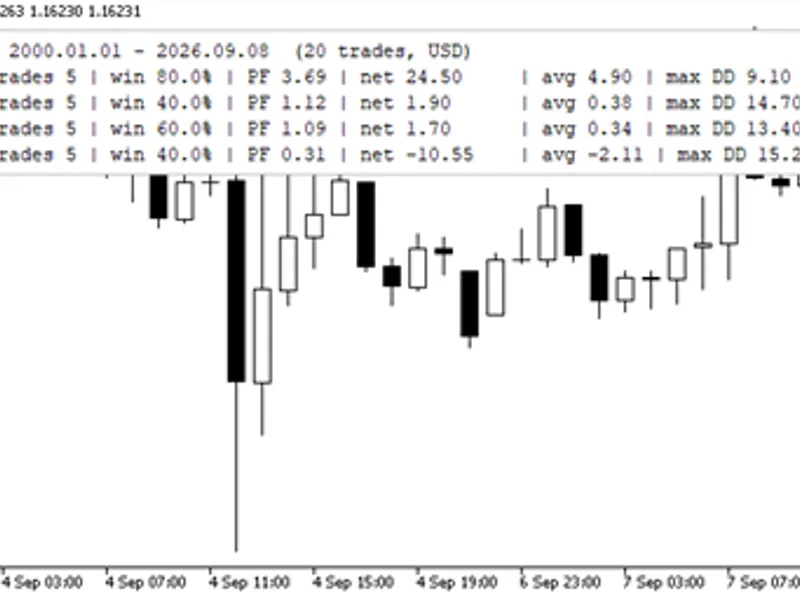
- Number of trades, wins, losses, and win rate.
- Gross profit, gross loss, and profit factor.
- Net profit and average trade profit/loss.
- Best and worst performing trades.
- Maximum drawdown based on the closed-trade equity curve.
- Symbols traded.
The performance table is outputted to the Experts journal, displayed on the chart, and saved to a CSV file (MagicScorecard.csv) within the MQL5\Files directory for easy analysis in spreadsheet software. Results are sorted by net profit in descending order.
Trade Counting Methodology:
A trade is defined as a closed position, with all associated deals, including profit, swap, commission, and fees, summed together. Positions closed in multiple parts are treated as a single trade.
Trade Ownership:
The magic number associated with the opening deal determines the EA responsible for a trade. Trades closed manually are still attributed to the originating EA.
Open positions are excluded from this analysis.
Inputs:
Parameter
Default
Description
From / To
2026.01.01 / 0
Specifies the historical data range. A 'To' value of 0 indicates the current date.
Only this symbol
empty
Filter results for a specific symbol. 'empty' includes all symbols.
Write CSV file / CSV file name
true / MagicScorecard.csv
Enables saving the report to a CSV file in MQL5\Files.
Show the table on the chart
true
Displays the performance table as a chart comment. Setting to false removes the comment.
To use the script, attach it to any chart. It analyzes account history without executing any trades.
You may also like: Number of Objects in a Chart - excellent alternative for script users on MetaTrader 5.
Source Code
#property copyright "RobotFX"
#property link "https://robotfx.org"
#property version     "1.00"
#property description "This code is educational. Feel free to use, modify and upgrade as you wish. Visit ROBOTFX.ORG for professional trading tools"
#property script_show_inputs
#include <Generic\HashMap.mqh>
input datetime InpFrom        = D'2000.01.01 00:00';
input datetime InpTo          = 0;
input string   InpSymbol      = "";
input bool     InpWriteCsv    = true;
.......
⚠ Limitations & Risk Warning
- This tool is provided for educational and testing purposes only.
- Past performance does not guarantee future results.
- Trading involves substantial risk of loss. Use on a demo account first.
- Results may vary depending on market conditions, broker, and settings.
- We recommend thorough backtesting and forward testing before using with real funds.