

Session Candle Counter: DST-Aware Candle Numbering from Session Open
Info
The Session Candle Counter: DST-Aware Candle Numbering from Session Open is a Indicator for MetaTrader 5 that intraday trading often involves references to specific candles after a market open, such as 'the third candle after the open' or 'it turned on bar seven'. Manually counting these on a five-minute chart can be time-consuming and prone to errors, especially when daylight saving time changes occur on different dates for exchanges and broker servers.
Usage
This tool is typically used for enhancing chart analysis and decision making.
Platform
This Indicator works exclusively on MetaTrader 5 (both build 600+ and newer versions).
Setup
Place the downloaded file in MQL5/Indicators folder via File ? Open Data Folder in MetaTrader 5.
How to Install and Use Session Candle Counter: DST-Aware Candle Numbering from Session Open
1. Installation: Place your file in the MQL/Indicators folder via "Open Data Folder" and restart your terminal.
2. Loading: Find the indicator in the Navigator, drag it onto your chart, and configure the input parameters in the popup window.
3. Customization: Press Ctrl+I to open the indicator list, select your tool, and click "Properties" to change colors, levels, or visual styles.
4. Updating: Replace the old file in the Indicators folder with the new version and restart the platform to apply changes.
Frequently Asked Questions
Q: Why is my indicator not showing? A: Verify the file is in the MQL/Indicators folder, or try right-clicking the "Indicators" tree in the Navigator and clicking "Refresh."
Q: Do custom indicators slow down the platform? A: Too many complex indicators can impact performance; remove unused ones via the "Indicator List" (Ctrl+I).
Q: Can I use MT4 indicators on MT5? A: No, MQL4 and MQL5 are distinct languages; ensure the indicator is compiled specifically for your platform version.
What this tool does
Intraday trading often involves references to specific candles after a market open, such as 'the third candle after the open' or 'it turned on bar seven'.
Typical Use Case
This Indicator excels in automated trading and technical analysis on MetaTrader 5.
Compatible Platform & Setup
This Indicator works on MetaTrader 5. Place the file in the MQL5/Indicators folder and restart the terminal.
Description & Settings
Related: Candle Timer Countdown for MetaTrader 5 - another powerful indicator for MetaTrader 5 traders.
Intraday trading often involves references to specific candles after a market open, such as 'the third candle after the open' or 'it turned on bar seven'. Manually counting these on a five-minute chart can be time-consuming and prone to errors, especially when daylight saving time changes occur on different dates for exchanges and broker servers.Also recommended: Trading Session Boxes Indicator for MT4/MT5 - similar indicator with strong performance on MetaTrader 5.
This indicator automates this counting process. It identifies the cash open for your selected session, finds the first candle at or after that time, and then assigns a sequential number to each subsequent candle of that day.
The indicator correctly handles time zone conversions from exchange local time to UTC and then to your broker's server time. It accounts for DST shifts, which occur on specific Sundays in March and October for Frankfurt and London, and in March and November for New York. Tokyo does not observe DST. The broker's time zone offset is read directly from the terminal and rounded to the nearest half-hour, ensuring compatibility with all common server time zones.
The chart display is not altered beyond the temporary text objects created by the indicator, which are removed when the indicator is detached.
Example:
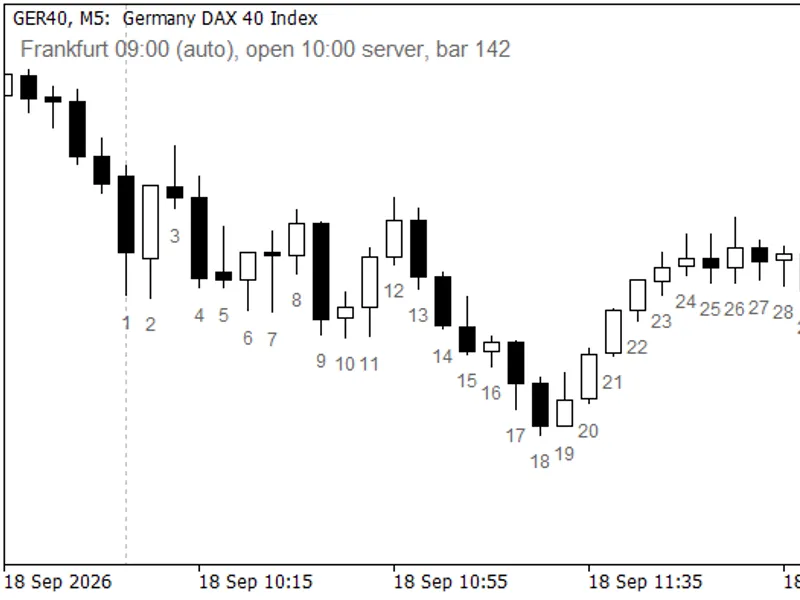
GER40 M5: Numbering begins at the Frankfurt cash open. The dotted line indicates the anchor point.
Features Visible on the Chart
A number displayed beneath each candle starting from the session's cash open, with the first candle of the session numbered as '1'. Candles preceding the session open remain unlabelled, clearly delineating the night and pre-open auction periods.
A switchable dotted vertical line at each session open within the visible chart range. This allows for visual verification of the anchor point against price action.
An information label located in a chart corner displays the selected session, the session open time in server time, and the number of the most recent candle. If the session was automatically detected based on the symbol name, the label will indicate 'auto', as automatic detection is not presented as a fixed setting.
Labels are generated only for the visible portion of the chart and are capped to ensure fast scrolling performance, even on charts with extensive histories. For high-density timeframes, an option is available to label only every Nth candle, preventing visual clutter.
Session Selection
By default, the indicator automatically selects the trading session based on the symbol name: British indices default to London, continental European indices to Frankfurt, US indices to New York, and the Japanese index to Tokyo. Symbols not falling into these categories will default to Frankfurt, and this will be indicated as a 'guess' in the info label. Any automatic selection can be overridden. In manual mode, you can specify a precise server time, such as 15:30, for sessions that the automatic name detection does not cover.
Example:
US30 M5 showing the New York anchor and the info label with session open time and the latest candle number.
Input Parameters
Parameter
Default
Meaning
InpSession
Auto
Session anchor: Auto, Frankfurt 09:00, London 08:00, New York 09:30, Tokyo 09:00, or Manual
InpManualOpen
09:00
Open time in server time (format HH:MM), used when the Manual session is selected
InpLabelEvery
1
Label every Nth candle; 1 labels all. The first candle is always labelled
InpMaxLabels
500
Maximum number of labels displayed on the chart
InpDaysBack
10
Number of recent calendar days to label; 0 removes the limit
InpLabelColor
DimGray
Color of the candle numbers and the info label
InpFontSize
7
Font size for the candle numbers; the info label uses a font size two points larger
InpLabelOffsetPct
1.5
Vertical offset of the number below the candle low, as a percentage of the visible price range
InpShowOpenLine
true
Display the dotted vertical line at each session open
InpOpenLineColor
Silver
Color of the session open line
InpShowInfo
true
Display the info label
InpInfoCorner
left upper
Position of the info label (e.g., 'left upper', 'right lower')
InpInfoX
10
Horizontal offset for the info label in pixels
InpInfoY
20
Vertical offset for the info label in pixels
Supported Symbols and Timeframes
This indicator is designed for index CFDs and stock symbols with a defined cash open, such as GER40, UK100, US30, NAS100, US500, and JP225. Timeframes from M1 to H1 are suitable, with M5 and M15 being common choices for intraday analysis. For M1 charts, consider setting InpLabelEvery to 5 or 10 to avoid label overcrowding. For Forex pairs, where a cash open is not applicable, use the manual mode with a time that is significant to your trading strategy.
Limitations
The candle count adheres to calendar days. If a session's open occurs before the server's midnight (which can happen with specific server offsets and the Tokyo anchor), the numbering will restart on the same calendar day, not across midnight.
The indicator does not have knowledge of exchange holidays. On days when the exchange is closed but the CFD continues to trade, the count will proceed from the usual open time.
In the Strategy Tester, the terminal reports simulated server time as GMT. This results in a broker offset of zero and anchors treated as UTC. While the numbering remains consistent, the displayed clock time may differ.
Session detection relies on the symbol name. For brokers using non-standard naming conventions, symbols may default to the Frankfurt fallback, which is indicated as 'auto' in the info label.
This indicator is for display purposes only. It does not utilize buffers, write files, or send trading orders.
Quick Start Guide
Attach the indicator to an index chart (e.g., M5 timeframe) and leave all input parameters at their default settings. Candle numbers for the current session will immediately appear.
Verify the dotted line against your expected session open time. If the symbol name is not recognized by the indicator's detection logic, manually select the correct session using the InpSession parameter.
For M1 charts, increase InpLabelEvery to 5. For extensive historical data, consider reducing InpDaysBack to manage the number of displayed labels.
This indicator is provided as a free companion to my proprietary trading utilities available in the Market. It operates independently and requires no additional components.
You may also like: Accurate Broker Time Zones and Session Lines for MT4/MT5 - excellent alternative for indicator users on MetaTrader 5.
Source Code
#property copyright "RobotFX"
#property link "https://robotfx.org"
#property version "1.00"
#property description "This code is educational. Feel free to use, modify and upgrade as you wish. Visit ROBOTFX.ORG for professional trading tools"
#property indicator_chart_window
#property indicator_buffers 0
#property indicator_plots 0
enum ENUM_SC_SESSION
  {
   SC_AUTO=0,
.......
⚠ Limitations & Risk Warning
- This tool is provided for educational and testing purposes only.
- Past performance does not guarantee future results.
- Trading involves substantial risk of loss. Use on a demo account first.
- Results may vary depending on market conditions, broker, and settings.
- We recommend thorough backtesting and forward testing before using with real funds.