








clear view - price pointer, round number marker, period separator, and template
Info
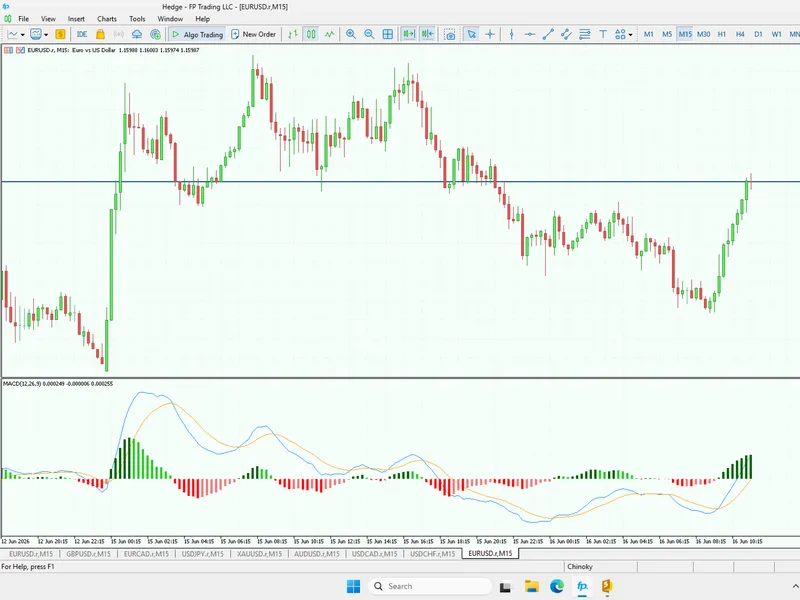
The clear view - price pointer, round number marker, period separator, and template is a Indicator for MetaTrader 5 that this is a set of three indicators to enhance the look of your charts. use it as an alternative to the default 'show grid' option in the chart properties menu.
Usage
This tool is typically used for enhancing chart analysis and decision making.
Platform
This Indicator works exclusively on MetaTrader 5 (both build 600+ and newer versions).
Setup
Place the downloaded file in MQL5/Indicators folder via File ? Open Data Folder in MetaTrader 5.
How to Install and Use clear view - price pointer, round number marker, period separator, and template
1. Installation: Place your file in the MQL/Indicators folder via "Open Data Folder" and restart your terminal.
2. Loading: Find the indicator in the Navigator, drag it onto your chart, and configure the input parameters in the popup window.
3. Customization: Press Ctrl+I to open the indicator list, select your tool, and click "Properties" to change colors, levels, or visual styles.
4. Updating: Replace the old file in the Indicators folder with the new version and restart the platform to apply changes.
Frequently Asked Questions
Q: Why is my indicator not showing? A: Verify the file is in the MQL/Indicators folder, or try right-clicking the "Indicators" tree in the Navigator and clicking "Refresh."
Q: Do custom indicators slow down the platform? A: Too many complex indicators can impact performance; remove unused ones via the "Indicator List" (Ctrl+I).
Q: Can I use MT4 indicators on MT5? A: No, MQL4 and MQL5 are distinct languages; ensure the indicator is compiled specifically for your platform version.
What this tool does
this is a set of three indicators to enhance the look of your charts.
Typical Use Case
This Indicator excels in automated trading and technical analysis on MetaTrader 5.
Compatible Platform & Setup
This Indicator works on MetaTrader 5. Place the file in the MQL5/Indicators folder and restart the terminal.
Description & Settings
Related: MACD Trading View Style for MT5 - another powerful indicator for MetaTrader 5 traders.
this is a set of three indicators to enhance the look of your charts. use it as an alternative to the default 'show grid' option in the chart properties menu. a template is also included to facilitate the loading of all three indicators.Also recommended: X Bar Clear Close Trend Indicator - similar indicator with strong performance on MetaTrader 5.
these indicators may be particularly useful for manual or hybrid trading, but they can also provide visual cues for optimizing automated trading systems.
the concept behind these indicators is based on the tendency of traders to set targets and stops near round numbers (e.g., 50/100/500/1000 pips) and historical highs and lows on the chart. these price points often become support or resistance areas. the indicators clearly highlight when the price is approaching these critical points.
when loading the indicators, allow sufficient time for the terminal to update the history for the current chart and retrieve data from the monthly chart.
the default color schemes are optimized for use on a black background.
clearview_pricepointer
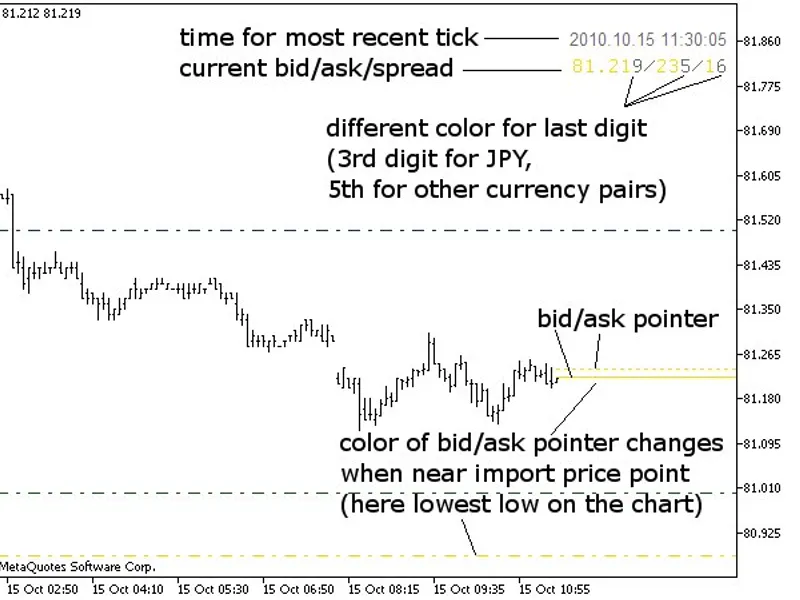
- bid/ask pointer with color-coded alerts every 500/1000 pips, daily high/low, high/low on the chart, and historical high/low.
- displays the last bid/ask/spread/tick-time.
- option to print the high/low for the current chart and the historical high/low for the currency upon loading the indicator.
- ability to set historical high/low manually if your data provider's history is insufficient.
- toggle bid and ask lines on or off separately.
- extend bid/ask lines to the start of the chart or just to the latest bar.
- bid/ask lines change color when approaching significant price points (500/1000 pips, daily high/low, high/low on the chart, historical high/low).
- set the pip threshold for color change in the bid/ask lines when near important price points (e.g., 10 pips between 1.30104 and 1.30204).
- option to color-code the last (5th) digit in bid/ask/spread for better visibility.
- choose the corner for displaying the bid/ask/spread/time of the last tick.
- show the bid/ask/spread/time in the main window or in another subwindow of the same chart.
- note: when using clearview_pricepointer, consider shifting the chart for improved visibility (enable 'chart shift' on the 'common' tab of chart properties).
clearview_roundnumbermarker
- draws markers for every 50/100/500/1000 pips, high/low on the chart, and historical high/low.
- select between bright or dim color sets for line visibility.
- draw lines as background (default) or foreground.
- option to print the high/low for the current chart and the historical high/low for the currency upon loading.
- manual setting of historical high/low if your data provider's history is insufficient.
- when price reaches historical high/low or chart's high/low, it marks potential support/resistance areas and displays the new high/low.
- set the duration for marking previous high/low price points (default=1 day).
- specify the maximum timeframe for displaying each marker. for instance, you can show 100-pip markers (eurusd 1.3000, 1.3100, etc.) only up to the 1-hour timeframe, preventing chart clutter when switching timeframes.
- markers have object descriptions indicating 50, 100, 500, or 1000 pips, chart's (previous) high/low, or (previous) historical high/low.
clearview_periodseparator
- period separator marks days, weeks, months, and custom session start/end.
- choose between bright or dim color sets for line visibility.
- draw lines as background (default) or foreground.
- set custom start and end times for your trading session.
- specify whether each marker is shown and up to which timeframe. for example, display daily markers only up to the 1-hour timeframe to avoid clutter.
- markers have object descriptions for session start/end, day (with a three-letter abbreviation), week, month, or year.
- session start/end and new day markers are projected into the future to indicate remaining time.
clearview_charttemplate
- a template for quickly loading the three indicators.
- note: the template searches for indicators in the default folder /mql5/indicators.
the images below are on a white background, and some colors may not appear correctly due to the default settings optimized for a black background. all colors can be customized in the indicator properties to match your preferred background color.
You may also like: Inverted Chart View Indicator - excellent alternative for indicator users on MetaTrader 5.
Source Code
#property copyright "robotfx"
#property description "this code is educational. feel free to use, modify and upgrade as you wish. visit robotfx.org for professional trading tools"
#property description "this code is educational. feel free to use, modify and upgrade as you wish. visit robotfx.org for professional trading tools"
#property description "this code is educational. feel free to use, modify and upgrade as you wish. visit robotfx.org for professional trading tools"
#property description "this code is educational. feel free to use, modify and upgrade as you wish. visit robotfx.org for professional trading tools"
#property description "this code is educational. feel free to use, modify and upgrade as you wish. visit robotfx.org for professional trading tools"
/*----------------------------------------------------------------------------------------------------
   this is one of a set of three indicators to enhance the look of your charts.
   the other indicators are: clearview_roundnumbermarker and clearview_periodseparator
   a template to quickly load all three is also available: clearview_charttemplate.tpl
.......
⚠ Limitations & Risk Warning
- This tool is provided for educational and testing purposes only.
- Past performance does not guarantee future results.
- Trading involves substantial risk of loss. Use on a demo account first.
- Results may vary depending on market conditions, broker, and settings.
- We recommend thorough backtesting and forward testing before using with real funds.