






Magic Number Inventory: Trade Logging and Classification
Info
The Magic Number Inventory: Trade Logging and Classification is a Script for MetaTrader 5 that when running multiple expert advisors (eas) or trading manually alongside an ea, the standard account statement aggregates all activity into a single equity curve. This makes it impossible to discern which systems are profitable, which have ceased trading, or which are solely responsible for the account's performance.
Usage
This tool is typically used for enhancing chart analysis and decision making.
Platform
This Script works exclusively on MetaTrader 5 (both build 600+ and newer versions).
Setup
Place the downloaded file in MQL5/Scripts folder via File ? Open Data Folder in MetaTrader 5.
How to Install and Use Magic Number Inventory: Trade Logging and Classification
1. Installation: Move your script file into the MQL/Scripts directory and restart the platform.
2. Execution: Drag the script onto a chart; it will perform a one-time action, such as closing all open orders or clearing chart objects.
3. Editing: Use MetaEditor (F4) to modify code, click "Compile," and verify no errors appear in the terminal before running.
4. Removing: Scripts stop automatically, but you can remove them manually by right-clicking the chart and choosing "Remove Script."
Frequently Asked Questions
Q: How are scripts different from EAs? A: Scripts execute a single action and then stop; EAs monitor the market and trade continuously.
Q: Can I assign a hotkey to a script? A: Yes, right-click the script in the Navigator, select "Set Hotkey," and define your preferred keyboard shortcut.
Q: Why did my script stop? A: Scripts are designed to stop immediately after finishing their programmed command; this is normal behavior.
What this tool does
When running multiple Expert Advisors (EAs) or trading manually alongside an EA, the standard account statement aggregates all activity into a single equity curve.
Typical Use Case
This Script excels in automated trading and technical analysis on MetaTrader 5.
Compatible Platform & Setup
This Script works on MetaTrader 5. Place the file in the MQL5/Scripts folder and restart the terminal.
Description & Settings
Related: Magic Number Scorecard: Performance Analysis per EA - another powerful script for MetaTrader 5 traders.
When running multiple Expert Advisors (EAs) or trading manually alongside an EA, the standard account statement aggregates all activity into a single equity curve. This makes it impossible to discern which systems are profitable, which have ceased trading, or which are solely responsible for the account's performance. The magic number, associated with every trade placed by an EA, provides this crucial separating information.Also recommended: File Analysis and Random Number Display - similar script with strong performance on MetaTrader 5.
This script analyzes trade history to categorize and present performance by magic number. Load it onto any chart for the account you wish to audit. It reads historical data only and does not execute trades. Algorithmic trading does not need to be enabled, and the chart's symbol is irrelevant as the entire account history is scanned.
As a script, it runs once and then self-removes.
WHAT THE SCRIPT REPORTS
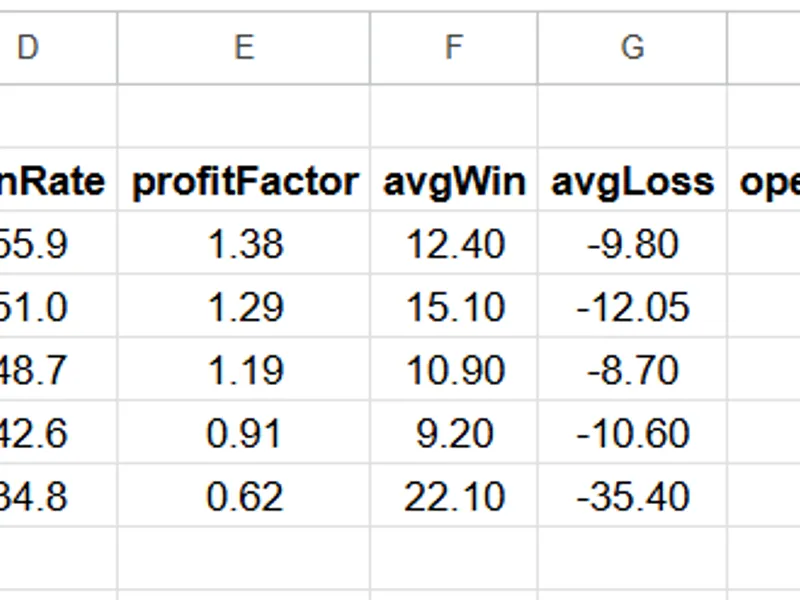
A table is generated with one line per magic number, sorted by net profit (best first). The columns include:
- trades: Number of closed round turns (handling of partial closes is detailed below).
- net P/L: Realized profit and loss, including swaps and commissions.
- win%, PF: Win rate and profit factor, calculated per round turn.
- avgWin/Loss: Average profit of winning round turns and average loss of losing round turns.
- open(vol): Currently open positions for this magic number and their total volume.
- pend: Number of pending orders currently placed by this magic number.
- first..last: Dates of the first and last activity for this magic number.
- symbols: Instruments traded (truncated to a maximum of three, indicated with a '+').
A 'totals' row summarizes the overall results.
Magic number 0 aggregates manual trades and trades from EAs that do not specify a magic number. This category often represents a mix of different trading activities.
With 'InpExportCSV' enabled (the default setting), the same table is exported to MQL5\Files\MagicInventory.csv for further analysis in spreadsheet software.
IMPORTANT IMPLEMENTATION DETAILS AFFECTING RESULTS
Two aspects of trade execution can lead to misinterpretations if not handled correctly, potentially flattering performance metrics:
1. Partial Closes: A single position closed in multiple parts results in one entry deal and multiple exit deals. Counting each exit deal as a separate trade inflates the trade count and can inaccurately split a single profitable or losing trade into multiple smaller wins and losses. This script aggregates deals by DEAL_POSITION_ID before calculating metrics, ensuring win rate and profit factor remain accurate for systems that scale out of positions.
2. Entry Commission Calculation: Many brokers charge half of the round-turn commission on the initial entry deal, even when the DEAL_PROFIT is zero at that stage. A tool that only analyzes closing deals would miss this entry commission, overstating the net Profit and Loss by approximately half the total commission cost. This script accounts for commission on every deal within a position to provide an accurate net result.
Positions that are still open, including those that have been partially closed with a remaining portion still active, are not counted as closed trades because their final cost and profit are not yet determined. These are reported in the 'open(vol)' column.
HOW TO INTERPRET THE TABLE
- A magic number showing many closed trades but no open positions or pending orders, with an old 'last activity date,' may have become inactive. Investigate if a filter is preventing market entry or if the system has stopped functioning.
- A magic number whose entire net profit derives from a few large wins, indicated by a high 'avgWin' and a low win rate, might be performing inconsistently. The trading strategy's risk management should account for this reliance on rare, large-magnitude events.
- A profit factor below 1.0 with a significant history suggests a system that is losing money over time. A profit factor above 2.0 based on only a few trades may be statistical noise; wait for a larger sample size before drawing firm conclusions.
- If two magic numbers consistently show open positions simultaneously on correlated symbols, they might represent overlapping exposure under different names. The 'Portfolio Correlation Analyzer' companion script can measure the correlation between their monthly Profit and Loss.
NOTES
- The analysis is limited to the data held by the MetaTrader terminal. Ensure the 'History' tab is set to display 'All history' (right-click in the History tab and select 'All history') before running the script for a complete analysis.
- Deposits, withdrawals, credits, and account corrections are not considered trades and are therefore excluded from the report.
- Very old history entries that lack a position ID may be skipped to prevent miscounting.
- All output is read-only. Refer to the bundled guide for detailed installation and interpretation instructions.
You may also like: Number of Objects in a Chart - excellent alternative for script users on MetaTrader 5.
Source Code
#property copyright "RobotFX"
#property version   "1.10"
#property script_show_inputs
input bool InpExportCSV = true;
long   p_id[];
long   p_magic[];
double p_net[];
double p_volIn[], p_volOut[];
long   p_first[], p_last[];
string p_sym[];
.......
⚠ Limitations & Risk Warning
- This tool is provided for educational and testing purposes only.
- Past performance does not guarantee future results.
- Trading involves substantial risk of loss. Use on a demo account first.
- Results may vary depending on market conditions, broker, and settings.
- We recommend thorough backtesting and forward testing before using with real funds.