
create custom bitmap image script
Info
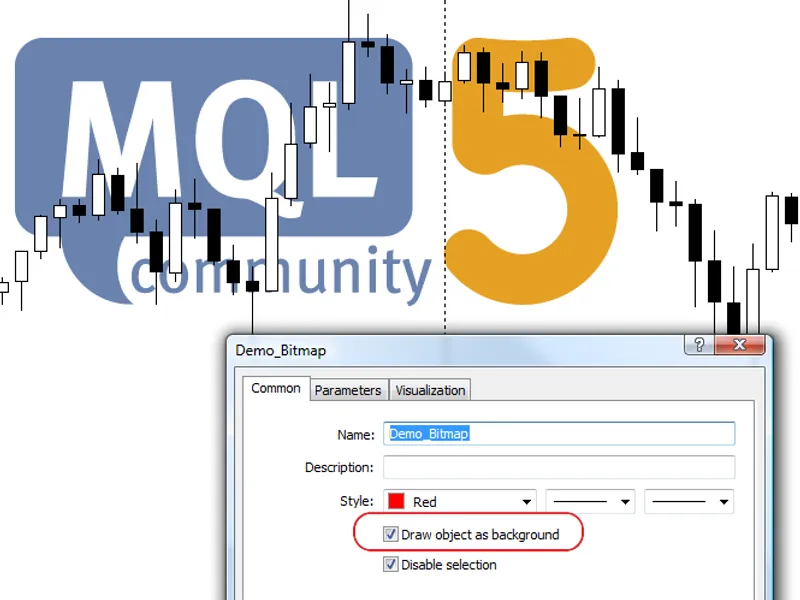
The create custom bitmap image script is a Script for MetaTrader 5 that the graphic object of type allows to show the. bmp images on the chart.
Usage
This tool is typically used for enhancing chart analysis and decision making.
Platform
This Script works exclusively on MetaTrader 5 (both build 600+ and newer versions).
Setup
Place the downloaded file in MQL5/Scripts folder via File ? Open Data Folder in MetaTrader 5.
How to Install and Use create custom bitmap image script
1. Installation: Move your script file into the MQL/Scripts directory and restart the platform.
2. Execution: Drag the script onto a chart; it will perform a one-time action, such as closing all open orders or clearing chart objects.
3. Editing: Use MetaEditor (F4) to modify code, click "Compile," and verify no errors appear in the terminal before running.
4. Removing: Scripts stop automatically, but you can remove them manually by right-clicking the chart and choosing "Remove Script."
Frequently Asked Questions
Q: How are scripts different from EAs? A: Scripts execute a single action and then stop; EAs monitor the market and trade continuously.
Q: Can I assign a hotkey to a script? A: Yes, right-click the script in the Navigator, select "Set Hotkey," and define your preferred keyboard shortcut.
Q: Why did my script stop? A: Scripts are designed to stop immediately after finishing their programmed command; this is normal behavior.
What this tool does
the graphic object of type allows to show the.
Typical Use Case
This Script excels in automated trading and technical analysis on MetaTrader 5.
Compatible Platform & Setup
This Script works on MetaTrader 5. Place the file in the MQL5/Scripts folder and restart the terminal.
Description & Settings
Related: create csv history file from mt5 for mt4 - another powerful script for MetaTrader 5 traders.
the graphic object of type allows to show the .bmp images on the chart.Also recommended: fibonacci retracement with custom values - similar script with strong performance on MetaTrader 5.
unzip the mql5_logo.bmp to terminal_data_folder\mql5\images\ folder
it's possible to draw the image as background (draw image as background object property).
by default, the disable selection property is enabled for all graphic objects, created in mql5.
Source Code
#property copyright "robotfx"
#property link "https://robotfx.org"
#property version   "1.00"
#property script_show_inputs
input string   picture_filename="\\images\\mql5_logo.bmp";
string bitmap_name="demo_bitmap";        // obj_bitmap object name
void onstart()
  {
   if(objectfind(0,bitmap_name)<0)
     {
.......
⚠ Limitations & Risk Warning
- This tool is provided for educational and testing purposes only.
- Past performance does not guarantee future results.
- Trading involves substantial risk of loss. Use on a demo account first.
- Results may vary depending on market conditions, broker, and settings.
- We recommend thorough backtesting and forward testing before using with real funds.