







Safe Pyramiding: Add to Winning Trades Only When Risk-Free
Info
The Safe Pyramiding: Add to Winning Trades Only When Risk-Free is a Library for MetaTrader 5 that pyramiding can significantly enhance a successful trend trade, but incorrect implementation can transform a winning position into a substantial loss. This include ensures that additions to trades are only made when certain safety criteria are met:All open positions in the same direction must have their stop-loss set at break-even or a more favorable level.
Usage
This tool is typically used for enhancing chart analysis and decision making.
Platform
This Library works exclusively on MetaTrader 5 (both build 600+ and newer versions).
Setup
Place the downloaded file in MQL5/Libraries folder via File ? Open Data Folder in MetaTrader 5.
How to Install and Use Safe Pyramiding: Add to Winning Trades Only When Risk-Free
1. Storage: Place library files in the MQL/Libraries directory to ensure they are accessible to your projects.
2. Implementation: Include the library in your code using the #import directive, ensuring you match the exact function names and parameters.
3. Compilation: Ensure the library is present in the directory before you compile your main EA or script, as the compiler links them during this phase.
4. Management: Keep libraries organized in sub-folders if you manage many custom functions to maintain a clean project structure.
Frequently Asked Questions
Q: What is a library file used for? A: Libraries store reusable code modules, allowing you to centralize common logic used by multiple EAs or indicators.
Q: Is a library executable? A: No, libraries are non-executable files containing functions; they must be imported into an EA, indicator, or script to function.
Q: Can I update a library while the platform is running? A: You should compile your EA or script after updating a library to ensure the latest code changes are integrated.
What this tool does
Pyramiding can significantly enhance a successful trend trade, but incorrect implementation can transform a winning position into a substantial loss.
Typical Use Case
This Library excels in automated trading and technical analysis on MetaTrader 5.
Compatible Platform & Setup
This Library works on MetaTrader 5. Place the file in the MQL5/Libraries folder and restart the terminal.
Description & Settings
Related: cexecutionsafety: network latency guard for metatrader 5 expert advisors - another powerful library for MetaTrader 5 traders.
Pyramiding can significantly enhance a successful trend trade, but incorrect implementation can transform a winning position into a substantial loss. This include ensures that additions to trades are only made when certain safety criteria are met:Also recommended: Smooth Algorithms for Trading Analysis - similar library with strong performance on MetaTrader 5.
All open positions in the same direction must have their stop-loss set at break-even or a more favorable level.
The newest position must have achieved a profit of at least 'x R', where 'R' represents the stop-loss distance of the initial trade.
The maximum allowed number of additions has not been reached.
The stop-loss for an added position must respect defined stop-loss levels, and sufficient free margin must be available.
An added position will have the same stop-loss distance as the initial trade but with a smaller lot size (e.g., 0.5x). This ensures that the total open risk never exceeds the risk of a single added position.
Functions
pyr.Setup(magic, max_adds, profit_to_add, add_lot_multiplier) - Configures the pyramiding system. For example, pyr.Setup(12345, 2, 1.0, 0.5) sets a maximum of 2 additions, allows adding when the profit reaches +1R, and sets the lot size for additions to half of the initial trade's lot size.
LS_Pyramid::Remember(ticket, open_price, stop_loss) - Call this function after every trade entry to store the stop-loss distance. This information persists even after a terminal restart.
pyr.CanAdd(position_type, lot, stop_loss) - Returns true if an addition to the trade is permitted, providing the calculated lot size and stop-loss level for the add.
pyr.Verbose(true/false) - Enables or disables detailed journal entries explaining why an addition is not allowed.
Usage
Include the library:
#include
Instantiate the object:
LS_Pyramid pyr;
Configure the system:
pyr.Setup(12345, 2, 1.0, 0.5);
After EVERY trade entry (including the initial trade and all additions):
LS_Pyramid::Remember(positionTicket, openPrice, sl);
Later, for example, on a new bar and only if your trading signal remains valid:
double lot, sl;
if(pyr.CanAdd(POSITION_TYPE_BUY, lot, sl))
trade.Buy(lot, _Symbol, 0, sl);
This include file only makes the decision regarding additions; it does not execute trades. Your Expert Advisor (EA) is responsible for opening orders, thus maintaining control over your own filters such as signal validity, spread, trading sessions, and news events. This system is designed for hedging accounts only; it will always return false for netting accounts.
To set stops to break-even, the package utilizes LS_StopManager.mqh, which is a library for break-even and trailing stops. Alternatively, you can integrate your own stop management code.
Demo EA
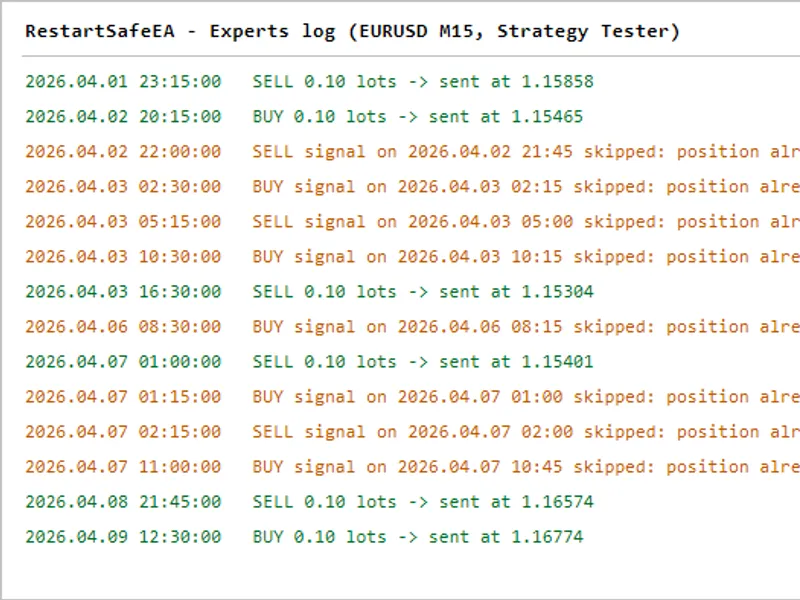
The provided demo EA does not open trades on live or demo accounts. Instead, it exclusively prints messages indicating when an addition to your existing positions would be permissible. Within the strategy tester, it simulates an example buy trade, moves the stop-loss to break-even, and executes a simulated addition, allowing you to observe its behavior in the journal. An example screenshot shows XAUUSD on H1 timeframe in October 2026.
A complementary lot size calculator is available for use with this system.
You may also like: mediator - behavioral design pattern - excellent alternative for library users on MetaTrader 5.
Source Code
#property copyright "RobotFX"
#property link "https://robotfx.org"
#property version   "1.00"
#property description "This code is educational. Feel free to use, modify and upgrade as you wish. Visit ROBOTFX.ORG for professional trading tools"
#include <Trade/Trade.mqh>
#include "LS_StopManager.mqh"
#include "LS_Pyramid.mqh"
input long   InpMagic       = -1;
input int    InpMaxAdds     = 2;
input double InpAddStepR    = 1.0;
.......
⚠ Limitations & Risk Warning
- This tool is provided for educational and testing purposes only.
- Past performance does not guarantee future results.
- Trading involves substantial risk of loss. Use on a demo account first.
- Results may vary depending on market conditions, broker, and settings.
- We recommend thorough backtesting and forward testing before using with real funds.