












cexecutionsafety: network latency guard for metatrader 5 expert advisors
Info
The cexecutionsafety: network latency guard for metatrader 5 expert advisors is a Library for MetaTrader 5 that cexecutionsafety is an mql5 include class designed to enhance trade execution safety by monitoring network latency and execution delays. it safeguards expert advisors (eas) from potential issues caused by poor network conditions.
Usage
This tool is typically used for enhancing chart analysis and decision making.
Platform
This Library works exclusively on MetaTrader 5 (both build 600+ and newer versions).
Setup
Place the downloaded file in MQL5/Libraries folder via File ? Open Data Folder in MetaTrader 5.
How to Install and Use cexecutionsafety: network latency guard for metatrader 5 expert advisors
1. Storage: Place library files in the MQL/Libraries directory to ensure they are accessible to your projects.
2. Implementation: Include the library in your code using the #import directive, ensuring you match the exact function names and parameters.
3. Compilation: Ensure the library is present in the directory before you compile your main EA or script, as the compiler links them during this phase.
4. Management: Keep libraries organized in sub-folders if you manage many custom functions to maintain a clean project structure.
Frequently Asked Questions
Q: What is a library file used for? A: Libraries store reusable code modules, allowing you to centralize common logic used by multiple EAs or indicators.
Q: Is a library executable? A: No, libraries are non-executable files containing functions; they must be imported into an EA, indicator, or script to function.
Q: Can I update a library while the platform is running? A: You should compile your EA or script after updating a library to ensure the latest code changes are integrated.
What this tool does
cexecutionsafety is an mql5 include class designed to enhance trade execution safety by monitoring network latency and execution delays.
Typical Use Case
This Library excels in automated trading and technical analysis on MetaTrader 5.
Compatible Platform & Setup
This Library works on MetaTrader 5. Place the file in the MQL5/Libraries folder and restart the terminal.
Description & Settings
Related: as q neural net pure mq l5 neural network library - another powerful library for MetaTrader 5 traders.
cexecutionsafety is an mql5 include class designed to enhance trade execution safety by monitoring network latency and execution delays. it safeguards expert advisors (eas) from potential issues caused by poor network conditions.Also recommended: MLP Neural Network Class for MetaTrader - similar library with strong performance on MetaTrader 5.
problem addressed
many eas execute trades without considering network health, which can lead to adverse effects during critical orders. high ping or execution delays may result in slippage, requotes, or failed fills.
solution
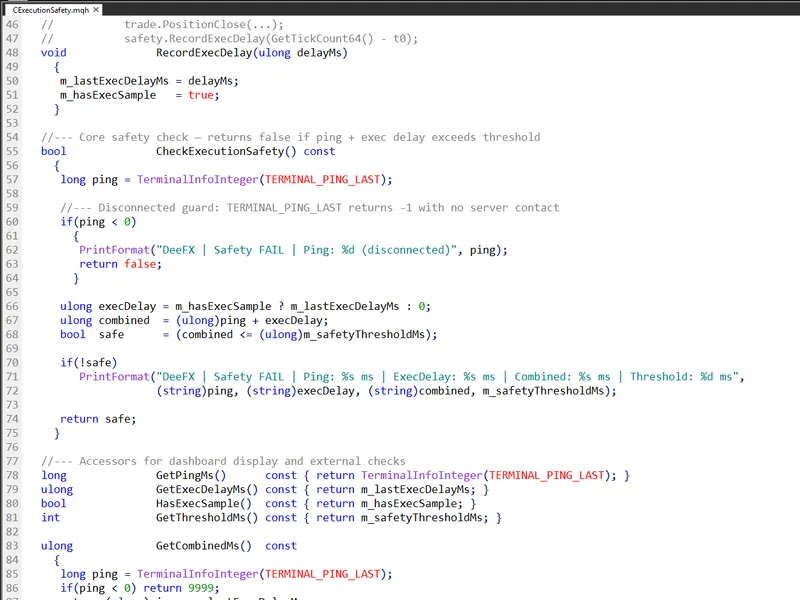
this class introduces a pre-trade safety mechanism that measures and evaluates two latency components:
- terminal_ping_last: the most recent ping recorded by the metaterminal in milliseconds.
- recordexecdelay(): a function to measure the wall-clock execution delay, which can be wrapped around ctrade operations.
these values are combined and compared against a configurable threshold. if the total latency exceeds the threshold, trade execution is blocked, and a diagnostic log is generated.
disconnection handling
the class also handles disconnection scenarios. when the terminal loses server contact, terminal_ping_last returns -1, triggering a false return value, thus preventing trade attempts on a disconnected terminal.
integration and accessors
to integrate, include the file and instantiate the class in your ea. several read-only accessors are provided for dashboard display or external logic:
- getpingms(): current terminal ping in milliseconds.
- getexecdelayms(): last recorded execution delay in milliseconds.
- getcombinedms(): combined ping and execution delay (returns 9999 if disconnected).
- hasexecsample(): true if at least one measurement has been recorded.
- getthresholdms(): configured safety threshold.
changelog
v1.0 - initial release.
v1.1 - macro renaming and format specifier updates.
v1.2 - init() return type changed to bool, ensuring state reset on reinitialization.
You may also like: rbf Neural Network Class - excellent alternative for library users on MetaTrader 5.
Source Code
#ifndef cexec_safety_mqh
#define cexec_safety_mqh
class cexecutionsafety
{
private:
int               m_safetythresholdms;
ulong             m_lastexecdelayms;
bool              m_hasexecsample;
public:
cexecutionsafety()
.......
⚠ Limitations & Risk Warning
- This tool is provided for educational and testing purposes only.
- Past performance does not guarantee future results.
- Trading involves substantial risk of loss. Use on a demo account first.
- Results may vary depending on market conditions, broker, and settings.
- We recommend thorough backtesting and forward testing before using with real funds.